

ProGet Migration
How to Manage Policies and SCA in ProGet for Sonatype Users
This article is part of a series on Migrating from Sonatype to ProGet, also available as a chapter in our free, downloadable eBook.
Teams use Sonatype Lifecycle’s Software Composition Analysis (SCA) to find vulnerabilities, risky licenses, and high-risk packages in their applications. The downside is that Lifecycle runs as a completely separate service. This means extra servers to manage, upgrades to schedule, policy syncs to maintain, and CI/CD wiring to keep working.
In contrast, ProGet’s SCA is built in. This removes the extra installation and maintenance overhead while still giving you accurate, build-time analysis of packages and their dependencies.
In this article, I’ll walk through how ProGet’s built-in SCA works, how it compares to Lifecycle, and why build-time scanning gives you cleaner, more reliable results. I’ll also show how teams migrating from Lifecycle to ProGet can get started quickly and use ProGet’s SCA workflow.
Built-In SCA vs. Separate SCA
For teams coming from Sonatype Nexus, the biggest difference is how SCA is delivered. In the Nexus ecosystem, you need Sonatype Lifecycle to perform SCA on your builds, and it runs as a completely separate service from the repositories it scans. That means treating Lifecycle as its own system; its own updates, its own configuration, and its own place in your CI/CD pipeline.
Because Lifecycle runs outside the registry, it must stay in sync with Nexus. Policies, scan results, and dependency data all move between systems, adding extra coordination and overhead.
ProGet takes a different approach. SCA is built into the product itself, with no extra server, no external service, and no syncing across tools. Policies, scanning, reporting, and SBOMs all live in one place, which simplifies the workflow and reduces overhead.
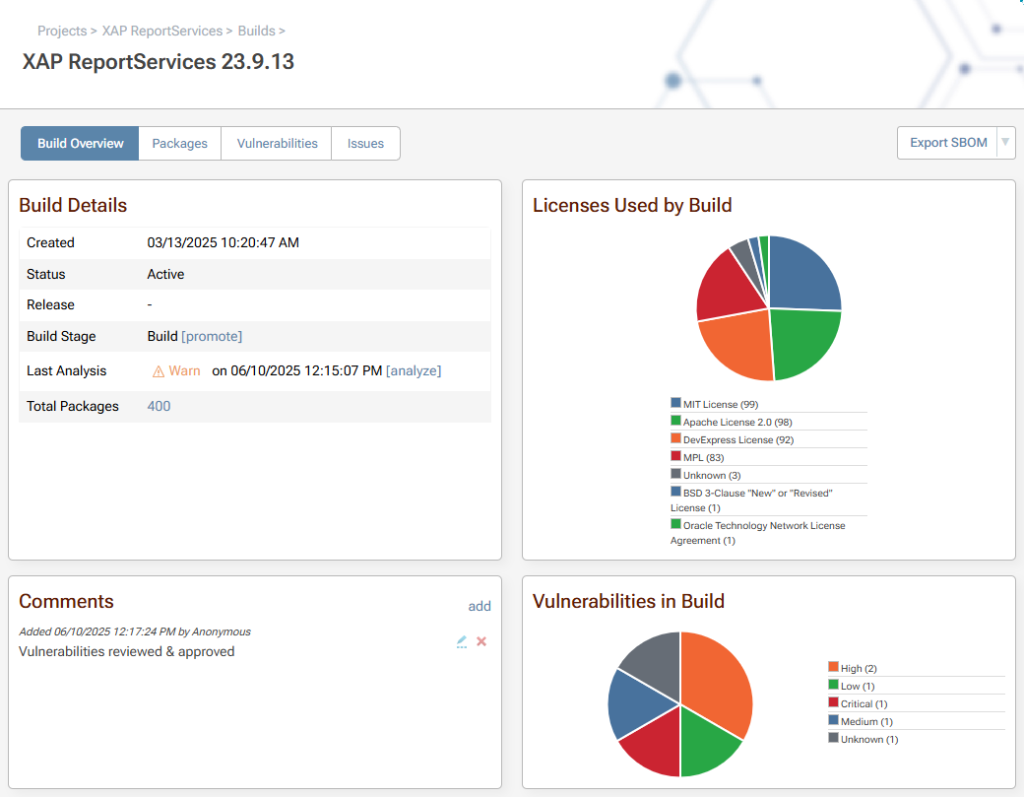
ProGet not only offers built-in SCA, but performs scanning at build time, analyzing fully resolved dependencies. While Lifecycle can run both build-time and source-code scans, ProGet focuses on build-time scanning for a precise view of what actually ends up in your builds.
Why Build-Time Scanning (and Not Source-Code Scanning)
ProGet focuses on build-time scanning of fully resolved dependencies, while Lifecycle can perform both build-time and optional source-code scans.
When designing ProGet, we considered source-code scanning but found it limiting. It can miss transitive dependencies or packages that only appear during build resolution, generate noisy or redundant alerts, and coverage varies across ecosystems. Using source-code and build-time scans together can produce conflicting results that require manual reconciliation.
Focusing on build-time scanning, ProGet gives a clear, reliable view of exactly what goes into your builds. Most vulnerabilities appear in transitive dependencies, so scanning fully resolved builds ensures developers see every package that ships.
Build-time scanning also delivers clear benefits:
✅ Produces a definitive Software Bill of Materials (SBOM) for every build.
✅ Captures all resolved packages, including transitive dependencies.
✅ Simplifies reporting, auditing, and remediation by giving developers a single authoritative view.
✅ Built into ProGet, reducing coordination, syncing, and maintenance overhead.
With build-time scanning, applying policies becomes straightforward. ProGet includes policy enforcement as part of its built-in SCA, giving teams one source of truth for dependency analysis.
Policies and Scanning in ProGet vs. Lifecycle
Both ProGet and Lifecycle let teams enforce security, licensing, and governance standards using customizable global and feed-level policies. You can also create exceptions for packages deemed safe in your application’s context, giving your team flexibility while maintaining compliance.
If you’re familiar with Lifecycle’s IQ CLI, ProGet’s pgutil provides a similar command-line workflow for scanning builds, reporting policy violations, generating SBOMs, and integrating directly with CI/CD pipelines. This makes adoption straightforward without disrupting existing workflows.

The key difference is that ProGet includes SCA as a built-in feature, rather than as a separate service. This keeps policy enforcement, scanning, and reporting all in one product, reducing overhead and simplifying workflows.
Smoothly Migrating to ProGet
The goal of migrating from Lifecycle to ProGet is a gradual, low-risk transition. A practical approach is to run IQ CLI and ProGet’s lightweight pgutil in parallel. This allows teams to scan the same builds with familiar tools, compare results, and explore ProGet’s Policies and SCA pages and SBOM outputs, all without disrupting your CI/CD pipeline.
By comparing scans side by side, developers can evaluate similarities and differences, verify results, and get comfortable with ProGet’s workflow. This parallel approach builds confidence and creates a platform for gradually shifting from IQ CLI to pgutil.
Eventually, you can fully migrate your policies, scans, and SCA processes to ProGet, giving teams a single, integrated platform for dependency analysis and compliance. This method lets teams transition at their own pace while taking full advantage of ProGet’s accurate, low-maintenance SCA capabilities, providing clear visibility into everything that actually ships to production.
Built-In SCA for Reliable Build-Time Scanning
ProGet builds on Lifecycle’s approach with flexible policies and familiar CLI tools, all without the need for a separate service. Both scan your CI/CD pipeline for vulnerabilities, but ProGet keeps everything in one product.
By focusing on build-time scanning, ProGet provides reliable analysis that captures risks in transitive dependencies without flooding developers with noise. And with pgutil, teams can easily run SCA and smoothly transition policies and scans from Lifecycle.
That’s a lot to digest, so make sure to bookmark this page for future reference. Better yet, check out our free eBook “Migrating from Sonatype to ProGet,” for a comprehensive guide to migration, including repositories, blocking packages, retention, and backup and restore. Sign up for your free copy today!
