

NuGet
How to Avoid Costly Lawsuits from Unexpected NuGet License Agreements
This article is part of our series on NuGet at Scale, also available as a chapter in our free, downloadable eBook
Ever feel like your dev team treats Visual Studio like an App Store—grabbing NuGet packages on a whim and breezing past the terms of service just to click “accept”? This kind of attitude toward open-source packages can land you in serious hot water. Just ask Orange S.A., who got hit with over €900,000 in damages after violating the GPL-2.0 license in the Entr’ouvert v. Orange S.A. case. All because they skipped some key requirements like sharing source code and proper notices.
As your organization scales, this isn’t just a legal cautionary tale—it’s a reminder that open-source licenses matter. It’s not just about avoiding legal pitfalls; it’s about safeguarding your project’s integrity and reputation. A little attention up front can save you a lot of pain (and money) down the line.
In this article I’ll explain how you can avoid this kind of costly lawsuit, as well as automate some of the processes so they can be as simple and fast as possible. It all starts by adding NuGet Packages to your company’s existing third-party software policy.
Third-party Software Policies
Whether or not they know the specifics of the policy, most employees do know that they cannot download free or paid software onto their company laptops without permission.
This is because an authorized person must check, among other things, the software’s licensing agreement and accept its terms. Without this, an employee could unknowingly cause a lawsuit due to license violations.
NuGet Packages are just like these free/paid applications. The only difference is that most developers mindlessly download packages off NuGet.org via Visual Studio since they trust the source. It doesn’t seem like it’s just downloading random things from the Internet.
NuGet Packages are Legally Binding
Just because they are easily downloaded with a click of a button doesn’t mean a NuGet package doesn’t have huge, real-world ramifications (again, see Entr’ouvert v. Orange S.A.).
NuGet packages are copyrighted material. When someone creates a package, they own its copyright – except in the rare case of being published in the Public Domain. The author decides how others can use their NuGet package through the license agreement.
License Agreements are legally binding contracts. When you use or otherwise incorporate freely available NuGet packages into your own applications, you are agreeing to a contract with the author of that package. By downloading a package, you—or you on behalf of your company—are agreeing to the terms. That’s why it’s so important to have a consistent process for reviewing and approving these packages before they make it into your codebase.
How to Expand your Existing Policy
In theory, it’s easy to add NuGet packages to your existing third-party software policy. Just do as you always do: ask for permission to use the package. As part of that process, the license agreement will be checked by an authorized person within the company, like a team lead, the legal department, or even the CEO.
Once a NuGet package is approved, it can be used by developers immediately. If they want to use one that is not “pre-approved” it must go through the authorized person. Fortunately, many NuGet packages use the exact same license agreement. This means that, if you can get approval for one type of license (ex. “MIT License Agreement”), then all other packages with that license would be acceptable.
There are two issues, however, with this manual processing; it’s very time-consuming, and the authorized person is likely not a developer. Before the authorized person can properly vet the license, they need to be able to access the license. What’s the best way to do that?

NuGet Metadata Licenses Explained for Non-Developers
Feel free to send this section to any non-developer as a quick explainer.
NuGet License Expressions
In a NuGet package’s metadata (known as the .nuspec XML manifest file), there is a “license expression” property. A license can be “expressed” in three ways: a license expression, a file, or a URL.
| Expression | Usually, Software Package Data Exchange (SPDX) identifier code. A code that represents an already-written open-source or free software license. Some are simple like “MIT” or “IJG,” but others can be complex if an author opts for a composite license. |
| File | A file found within the NuGet package metadata that can be opened and read. Either a .txt or .md file. A developer would use File if their license is a non-standard license or it is proprietary. |
| URL | A URL that links to a website page with NuGet’s license. This type is often shown in user interfaces like nuget.org. |
⚠️ License URLs Can Change
One problem with the URL expression is that the page linked to can change — and the license you originally agreed to will be different. Saving a copy of the page will ensure you have whatever you originally agreed to.
NuGet Package Licenses Types
Once you’ve accessed the license, either by URL, file or following the SPDX expression, you can start to check its content. Anyone can write any type of license agreement they’d like, as seen in the many proprietary licenses found in paid software. Open source, and more specifically those publishing to Nuget.org, tend to use the SPDX License List, a standard list of licenses available to reference.
The SPDX List is maintained by the Linux Foundation and aims to identify and standardize open-source software licenses. The list has well over a hundred items, and each license has an associated code. This shorthand allows authors to quickly insert their preferred license via ‘licensing – expression.’ Some of the more popular licenses are:
| SPDX Code | Full License Name |
|---|---|
| MIT | MIT License |
| MPL-1.1 | Mozilla Public License 1.1 |
| Apache-2.0 | Apache License 2.0 |
| BSD-3-Clause-Attribution | BSD with attribution |
| Beerware | Beerware License |
The SPDX Code is “fixed,” which means the license it represents will never change. Changes will require a new “version” of the license, like MPL-2.0.
If a package is licensed as MPL-1.1, and you’ve already decided that MPL-1.1 is acceptable for your organization, then you won’t need to read it again. This is why SPDX codes serve as a useful shorthand to license their NuGet packages.
Reduce the Team Leads Workload Automatically
The above section is a great introduction for a non-developer, authorized person – e.g. CEO or legal department. A team lead assigned this task will likely understand how to access the license and know some of the more popular SPDX codes.
Still, manually vetting licensing will be incredibly time-consuming for anything. Instead, do it automatically. An automatic system can be programmed to scan a NuGet package, check what license it has and either approve or disapprove its download. Take ProGet, for example. It can immediately display a package’s license on a user’s feed.

It can also be configured to filter licenses at the feed level. Licenses like GPL-3.0 are often unacceptable to businesses, so a user can configure the feed to block attempted downloads of packages with a GPL-3.0 license.
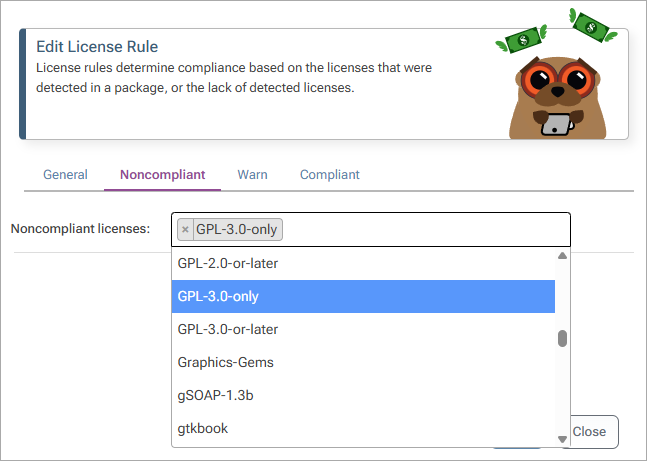
Attempting to download a NuGet package with a blocked license will be impossible, and ProGet will alert the user that the action is blocked due to license filtering rules.
An automatic system can also flag NuGet packages without a clear license expression, be it a missing SPDX identifier or an unrecognized URL. When detecting an unknown license, ProGet will display a warning and prompt a user to create a new license type.

An automatic system configured by a team lead, with approval by an authorized person, will greatly cut down on time spent manually shifting through NuGet package licenses.
If you’re already using ProGet, check out our license filtering guide for yourself to see how easy it is.
Subtle Changes for the Better
By integrating NuGet packages into an organization’s existing third-party policy, developers can continue to download from NuGet.org without checking – because it’s already been done for them!
Team leads can rest easy as their developers click and scroll, because systems are in place to ensure they’re not agreeing to suspicious licenses. This process, especially when it’s automatic, can greatly decrease a company’s risk of legal action while simultaneously boosting development efficiency.
This article covered a lot of important points about licenses, so be sure to bookmark it for future use! For more insights, check out our free eBook, “NuGet at Scale”. It’s filled with everything here and more, including versioning NuGet packages at scale, to debugging with Visual Studio! Download your copy today!
