

NuGet
Making SBOMs for Your NuGet Projects and Why You Need them
Software Bills of Materials (SBOMs) are becoming something every developer needs to deal with. If your organization uses NuGet packages you’ve probably heard of them, but finding guidance that actually applies to NuGet can be a bit of a pain, since most resources focus on other ecosystems like npm or Maven. For many teams, SBOMs feel like just another checkbox. They’re easy to brush off or only half-do, especially when deadlines are tight and your backlog never ends.
But SBOMs aren’t just busywork. When done right, they’re a practical way to see what’s actually in your code, track dependencies, and protect your software supply chain. That’s especially important with NuGet, where even a single package can pull in dozens of transitive dependencies. Knowing exactly what’s included and being able to document it can save you a lot of headaches during audits, security reviews, or when a critical vulnerability pops up.
In this article, we’ll break SBOMs down from the ground up, explain why they matter, and walk you through how to create one for your NuGet packages. I’ll talk about different approaches, why you might pick each one, and show exactly how to do it using tools like CycloneDX and ProGet.
What Is an SBOM and Why You (Will) Need It
Trying to figure out what’s inside your software without an SBOM is like trying to remember every ingredient in a recipe after it’s been cooked. It’s nearly impossible without a clear list. If you’re developing with NuGet packages, this is especially true. A single package can pull in dozens of transitive dependencies, each with its own version, license, and potential risks.
An SBOM is a detailed inventory that lists every component in your software, including all packages and their dependencies. This lets you know exactly what’s in your project. It’s usually built from a mix of open-source libraries, commercial components, and internal modules. That tangled web of dependencies can bring security vulnerabilities, license headaches, or regulatory challenges if you don’t track it carefully. An SBOM helps answer key questions:
- What’s in our software?
- Where did it come from?
- Is it safe to use?
SBOMs are also increasingly becoming a requirement. Policies like the U.S. Executive Order 14028 and frameworks such as NIST’s Secure Software Development Framework (SSDF) expect organizations to provide accurate SBOMs for security and compliance.
What Does an SBOM Actually Look Like?
At a technical level, an SBOM is usually an XML, JSON, or YAML file that lists all components, their versions, licenses, and dependencies. For example, here’s a simplified CycloneDX SBOM for a NuGet project that includes a package with several transitive dependencies:
<?xml version="1.0" encoding="UTF-8"?>
<bom xmlns="http://cyclonedx.org/schema/bom/1.3" version="1">
  <components>
    <component type="library" bom-ref="pkg:nuget/Microsoft.AspNetCore.App@2.2.0">
      <name>Microsoft.AspNetCore.App</name>
      <version>2.2.0</version>
      <licenses>
        <license>
          <name>MIT</name>
        </license>
      </licenses>
      <dependencies>
        <dependency ref="pkg:nuget/Microsoft.AspNetCore.Http@2.2.0"/>
        <dependency ref="pkg:nuget/Microsoft.Extensions.Logging@2.2.0"/>
        <dependency ref="pkg:nuget/Newtonsoft.Json@12.0.3"/>
      </dependencies>
    </component>
    <component type="library" bom-ref="pkg:nuget/Newtonsoft.Json@12.0.3">
      <name>Newtonsoft.Json</name>
      <version>12.0.3</version>
    </component>
  </components>
</bom>
Like the Microsoft.AspNetCore.App package above, NuGet packages often bring in a whole bunch of transitive dependencies. Even if you only install one package, it can pull in many others, each with its own version, license, and potential vulnerabilities.
This is a big part of what makes SBOMs important. They make it clear which NuGet packages are in your project, including the ones you don’t add directly. There are a few different ways to actually generate an SBOM, each with its own trade-offs, and understanding the options makes it easier to pick the right approach for your NuGet projects.
What Are Your Options When Creating SBOMs?
To generate SBOMs for NuGet projects, you have a few options to choose from. Each solves the problem in a slightly different way, depending on your needs.
CycloneDX (Good for Quick, One-Off SBOMs)
CycloneDX is a CLI tool that scans your project’s dependencies and generates a standards-compliant SBOM file. Once the file is created, you’re done; there’s nothing more to manage. This makes it good for small projects or situations where you just need a quick SBOM to share with an auditor or security team. It’s fast, simple, and doesn’t require any ongoing setup.
ProGet (Good for Tracking, Analysis and Compliance)
ProGet’s SBOM features are good if you’re looking for something more comprehensive. It works with NuGet to automatically scan all your packages every time you build or release, gathers all the details, and stores everything in one place. This makes it easy for your team to track what’s in your software and catch any security or compliance issues early.
It also offers built-in Software Composition Analysis (SCA), helping you identify security vulnerabilities and license issues of any packages listed in a project’s SBOM. This makes it a great choice for organizations that want to maintain up-to-date SBOMs, improve supply chain visibility, and automate much of the work involved in managing dependencies.
Manual Creation (Not Recommended)
Technically, you could create an SBOM by hand, listing every single package, version, license, and all those pesky transitive dependencies. But good luck typing out 100 packages and their dependencies without losing your mind, or making a mistake. Manual SBOMs are mostly only useful for tiny projects or just playing around. For anything real, you’re almost always better off using CycloneDX or ProGet.
The easiest way to handle SBOMs for NuGet is to automate them as part of your build. Use tools that track every package, including transitive dependencies, and capture key details like versions and licenses. CycloneDX works well for quick, one-off SBOMs, while ProGet helps teams automate and maintain them long-term. Once you’ve seen what these tools can do, creating an SBOM for your NuGet project feels a lot more straightforward.
How to Create an SBOM For Your NuGet Projects
Now we’ve covered our options, here’s how to actually generate SBOMs for your NuGet projects, whether you’re using CycloneDX or ProGet. Before you generate an SBOM, make sure you’ve built your project so that all dependencies are restored.
Creating an SBOM with Cyclone DX
If you haven’t already installed CycloneDX you’ll need to start with that by running:
dotnet tool install --global CycloneDX Then it’s just a case of navigating to the root directory of the NuGet project you want to scan and running this command to create an SBOM in XML format:
cyclonedx dotnet -o sbom.xml This command scans your project, including all transitive dependencies, and outputs a structured SBOM file called sbom.xml. This will make sure even transitive dependencies are captured, so you get a complete view of your project.
Once the file is generated, you’re done, but note that if your dependencies change, you’ll need to regenerate the SBOM.
Creating an SBOM in ProGet
ProGet makes it easier to implement automated SBOM workflows in alignment with standards such as the OWASP CycloneDX specification and federal guidance like Executive Order 14028. SBOMs can be generated as part of the build process using Inedo’s pgutil CLI tool and the pgutil builds scan command, which audits components and automatically uploads the SBOM to a centralized instance. For example:
pgutil builds scan --project-name="Web Data Tool" --version=1.2.3This command will capture all dependencies (even the transitive ones) and upload a lightweight SBOM to ProGet. From there, ProGet fills in the gaps with extra details like licenses, vulnerabilities, and author info, checking everything against your organization’s policies. From here, you can:
- ⭐ Create or update Projects and Releases based on component metadata
- ⭐ Add all relevant packages (including transitive dependencies) to each release
- ⭐ Store the SBOM document alongside the release for audit purposes
- ⭐ Audit components for license issues and retain results for ongoing compliance tracking

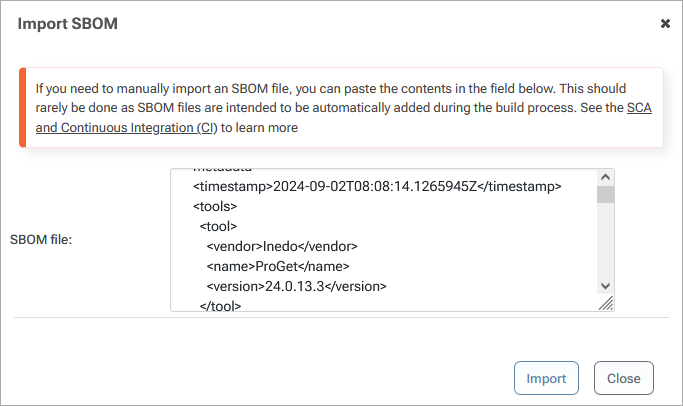
You’re not limited to pgutil. If your build system already generates SBOMs (including CycloneDX), you can upload them to ProGet via the UI or API. ProGet then fills in extra details like author info and release notes, runs audits to catch compliance issues, and gives you centralized traceability and real-time visibility. Exported SBOMs are still useful for reports, but connecting everything to ProGet gives you the full picture.
Best Practices for Managing SBOM
Before I leave you, it’s worth mentioning a few things you’ll want to keep in mind if you want to effectively manage your SBOMs.
💡 Keep SBOMs up-to-date: Dependencies change all the time. Regenerate SBOMs whenever packages are added, updated, or removed. ProGet can automate this, while CycloneDX requires running a new scan.
💡 Integrate SBOMs into your workflow: Treat SBOMs like any other artifact. Store them in source control or CI/CD pipelines so they’re always available and versioned. With ProGet, you don’t even have to worry about this, as SBOMs are stored automatically and ready whenever you need them.
💡 Use SBOMs for risk management, not just compliance: It’s all too easy to generate an SBOM, tick the checkbox, and then forget it exists. The real value comes from actively using it to keep a tab on vulnerabilities, outdated packages, or license conflicts, and act on the findings rather than letting them sit on a shelf.
💡 Merge SBOMs when multiple ecosystems are involved: Many projects mix different types of dependencies. For example, you might have a NuGet backend alongside an npm-based frontend, each producing its own SBOM. Keeping them separate can make it hard to get a complete view of your software supply chain.
Merging them though, will make sure you have a complete, accurate inventory of everything your project depends on, no matter which package ecosystem it comes from. With CycloneDX, you can merge multiple SBOM files into a single SBOM using the CLI:
cyclonedx merge -i sbom1.xml sbom2.xml -o merged-sbom.xml This creates one SBOM that combines the components and dependencies from the input files. With ProGet, SBOMs are automatically merged within a project, giving you a unified view of all dependencies without extra work.
Making SBOMs Work for NuGet
SBOMs are becoming an important and common way of tracking what’s in your code. But when you have to keep track of not only the packages you’re installing, but also the dozens of hidden dependencies that come along with them, it’s easy to see why NuGet SBOMs might feel a bit too much to get your head around.
Good news is that generating and managing SBOMs doesn’t have to be painful. CycloneDX lets you quickly create one-off SBOMs for individual projects, while ProGet keeps everything up-to-date, automatically merges dependencies, and gives you visibility across multiple projects. With these tools integrated into your workflow, SBOMs start being a practical way to stay on top of your dependencies, security, and compliance.
There’s a lot of useful stuff to digest here for organizations working with NuGet, so it’s worth making a note of it! I recommend bookmarking this page for later. Or you could do one better and check out our eBook, “NuGet at Scale”. It’s got all the stuff we just went over, plus extra insights on how NuGet packages work as you scale your organization, challenges with CI/CD, and a lot more! Download your free copy today!
