

ProGet Migration
How to Manage SBOMs in ProGet for Sonatype Users
This article is part of a series on Migrating from Sonatype to ProGet, also available as a chapter in our free downloadable eBook.
SBOMs (Software Bill of Materials) are increasingly becoming a requirement for organizations across industries. Policies such as the U.S. Executive Order 14028 and frameworks like NIST’s Secure Software Development Framework (SSDF) call for accurate, up-to-date SBOMs. By tracking all components and dependencies, SBOMs help teams maintain security, compliance, and supply chain transparency.
Both Sonatype and ProGet provide similar SBOM management features, but they take different approaches: Sonatype uses a separate manager, while ProGet integrates SBOM management directly into the repository.
In this article, we’ll explore how both Sonatype and ProGet handle SBOMs, and walk through creating and uploading them in ProGet.
SBOM Management in Sonatype vs ProGet
Sonatype SBOMs are managed through the separate SBOM Manager rather than the Nexus Repository. This setup requires its own installation, configuration, and ongoing maintenance for storage, analysis, and compliance tracking. For example, teams might update SBOMs manually after each build. So if a new dependency isn’t added right away, it may be missed, leaving gaps in vulnerability and license information.

ProGet includes SBOM management as a built-in feature, fully integrated with your repository. It automatically connects with Builds and Projects/SCA to keep analysis and compliance tracking centralized, reducing manual work and the risk of outdated SBOMs. By contrast, when a new dependency is added, ProGet updates the SBOM automatically, ensuring complete, current, and audit-ready vulnerability and license information.

SBOM management in ProGet is simple and efficient. You can import existing SBOMs, and the system automatically updates them when dependencies change to maintain accuracy and compliance. ProGet also merges metadata such as vulnerabilities and licenses, giving teams a complete, up-to-date view of their software components.
With SBOMs centralized, automatically updated, and enriched with metadata, teams can easily track every dependency from the start.
Creating and Uploading SBOMs in ProGet
Creating SBOMs in ProGet can be done using CycloneDX or pgutil. To start, configure pgutil with your ProGet instance. The pgutil builds scan command can then audit your components and automatically upload the SBOM to your centralized instance.
pgutil builds scan --project-name="Web Data Tool" --version=1.2.3This process captures all dependencies (including the transitive ones) and uploads a lightweight SBOM, while filling in additional details such as licenses, vulnerabilities, and other metadata. It also checks the SBOM against your organization’s policies, ensuring that your software complies with internal standards and regulatory requirements.
Once uploaded, ProGet allows you to:
⭐ Create or update Projects and Releases based on the component metadata
⭐ Add relevant packages, including transitive dependencies, to a release
⭐ Store the SBOM document alongside the release for auditing purposes
⭐ Audit components for license compliance or security issues
⭐ Retain all results for ongoing compliance tracking
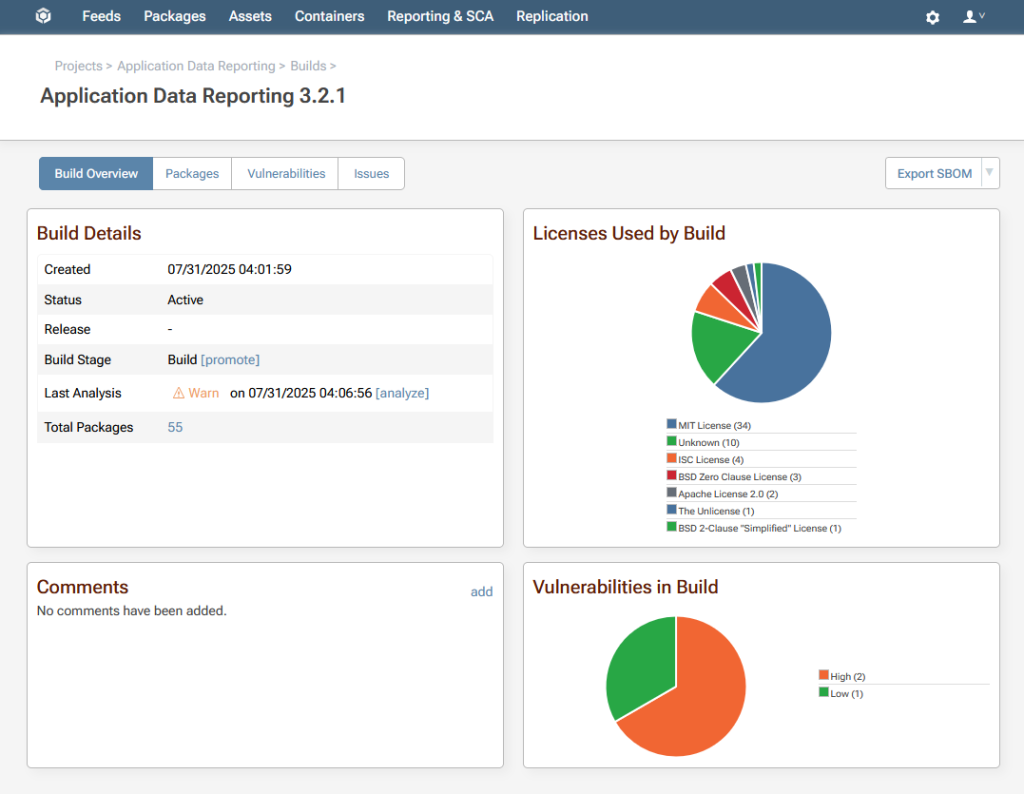
Uploading SBOMs in ProGet is essentially the same as importing them. You can upload existing SBOMs created by your build systems or through CycloneDX. Uploads can be done via the UI or API, and ProGet enhances them with extra details such as author information and release notes. ProGet also runs audits on imported SBOMs to catch compliance issues and provides centralized traceability with real-time visibility into your software components, ensuring that all your SBOMs remain accurate, complete, and ready for audit at any time.

Simplify SBOM Management with ProGet
Managing SBOMs in ProGet offers the same capabilities you’re used to, but with everything integrated into a single tool. Simply use pgutil and connect it to your ProGet instance to start generating, uploading, and managing SBOMs seamlessly.
ProGet’s SBOM feature automatically updates SBOMs when dependencies change, integrates them into your existing workflows, and merges SBOMs across your project. By keeping everything centralized, your SBOMs stay current, accurate, and ready for security and compliance audits.
Ready to make the switch? Download our free eBook, “Migrating from Sonatype to ProGet”! You’ll learn how to set up repositories, manage packages, and much more. Request your copy today!
