

ProGet Migration
How to Manage Retention in ProGet for Sonatype Users
This article is part of a series on Migrating from Sonatype to ProGet, also available as a chapter in our free downloadable eBook.
Retention is a key part of managing your development environment, as it helps you automatically handle component storage. By regularly cleaning up and archiving outdated or unused artifacts, repositories stay fast and responsive instead of getting bloated. Retention policies can also remove packages entirely when they’re no longer needed, which reduces the security risks of keeping old or deprecated components around.
Both Sonatype and ProGet offer retention policies to help manage disk space. If you’re migrating to ProGet, it’s important to understand how retention works. Retention of components (called packages in ProGet) will feel familiar, but things like SCA retention (Lifecycle scans in Sonatype) are handled differently.
In this article, I’ll walk you through how retention works in ProGet, including what will be familiar for Sonatype users, and what’s different. This will help make sure your retention policies are set up correctly and make the migration process smoother.
How Package and Feed Retention Works
Sonatype Nexus uses retention to remove old or unused components. Retention tasks are automatically created to enforce your storage policies, and if a task is deleted, Nexus will recreate it to make sure cleanup rules keep running. Cleanup tasks first flag components called ‘soft deletion’, which are then automatically removed and deleted in cleanup tasks. Components flagged for deletion in this way will still take up disk space.
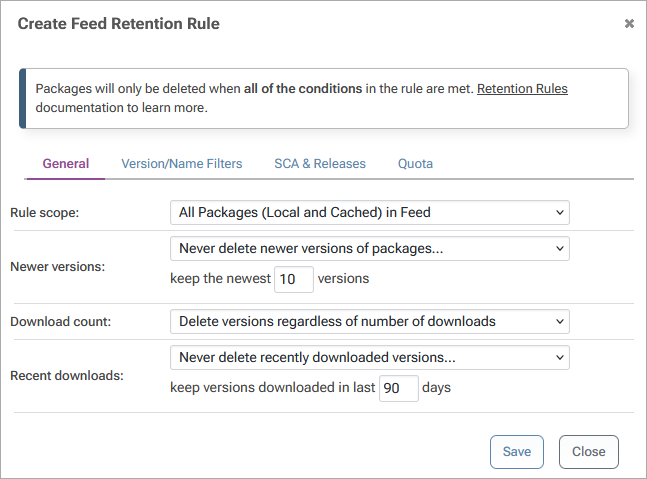
ProGet offers similar package retention policies, but it doesn’t use soft deletion, which can sometimes leave data in an unclear state and complicate automated cleanup. Instead, ProGet’s retention policies automatically move older packages to lower-cost storage while keeping them accessible.
Administrators can create rules based on package age, disk usage, version count, or feed-specific criteria. Plus, ProGet includes a dry-run mode, so you can test retention policies before making any permanent changes.
SCA and Build Retention in ProGet
In Sonatype Lifecycle, deleted data is moved to a trash folder before being fully removed on a set schedule. Retention settings and cleanup previews are available, but this can slow down storage recovery and make workflows less predictable, as data lingers in the trash until it’s completely gone. Admins need to plan for this delay, which can complicate managing older builds and reports.
ProGet does things differently by using build pipelines to handle SCA (Software Composition Analysis) data. Builds are retained by stage rather than by age. This means you can clear out old CI builds while hanging onto the ones you want to archive. It gives teams tighter control over what stays and what goes, making cleanup more intentional and less like just dumping stuff in a trash bin.
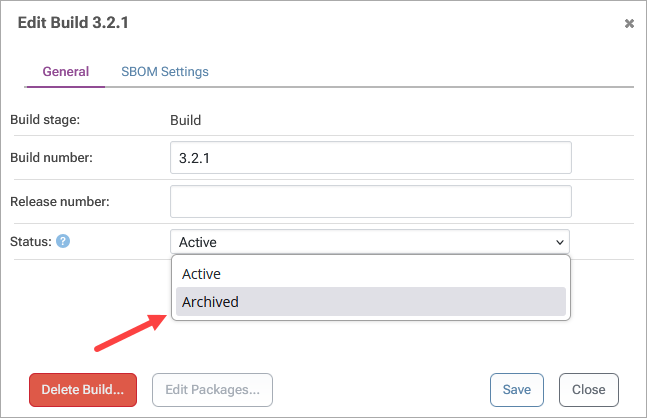
With ProGet’s pipeline approach, deleted items are gone right away, freeing up space fast and encouraging smarter delete and retention habits. If you accidentally delete something, you can still pull it back from a backup folder, though you’ll need to manually upload those files. Unlike Sonatype, where digging into blob storage backups is a pain, ProGet uses a straightforward, file-based setup that makes managing and restoring build data way easier and clearer.
Managing Retention with ProGet Made Simple
Both Sonatype and ProGet offer strong retention and cleanup tools to keep repositories efficient and manageable. For teams migrating from Sonatype, the overall concepts will feel familiar, but ProGet’s more transparent, file-based design simplifies data handling and makes it easier to see what’s being stored, deleted, or archived.
Understanding how ProGet manages package and SCA data retention helps teams configure policies that keep repositories lean and predictable. By using a file-centric storage and pipeline-based retention model, ProGet makes sure storage is used effectively, cleanup happens immediately, and data remains easy to verify and restore when needed.
Found this information useful? This article is just one of the chapters found in our eBook on Migrating from Sonatype to ProGet, breaking down everything from setting up repositories to managing your vulnerabilities, licenses and much more. Reserve your free copy of “Migrating from Sonatype to ProGet” today!
