

ProGet Migration
How to Block Packages in ProGet for Sonatype Users
This article is part of a series on Migrating from Sonatype to ProGet, also available as a chapter in our free downloadable eBook.
Sonatype’s Nexus Firewall takes an antivirus-style approach to open-source risk, quarantining packages that look unsafe. But this model simply doesn’t work for vulnerabilities or licenses. Vulnerabilities aren’t malicious files you can isolate, and licenses aren’t bits of code that can be “cleaned.” Starting with quarantine leads teams to focus on packages instead of the vulnerabilities or license issues themselves.
Nexus Firewall quarantines packages because it treats the package itself as the problem, rather than the vulnerability or license that appears across many versions and dependencies. It also only acts on new requests, leaving already-pulled packages exposed. ProGet takes a different approach: it blocks vulnerabilities and licenses registry-wide, while still letting safe packages be used in your apps.
In this article, I’ll break down why quarantining vulnerabilities and licenses is an outdated approach that doesn’t address the real problem. I’ll then show how ProGet takes a modern approach to handling vulnerability and license management, and how you can get this up and running.
Why Quarantine Doesn’t Work for Vulnerabilities and Licenses
Quarantine works in antivirus tools because a malicious file is always bad. There’s never a situation where a virus-infested .exe is “safe depending on context”. Nexus Firewall applies that same logic to OSS vulnerabilities and licenses by quarantining packages, as if the package file is the problem. But this is an outdated approach that just doesn’t apply to vulnerabilities in the same way:
⛔ Vulnerabilities aren’t malicious files. They’re flaws in code that may not actually be exploitable depending on the context. Older versions of Newtonsoft.Json might be fine for internal apps, while something like Log4Shell can put cloud environments at serious risk. Quarantine kills this kind of judgment entirely by treating the package itself as the problem.
⛔ The same vulnerability can show up in tons of packages. Quarantining just one package doesn’t fix the problem. Other packages and transitive dependencies with the same flaw can still expose the same risk. This is another reason why the “the package is the problem” mindset just doesn’t track.
⛔ Vulnerabilities can already be in your registry. Most vulnerabilities are discovered long after a package version is published, meaning your registry may already contain risky packages before anyone knows there’s an issue. Nexus Firewall only blocks new requests, so it doesn’t detect or prevent the use of these already-pulled versions. This gap is a major reason teams often need additional tools like Lifecycle to try to cover what Firewall misses.
The same idea applies to licenses, you can’t treat them like files to quarantine:
⛔ Licenses are agreements, not code. They define how you can use an OSS package, and unlike vulnerabilities, they can’t be “patched” in a new release. If a license doesn’t meet your organization’s rules, it’s always going to be non-compliant. The terms don’t magically change when a new version ships.
⛔ Licenses aren’t files you can quarantine. Treating them like malware by blocking them package by package or offering time-based waivers doesn’t work. Releasing a “quarantined” license implies you could recheck it later and find it safe, but in reality, a violation stays a violation. Managing licenses effectively means looking at compliance across all packages and versions, not reacting to individual files.
The antivirus/quarantine mindset just isn’t suited for vulnerabilities or licenses. Quarantining packages only addresses part of the problem, leaving many vulnerabilities and non-compliant licenses untouched. This includes those already in your registry. The real solution is to manage them across all packages, versions, and dependencies, rather than reacting to individual files. This is exactly what ProGet is made to do.
ProGet: Designed for Modern Development
ProGet takes a modern approach to managing vulnerabilities and licenses, different to outdated quarantine-based tools. With customizable vulnerability and license policies, teams can decide which packages are safe, and which pose a risk, enforcing rules across the entire registry or at the feed level.
Proxied packages are automatically scanned, showing vulnerabilities in the Vulnerabilities tab both before and after they’re pulled. Admins can assess risk and set policies to block vulnerabilities globally or per feed. When a vulnerability is blocked, all affected packages are covered, even those already pulled. This protects your registry without relying on extra tools like Lifecycle.
Licenses work in a similar way. ProGet detects licenses in packages and shows them on the version page, so teams can proactively set license rules instead of reacting only when a package is requested.

Unknown licenses can be updated and evaluated against your app. Once a license is blocked, it applies across all packages, with exceptions possible for app-safe cases.

Configuring Vulnerability and License Management in ProGet
So now we’ve talked about how vulnerability and license management works in ProGet, let’s look at setting it up. If you’ve already got a package blocked in your Nexus repo, you’ll want it configured the same in ProGet. Known vulnerabilities will show up in a package’s “Vulnerabilities” tab:

From here, you can assess packages as “Blocked”, “Caution or “Ignore”:

Packages with “Blocked” vulnerabilities will be considered non-compliant and unable to be downloaded:

These policies will apply registry-wide, for any package containing this vulnerability.
Managing License Compliance
License policies can be set either from the package directly or from the policies page:

From here, a license can be set to non-compliant, blacklisting it from downloads across every package it’s detected in:

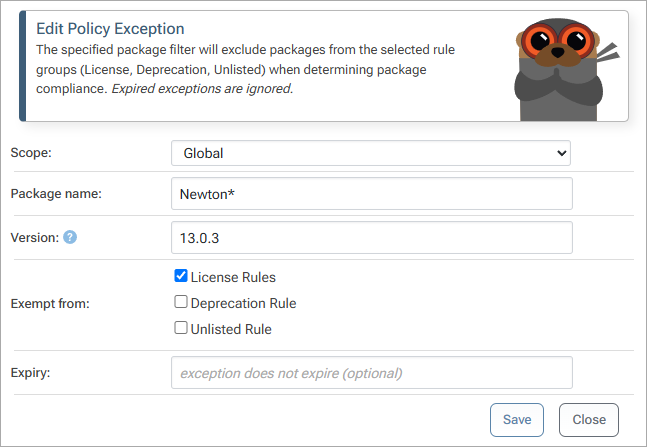
Plus, exceptions can be created in the form of feed-level rules, giving you the option to whitelist blocked licenses on a package-to-package basis.
Manage Vulnerabilities Like Vulnerabilities
Old-school tools like Firewall aren’t designed for vulnerabilities. That antivirus-style quarantine only isolates one package at a time and reacts too late to catch risks already in your registry. Vulnerabilities aren’t just “bad files” — they’re exploitable flaws that can exist across thousands of OSS packages, many of which may already be in your repos. Relying on quarantine alone leaves your pipeline exposed and forces teams to lean on extra tools like Lifecycle.
ProGet flips that approach. It focuses on the vulnerabilities themselves, not the packages, letting you block risks proactively before they ever reach your builds. Assessments target the underlying issues, so all affected packages — even ones already in your feeds — are covered, keeping your pipeline safe without extra overhead.
We covered a lot here, so make sure to save this page for when you need it. Or, check out our free eBook, “Migrating from Sonatype to ProGet“. It includes everything on this page and is also jam packed with content on managing SBOMs, migrating your repositories to validated feeds, replication, and more. Sign up for your free copy today!
