

Jenkins
Can You Build a Continuous Delivery Pipeline in Jenkins? And Why You Probably Shouldn’t.
Are you considering Jenkins for your Continuous Delivery pipeline? While technically feasible, relying on Jenkins alone can lead to a frustratingly unreliable experience. Imagine deployment failures, missed deadlines, and constant tinkering just to keep things running smoothly. This isn’t because your code is broken, but because Jenkins demands excessive manual configuration and a lack of native support for modern deployment workflows.
I’ve made this article to back up my Jenkins pipeline opinions. I’ll be the first to say that Jenkins is incredibly versatile – you can read about using it to run parameterized PowerShell scripts here – but it’s a ‘master of none,’ at least when it comes to CD Pipelines. Jenkins often falls short when tasked with the seamless orchestration demanded by modern CD practices. If you’re tempted to stick with Jenkins for all your deployment needs, think again.
In this article, I’ll explain why Jenkins isn’t built for true Continuous Delivery pipelines, and what you should be doing instead. I’ll walk through the difference between a Jenkins pipeline and a real CD pipeline, highlight the limitations of Jenkins when used on its own, and show how combining Jenkins with a dedicated CD tool like BuildMaster gives you a more scalable deployment process.
What is a Continuous Delivery Pipeline vs. a Jenkins pipeline?
The key to Continuous Delivery is the deployment pipeline. Pipelines model the software release process by defining the servers and environments that the build will be deployed to, as well as the manual and automatic approvals required at each stage of the process.

There is no “universal” Continuous Deployment pipeline because every organization has different requirements. For example, a basic web application might use a pipeline with only two stages (testing and production) and simply deploy to a different folder on the same server.

A Jenkins pipeline, meanwhile, is now a core feature implemented via the Pipeline plugin (originally called workflows), which comes bundled with modern Jenkins installations.
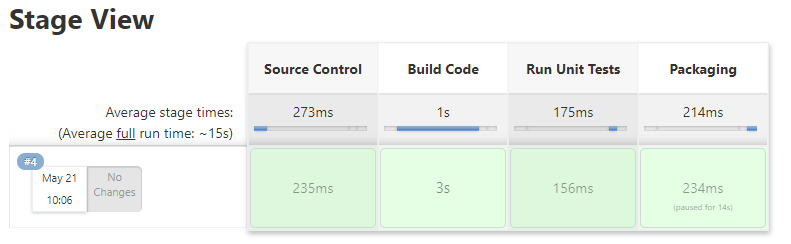
So how do you build a Continuous Delivery pipeline in Jenkins?
The short answer: You can’t, not practically anyway. Jenkins on its own is a poor fit for Continuous Delivery due to its complexity, plugin sprawl, and limited native support for release governance. Jenkins on its own is a poor choice for Continuous Delivery for many reasons. It’s true that there are ways to Jenkinstein a pseudo-CD pipeline using different Jenkins plugins, like Jenkins Pipeline Input Step. Just as a PowerShell or Bash script can prompt a user for input in the middle of running, a Jenkins Pipeline script can do the same.

But remember, Continuous Delivery processes must fit organizational and business needs—and an input prompt in the middle of a Jenkins Pipeline isn’t going to cut it. CD is not only automation but rigorous approvals. This minimally-viable option isn’t going to meet the needs of most organizations.

How do you do Continuous Delivery with Jenkins?
Simple; use a dedicated Continuous Delivery tool with Jenkins. I think our product (BuildMaster) is a great choice, but I’m a bit biased.
When you use BuildMaster (or any other CD or deployment tool) with Jenkins, you get all of the value that Jenkins is currently bringing you (build automation/CI, testing, and/or running arbitrary scripts) plus a flexible release process that the business wants to use. This also has the added bonus of being more accessible to team members who aren’t Jenkins experts. You can read the step-by-step process of integrating Jenkins and BuildMaster on our docs page here.
At the end of a build process in Jenkins, you may want to automatically import those artifacts into BuildMaster so you can smoothly move those CI builds into the CD pipeline for testing and release. This can be programmatically done either using the Release & Build Deployment API or the Jenkins BuildMaster Plugin.
Pipelines in BuildMaster? How do they work?
BuildMaster pipelines let you build a repeatable release process by defining the servers and environments that your builds will be deployed to, as well as the manual and automatic approvals required at each stage of the process.
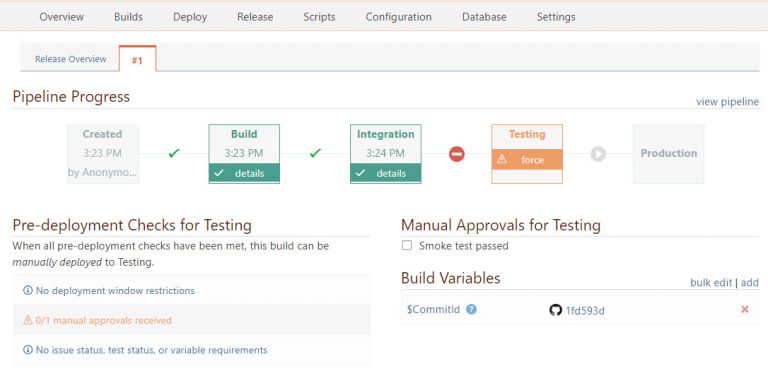
Once a pipeline is created, you can select it when creating or editing a release. Builds created for that release will then follow the process you defined in the pipeline.
You can configure a stage to automatically deploy into the next stage by checking the “Auto deploy” checkbox in the stage properties. When checked, builds will automatically be deployed to the next stage upon a successful deployment, as soon as all requirements for the following stage are met. This feature can be super useful to build an automated deployment pipeline.
The Limits of Jenkins and the Smarter Way Forward
Jenkins might be your go-to tool for builds and automation, but when it comes to true Continuous Delivery, it simply falls short. Relying on Jenkins alone often means cobbling together fragile plugins, scripting around limitations, and creating pipelines that are hard to manage and scale. It’s a setup that leads to unreliable deployments, poor visibility, and a process that doesn’t align with real business needs.
The better approach is to pair Jenkins with a purpose-built CD tool like BuildMaster. This lets Jenkins handle building, testing, and scripting, while BuildMaster takes over the release pipeline with structured approvals, environment modeling, and easy integration across teams. Together, they form a solid foundation for scalable, maintainable, and enterprise-ready CD.
This article is a lot to process, so be sure to save this info for later! Better yet, check out our free eBook, Level Up Your CI/CD with Jenkins. It’s got all the stuff we’ve talked about here including Jenkins alternatives, automated deployment, and other useful insights and tips that’ll take your CI/CD skills to the next level!
