

NuGet
What are NuGet Package Vulnerabilities and How to Manage Them
This article is part of our series on NuGet at Scale, also available as a chapter in our free, downloadable eBook.
When you’re working with NuGet packages as part of your .NET applications, it can be frustrating to run a package audit and see vulnerability warnings pop up. New issues in popular packages come up constantly, so you’re forgiven for worrying about how secure your app really is. Even if you’ve used the NuGet or dotnet CLI to scan for vulnerabilities, figuring out which packages are safe for production and what needs attention can quickly become a headache.
Scanning NuGet.org could return several vulnerability warnings, and lead to a bunch of questions: How do I manage them? Does a “Low severity” mean it’s safe? How about “High severity”, just how severe is it? Can I explain what this means.. or how it affects my code? What should we do about it? Do I even need to do anything at all?
It’s a lot to consider! In this article, I’ll explain NuGet vulnerabilities, how scanning works, and how organizations can manage them effectively at scale. I’ll then talk about using ProGet to handle your vulnerability management with features like categories, customizable assessments, and download blocking to resolve your NuGet vulnerabilities.
What Are NuGet Package Vulnerabilities and Scanning Exactly?
NuGet package vulnerabilities are security weaknesses discovered in .NET packages and reported to a database like the GHSA, NVD and CVE. For example, Newtonsoft.Json has a vulnerability concerning “Improper Handling of Exceptional Conditions”:
Improper handling of expressions with high nesting level that lead to StackOverFlow exception or high CPU and RAM usage. Can result in Denial Of Service (DoS).
https://github.com/advisories/GHSA-5crp-9r3c-p9vr
Package vulnerabilities can pose serious security risks. In some cases, such as this well-known incident where multiple popular packages were compromised, these risks aren’t just accidental flaws but deliberately injected malicious code. When you run dotnet list package --vulnerable or nuget audit you’ll get a list of these vulnerabilities and what package versions they affect.

Keep in mind, this just compares your NuGet packages against a database of reported vulnerabilities, not every vulnerability a package could have. This isn’t some kind of “virus scanning” nor does it “eliminate all vulnerabilities”. What’s more, it only scans a single database (GitHub Advisory Database), so vulnerabilities reported in other databases won’t show up.
But it’s a lot better than nothing! Even so, the “severity” of these package vulnerabilities doesn’t always reflect how you should handle them. For example, even though the Newtonsoft.Json vulnerability from earlier has a “High” severity, it probably won’t be a real risk inside your applications:
Quite high nesting level (>10kk, or 9.5MB of
{a:{a:{...input) is needed to achieve the latency over 10 seconds, depending on the hardware.
Wait… a 9.5MB malicious JSON document!? For an application sitting behind your firewall, that’s probably not a real worry. The rated severity doesn’t up the chance of exploitation or the impact on your application, but this can be difficult to tell, since severity scores don’t model risk.
Most vulnerabilities are not easily exploitable. If they require specific access rights or aren’t accessible through typical user interactions, the risk of exploitation is close to zero.
So, What Can We Do About NuGet Package Vulnerabilities?
First things first, don’t just mindlessly upgrade everything! Instead, your organization should establish scalable vulnerability management that includes:
✔ Regularly monitoring packages you use in production for updates
✔ Routinely monitoring security advisories like GHSA and NVD
✔ Using automated scanning tools to identify new package vulnerabilities
✔ Assessing NuGet vulnerabilities not simply based on “severity” numbers or labels, but on the real risk and impact they pose in your applications
Like I was saying, mindlessly upgrading when new updates are available isn’t a great idea. Not all package vulnerabilities detected are a threat in your environment, but upgrading could introduce unknown vulnerabilities or cause other regressions or issues in your application. For example, if you were to blindly upgrade NetwtonSoft.Json to the latest version, you might end up with production errors because of how the new version deserializes objects.
What’s more, you can’t just rely on the NuGet client’s built-in scanning. There’s simply no guidance for resolving detected NuGet vulnerabilities, and the implied advice is to just upgrade by default.
This lack of context is the problem. It treats every vulnerability as equally urgent, when in reality, risk of exploitation and impact can vary widely depending on how a package is used. So, instead of reacting automatically, the better approach is to evaluate each case on its own merits.
💡 Assess NuGet Package Vulnerabilities Case-by-Case
Instead of always upgrading, first, determine if the vulnerability should be worked around or simply ignored. The reported vulnerability may simply not impact your application.
Will there even be an opportunity for a malicious actor to inject a 9.5MB JSON file? What are the consequences of Denial-of-Service attack on our application?
While the built-in NuGet vulnerability feature is helpful, it should not be your sole source of information. Combine data from various sources and conduct independent assessments of each package in the context of your applications.
💡 Be consistent in your Assessments
In large organizations, vulnerability assessments need to be repeatable and clearly documented. If you think about it, an “assessment” is basically someone’s personal judgment and their subjective take on the vulnerability’s severity at that time.
What one person considers “critical”, another might see as less important. Even if it’s one person doing multiple scans, evolving threats or personal knowledge growth can alter their judgment over time.

Should I Just Not Bother With Vulnerability Scanning?
Assessing vulnerabilities in NuGet packages is time-consuming and labor-intensive: you have to manually go through every vulnerability one-by-one, look them up, determine potential risks, and then decide how to deal with them. And then you have to somehow communicate this with the rest of your team (or your future self), so you don’t have to do the same work the next time the same vulnerability comes up.
This will eventually lead to review fatigue that may result in neglecting vulnerabilities that require thorough assessment.
So should I just not bother at all?
No! You should still scan your packages and assess the reported vulnerabilities on a case-by-case basis. Sure, most vulnerabilities have no real risk — but do you really want that bad package slipping through? Fortunately, ProGet’s automated vulnerability management can make this very easy, making large-scale vulnerability management far more sustainable.
Automated, Context-driven Vulnerability Management in ProGet
ProGet will automatically scan and identify vulnerabilities in OSS packages in your projects and assess them, providing tailored guidance on how you should respond to each vulnerability. This ranges from monitoring low-risk vulnerabilities that can continue to exist in your projects without impact, or containing high-risk vulnerabilities, preventing them from being used in builds.
PVRS (Package Vulnerability Rating Scale) focuses on action over severity. It translates vulnerability data into a range of categories that provide guidance on when to remediate vulnerabilities, based on your organization’s environment and how the vulnerable dependencies are used in applications:
Category 1: No action required
- Guidance: None
- Category one vulnerabilities don’t pose real-world risk since exploitation isn’t feasible, and the risk of upgrading outweighs the risk posed by the vulnerability.
Category 2: Monitor
- Guidance: Plan, but don’t rush
- Real-world risk is low since exploitation is unlikely, so wait until the next major release to implement fixes.
Category 3: Fix in upcoming maintenance release
- Guidance: Schedule intentionally
- Some vulnerabilities might pose real-world risk but still not warrant immediate remediation, so plan fixes for a scheduled maintenance release.
Category 4: Remediate in next maintenance release
- Guidance: Prioritize using standard maintenance release procedures
- High real-world risk means delaying remediation will increase exposure, but impact still doesn’t warrant suspending development or sidestepping standard procedure.
Category 5: Remediate Now
- Guidance: Act outside the normal release cycle
- While rare, category 5 vulnerabilities necessitate immediate remediation as the level of risk is unacceptable.

Categories aren’t universal. A vulnerability that poses minimal risk in one organization’s context can be categorized as a 1, and in this case, upgrading dependencies will risk more problems than it solves. In a different company’s environment the same vulnerability could be categorized as a 3 or 4, indicating that remediation has a higher urgency.
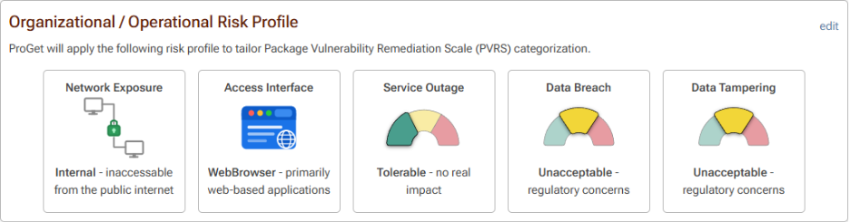
This context is based on a tailored risk profile, made up of several risk factors that can be customized to match your org and apps. These include risk exposure, if you can tolerate service outages, and if you can tolerate internal data being tampered with.
Out of the box ProGet has a default risk profile configured, one that assumes the org isn’t dedicating significant resources to monitoring and assessing vulnerabilities, and this profile can be configured to mirror your organization, so vulnerabilities are automatically categorized based on your environment, informing you of when to remediate:
By the time you see vulnerabilities, ProGet will have automatically assessed what action needs to be taken based on their category, showing you what next steps you need to take:
Monitor (Categories 1 and 2): Low-risk vulnerabilities can be monitored and addressed when appropriate, since their potential impact is low and unlikely to be exploited.
Remediate (Category 3): You should plan to address any vulnerabilities that pose a non-zero risk during a time when disruptions to development are tolerable.
Contain (Categories 4 and 5): Act immediately to fix vulnerabilities that pose severe risk. By default, ProGet will block builds with vulnerable dependencies assessed as “Contain”.

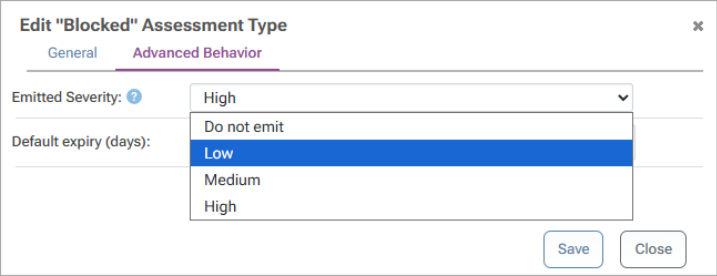
Assessment types can also be customized, giving you further control over how vulnerabilities are handled, including specifying how different categories are assessed, and setting expiry dates for assessments:

You can also configure the emitted severity of vulnerabilities, changing how alerts are shown when running NuGet and npm audit in the CMD, preventing developers from being swamped with vulnerability alerts for low-risk vulnerabilities:
Take Control of Your NuGet Package Vulnerability Management
As your development organization grows, vulnerabilities shouldn’t be a concern to your applications as long as you know what to do:
💡 Learn to assess vulnerabilities not only by severity but potential risk and impact
💡 Make informed decisions and determine how to react to vulnerabilities identified
This will involve individual package assessment over just mindless upgrading. ProGet can help you assess vulnerabilities consistently and reliably by introducing automated assessment against an aggregated, offline database of vulnerabilities.
This will be a lot to remember, so I recommend saving it somewhere or bookmarking it. If you want even more on NuGet in your organization, grab our free eBook, “NuGet at Scale”. It’s got everything we just covered, plus it’s packed with valuable insights on packages at scale, challenges with CI/CD, and much more! Download your copy now!
