

NuGet
4 Filtering Practices for NuGet.org
NuGet.org makes it easy to grab packages and get moving—but that convenience can come at a cost. When time is tight and deadlines are looming, it’s easy to reach for whatever works without checking if it’s approved or safe. That shortcut can lead to bigger problems down the road, like security risks or compliance issues.
By applying a few simple filtering practices, you can reduce risk, improve consistency, and get started with a package approval workflow that grows with your team, helping ensure your projects stay secure and compliant.
Next, we’ll walk through four easy filtering tips we’ve put together that can help your team improve security and control when using packages from NuGet.org.
1️⃣ Use Your Company’s Prefix
All packages created within your organization should start with your company name (e.g. Kramerica.*). This aligns with Microsoft’s naming recommendations by ensuring uniqueness and using namespace-like names with dot notation.
This naming approach, known a scoping, helps avoid conflicts with public packages and protects against dependency confusion attacks.
Reserving (or “blocking”) your company’s prefix on an open-source repository like NuGet.org further ensures that only your organization can publish under that scope, preventing illegitimate packages from sneaking into your supply chain.
2️⃣ Manually Approve Infrequently Updated NuGet Packages
Using tools like ProGet, you can set up connector filters between your private repository and open-source repositories (e.g., NuGet.org). These filters can be set to automatically approve or deny NuGet packages.
Packages that are important to development but updated infrequently—like Newtonsoft.Json, for example, should not need to be automatically approved or denied.
Instead, it’s better to have such packages go through a manual approval process, allowing for a more thorough assessment. This helps ensure that any major issues affecting development are caught before approval.

3️⃣ Automatically Approve Frequently Updated NuGet Packages
On the flip side, core NuGet packages that are updated frequently can be a hassle to approve manually every time.
Take AWSSDK.Core, for example, it’s an integral package that engineers rely on, and it’s updated twice a week. Instead of requiring manual approval each time, consider setting your connector filter to automatically approve these types of packages.
4️⃣ Trust ID Prefix Reservation
Organizations can apply for an ID Prefix Reservation on NuGet.org. Once approved, only that organization can publish packages using the reserved prefix. For example, “System.” is reserved by Microsoft and used for core .NET packages.
It’s kind of like being verified on social media—but for NuGet packages.
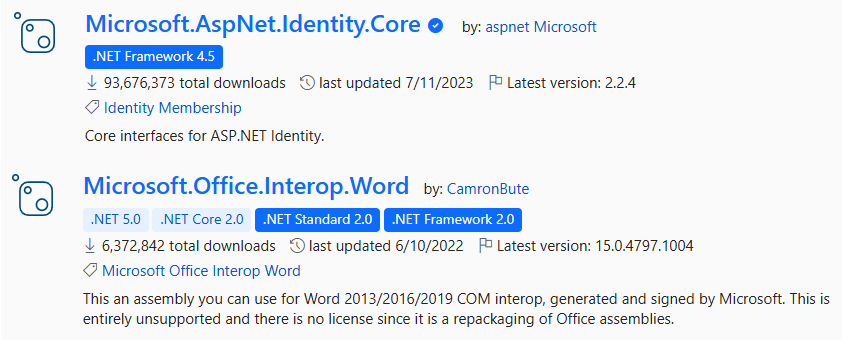
Applying for an ID Prefix Reservation supports the first best practice (using your company name as a prefix), so it’s highly recommended.
Filtering Out Unwanted Packages
NuGet.org makes using packages easy—but that convenience can open the door to unvetted or unsafe dependencies. Without proper checks, you could face security risks or compliance issues later on.
By adopting simple filtering practices—like scoping and prefix reservation—you can protect your projects and keep everything running smoothly. And when you combine that with a package approval workflow—supported by tools like ProGet to automate approvals based on these filters—you can reduce risk and ensure only trusted packages make it into your projects.
This article might be a lot to process, but if you want more check out our free online eBook, NuGet at Scale. It’s full of tips on handling package metadata in scaling organizations, private NuGet servers, and more!
