

ProGet
HowTo: Set Up ProGet as a UI for Cloud Storage
Cloud storage has become a go-to option for storing data. It’s generally reliable and designed to scale easily as needs grow. Having said that, it does come with its challenges. User interfaces often change as providers update their platforms, permission models tend to be complex, and managing cloud storage often demands a degree of tech-savviness.
ProGet sidesteps these challenges by acting as a user interface for cloud storage. Users get a single, familiar interface rather than having to juggle permissions, logins, and processes across multiple providers. Administrators still maintain full control over security, updates, and storage, while teams can easily upload, download, and organize their components and assets.
In this article I’ll walk you through how to set up ProGet as a simple, UI for a variety of cloud storage options, including Amazon S3, Google Cloud Storage, Azure Blob Storage, and other S3-compatible services.
Cloud Storage: Powerful but Not Always User-Friendly
Cloud storage platforms like Amazon S3, Azure, and Google Cloud are widely used because they’re secure, reliable, and built to scale as organizations grow. The catch is that they aren’t always intuitive for everyday users, which makes managing and navigating tedious and confusing, especially for non-technical teams.
Frequent UI changes, complex IAM configurations and detailed permission settings can turn even simple tasks into a hassle, like uploading or downloading files. Granting access or keeping storage structures organized often requires help from your resident engineer, making quick, everyday tasks feel unnecessarily time-consuming.
As organizations grow and more teams rely on cloud storage, the complexity only increases. Different teams often need different access levels, workflows, and retention rules, which can lead to inconsistencies and slow down collaboration. ProGet steps in here as a user-friendly UI, solving these hurdles by simplifying access and management across all teams.
ProGet as a UI for Cloud Storage
ProGet can serve as a single, consistent UI for all your cloud storage, so you don’t have to navigate each provider’s console or juggle separate permission settings. Administrators can connect the cloud storage services their teams use directly to ProGet, making it easy to manage access and keep everything organized in one place.
Asset Directories integrate directly with your cloud storage. Once connected, ProGet manages uploads, downloads, deletions, and versioning through its own interface. Users can easily browse and manage files without touching the underlying cloud console, while administrators retain full control over permissions, retention policies, and audit trails.
Configuring ProGet as a UI
Configuring ProGet will require credentials based on the service you are integrating with:
- Amazon S3 and S3 Compatible services: Access key, Secret access key, Region endpoint and Bucket
- Google Cloud Storage: Bucket and Service account key
- Azure Blob Storage: Connection string, Container and Target path
From here, head over to your ProGet instance and create a new asset directory in ProGet. In the “Storage and Retention” settings, select “change” next to the “Storage” option.

Then choose your package store from the options given:
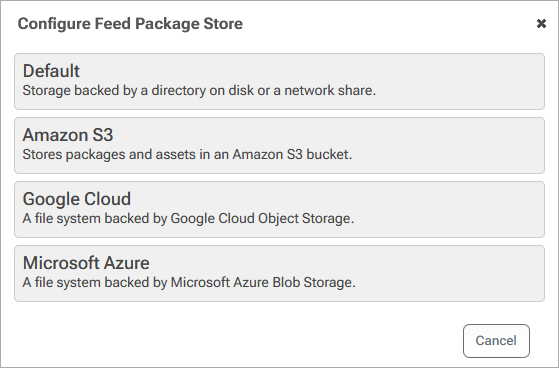
Finally, enter the credentials based on your cloud storage. Here’s Amazon S3 as an example:
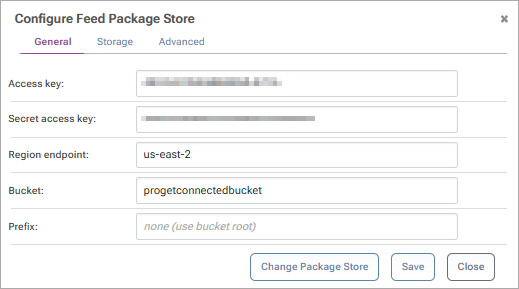
Now you can head back to your asset directory and upload some files to test the connection. Heading over to your cloud storage, you should see the files uploaded. Setting up permissions to this asset directory will let you control who views, downloads and uploads from it.
Using ProGet as your Cloud Storage UI
From here the asset directory allows you to upload, access, and manage your assets across teams as a simple and intuitive UI, regardless of which cloud storage solution you have it configured with.

From here, you can also create sub-folders to better organize your assets, as well as perform various operations such as bulk file management, and searching across the asset directory for specific files.

At the administrator level, permissions can be easily configured at the feed level for users and groups to allow access to the asset directory, and viewing and downloading of files.

ProGet as a UI For Cloud Storage
Cloud storage is efficient and scalable, but keeping track of files and permissions can be tricky. Non-technical teams often get stuck dealing with confusing interfaces, constant updates, and tricky access controls, while admins spend a lot of time making sure everything stays secure and consistent. All this can slow down collaboration, cause mistakes, and hurt productivity. Things that a simple, user-friendly interface like ProGet can help fix.
ProGet makes the whole process much simpler by providing a single, consistent interface for your cloud storage. Users can easily upload, organize, and access their files, while administrators keep centralized control over permissions, retention policies, and audit trails.
You can read more about ProGet and cloud storage on our Cloud Storage Overview.
