

ProGet Migration
How to Manage Users, Security, and API Keys in ProGet for Sonatype Users
This article is part of a series on Migrating from Sonatype to ProGet, also available as a chapter in our free downloadable eBook.
Migrating to a new platform means redefining how users, roles, and permissions are managed. API keys are a key part of that process, providing secure access for users and automation to interact with repositories and related systems.
In Sonatype, API keys are linked to user privileges and governed by content selectors that control access to specific repositories or components. ProGet takes a similar approach, using API keys to manage access across feeds, packages, and other features in your instance.
If you’re migrating to ProGet, you can reuse your existing keys and permissions and not have to start from scratch. In this article, we’ll look at how both tools handle users, roles, and permissions. Also, we’ll check out how API keys are used and how you can migrate everything from Sonatype.
Users, Security, and API Keys in Sonatype and ProGet
Sonatype manages user access through roles and privileges. Privileges define specific actions, while roles group those privileges for users or teams. It’s flexible, but can become confusing as teams grow, especially when roles contain other roles.
API Keys are created by an administrator and can’t be viewed, exported, or imported once generated. If lost, they must be regenerated. Because of this, users often store them securely right after creation in a password manager or embedded in automation scripts.
Sonatype also includes Content Selectors, which let admins restrict access based on package name patterns. For example, you might allow access to org.apache.commons but block org.apache.hadoop. Think of it like folder-level permissions; it’s helpful when you’ve got one huge Maven repository with lots of different packages, but it doesn’t fit how modern development works. Today, most users use a smaller, repo-per-project setup, like Git. So, you either have access to a repo, or you don’t. No middle ground.
Problems:
⚠️ This kind of granular access control can make dependency management confusing.
⚠️ One developer might have access to org.apache.commons, while another doesn’t, leading to frustration for the other developer, despite them both working on the same project.
How ProGet Handles Users, Permissions, and API Keys
ProGet uses a similar roles and privileges model to Sonatype, but it’s easier to visualize and manage. It integrates with your existing directory services, like Active Directory or LDAP, and maps groups from your organization to team-based permissions. This gives teams shared access to feeds instead of individual permissions, just like Git does.
Handling API keys is straightforward. You can enter keys directly as text, and if you’re migrating from Sonatype, you can even reuse your existing keys. No need to regenerate anything, plus your scripts and automation will keep running without interruption.
Unlike Sonatype’s Content Selectors, ProGet’s access model is feed-based. Permissions apply at the feed-level, “all or none”, just like how Git handles repository access. This keeps things simpler, modern, and consistent across teams, while avoiding the hidden dependency headaches that come from uneven access within the same repo.
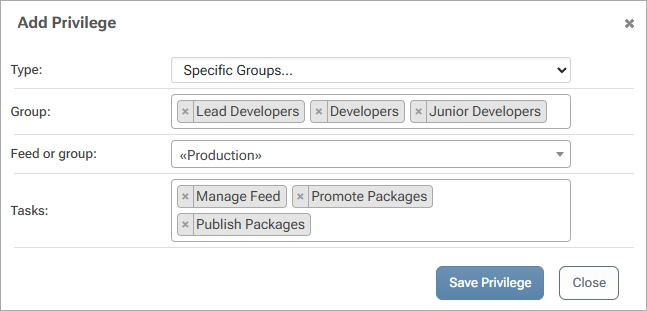
Creating & Managing Users and Permissions in ProGet
ProGet’s user model is built around the same core concepts as Sonatype: users, groups, and permissions, all managed in the permissions page.

You can manually create users and groups directly in ProGet, or if your organization already has an Active Directory of users set up, you can connect to it through LDAP to bring everyone over seamlessly. And if you’re already using SAML for authentication, ProGet supports that and can also be configured.
All User and Group permissions are managed on the Permissions page. Each user or group can be given specific access depending on what they need to do. By default, ProGet comes with a set of common permissions like Administration and Feed Management.

But you’re not limited to those defaults. You can tweak the existing permissions or create new ones entirely, customized to your team’s workflow.

Creating & Managing API Keys in ProGet
ProGet gives you a few different options for creating and managing API keys, depending on your preference. You can generate and manage them:
- directly in the ProGet web UI
- using the command-line tool (pgutil)
- through the HTTP API
These keys come in 3 types:
- System Keys – full-instance control, and are used for automation and configuration tasks.

- Feed Keys – scoped to a specific feed or feed group.
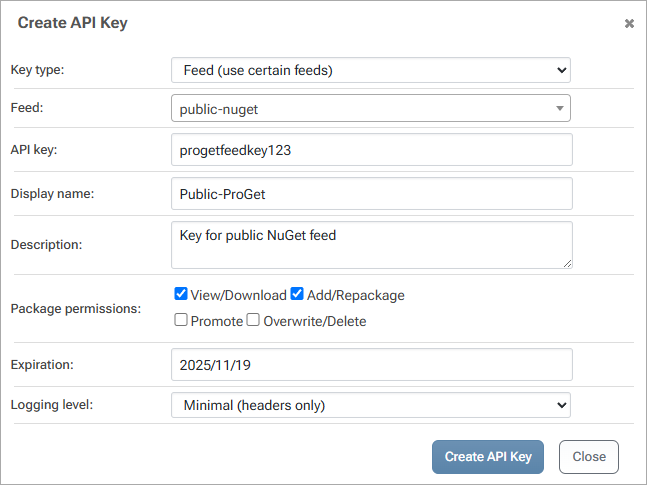
- Personal Keys – tied directly to an individual user’s permissions, like Sonatype’s profile keys.

Each user can create and manage their own personal keys right from their profile, while administrators have full visibility and control across all keys in the system.

Migrating Your Sonatype Keys
Moving your API keys from Sonatype to ProGet is straightforward. In ProGet, head to the API Keys page and create a new key.

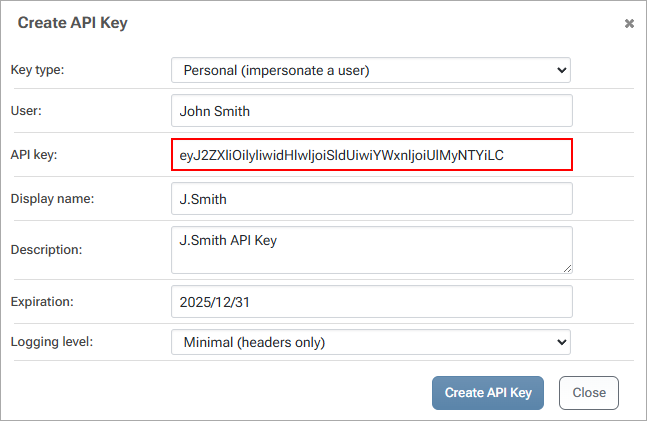
From there, you’ll assign a name, choose the key type (System, Feed, or Personal), and set the appropriate permissions. Next, copy and paste your stored Sonatype keys directly into ProGet. For example, if you had a user “John Smith” profile key with specific permissions, you could recreate that same setup in ProGet.
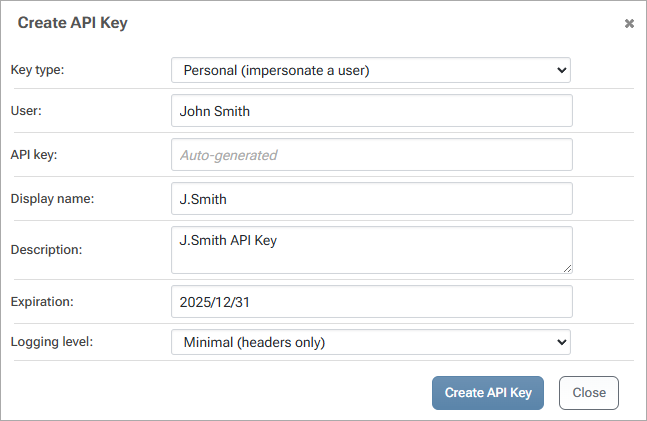
Just create a new personal key for John Smith, assign the same access level, and paste in the original key value.
Move to ProGet with Ease: Quick User and Permissions Migration, and Simplified API Key Usage
Migrating from Sonatype to ProGet is simple. Instead of juggling complex roles and content selectors, replace them with clear, feed-level permissions. ProGet’s approach to users, groups, and directory integrations also keeps things consistent and easy to manage across your organization.
API keys remain a key part of keeping your automation and repository access secure. The good news is that your existing Sonatype keys can often be reused, helping maintain continuity and avoiding disruptions in your automation or scripts. And ProGet makes key management simple by creating, scoping, and auditing keys through the UI, CLI, or API.
Want to learn more? This article is just a part of our free eBook, “Migrating from Sonatype to ProGet”, breaking down everything from setting up ProGet and configuring policies to managing SCA, replication, and lots more. Sign up to get your copy today!
