

ProGet Migration
How to Manage Replication in ProGet for Sonatype Users
This article is part of a series on Migrating from Sonatype to ProGet, also available as a chapter in our free downloadable eBook.
Replication is a useful feature for teams working across multiple sites, even globally. It ensures your components are accessible wherever needed and supports disaster recovery. Proper implementation keeps up-to-date components synchronized across servers, preventing delays caused by missing dependencies, and helps avoid bottlenecks by serving pre-distributed content to multiple teams.
If you’re familiar with Sonatype’s replication feature for Nexus repositories, ProGet offers a similar approach with a few key differences. Components, called packages in ProGet, can be replicated across instances on different servers, supporting distributed teams and maintaining package availability.
In this article, I’ll walk you through setting up replication in ProGet in a way that will feel familiar to Sonatype users. I’ll also cover various types of replication, from hub-and-spoke to federated development, so you can identify what’s best for your teams and get it up and running in ProGet.
Replication In ProGet
In ProGet, replication is available with an Enterprise license, much like a Sonatype Nexus Pro license. Instead of “repositories,” ProGet uses feeds, with replication running automatically every 60 seconds. While ProGet doesn’t use pre-emptive fetching like Nexus, its near continuous-syncing keeps packages up to date across your servers. Currently, replication only covers packages, but in ProGet 2025, teams will be able to replicate vulnerability assessments across servers as well, saving you from having to configure multiple servers.
You can replicate multiple feeds from a single source using a hub-and-spoke model, just like in Sonatype, allowing your main ProGet server and its feeds to be replicated by multiple teams, even across regions, ensuring everyone has access to the latest packages. ProGet also supports a bi-directional model, enabling teams to share and update packages instantly through two-way content streams.
Additionally, ProGet offers replication across versions, allowing smooth migration between older and newer versions of ProGet, including all of your packages, a unique feature compared to Nexus. It can also be used for disaster recovery, ensuring your feeds stay available if a primary server goes down, just like in Sonatype Nexus.
Setting Up Replication In ProGet
Replication can be configured through the ProGet UI or API, giving you flexibility to manage feeds as you prefer:

Once set up, replication runs automatically, eliminating the need to schedule updates manually:
To support teams in different locations and varied workflows, ProGet also offers specialized replication patterns, including Edge Locations and Federated Development:
⚙️Edge Locations uses a hub-and-spoke model to replicate a single feed to multiple edge servers, so teams operating in different regions can access the same content quickly, reducing the latency and load time on servers.
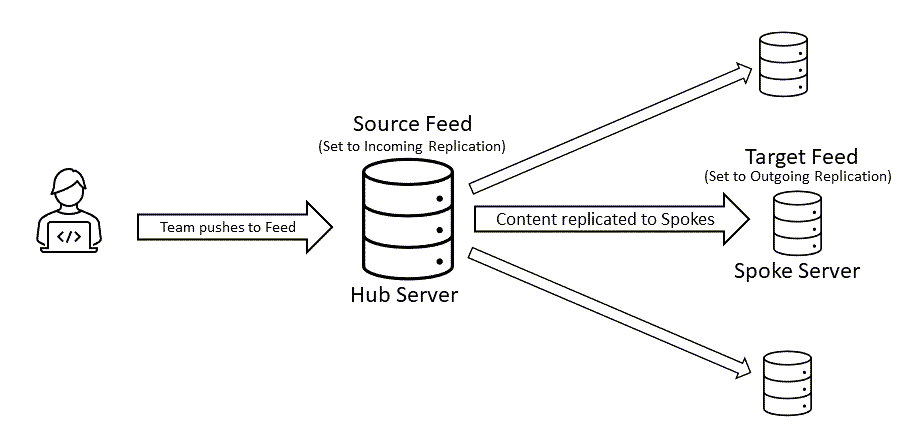
Check out our documentation for more details on setting up edge locations in ProGet.
⚙️Federated Development allows you to configure both incoming and outgoing feeds, so separate teams can collaborate seamlessly, while maintaining local copies of the packages they need.

Check out our documentation for more information on setting up Federated Development in ProGet.
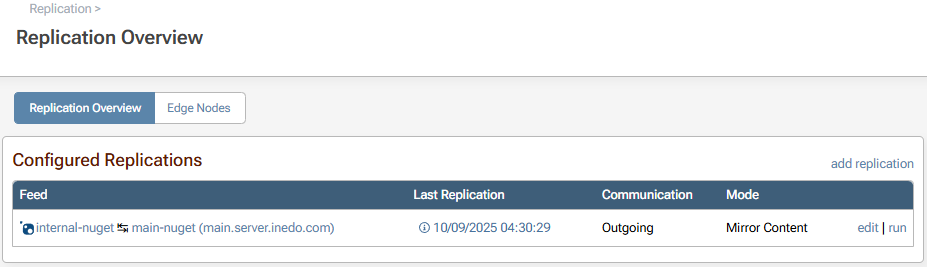
ProGet always runs replication in the background, so you don’t need to worry about missed updates that weren’t run manually. Built-in monitoring of your replication status and health can also be viewed via the Replication Overview page.
Replication in ProGet: Familiar, Simplified, and Better
For Nexus users, replication in ProGet will feel familiar but is simpler to configure and maintain. There’s no setting up pre-emptive pulls or managing replication tasks, since ProGet handles its near-continuous syncing automatically. Teams relying on Nexus Pro replication can achieve the same workflows with ProGet feeds, whether distributing packages across sites, supporting remote teams, or preparing for disaster recovery.
ProGet adds flexibility, letting you replicate feeds between instances on different versions of ProGet, and automatic syncing to keep packages up to date. In 2025, replication of vulnerability assessments will remove the need to configure security scanning on each instance, saving time and ensuring consistent policies across teams. Together, these features make replication easier to manage while offering flexibility to match your workflows.
Curious to learn more? Our eBook, “Migrating from Sonatype to ProGet“, expands on this article with guidance on repository setup, managing vulnerabilities, licenses, and much more. Grab your free copy today!
