

ProGet Migration
How Storage, Backing Up and Restoring Works in ProGet for Sonatype Users
This article is part of a series on Migrating from Sonatype to ProGet, also available as a chapter in our free downloadable eBook.
Data safety is a big deal in any development environment. By securely storing your artifacts and data, you can protect your projects from risks like hardware failures, system errors, and the unexpected data loss that comes along with it. Data loss typically means serious setbacks in time, effort, and progress, which is why most organizations have backup strategies in place to maintain the integrity of their development.
Both Sonatype Nexus and ProGet include backup and restore features. In most cases, they work in similar ways, so if you’re migrating from Sonatype to ProGet, the process should feel pretty familiar. That said, there are a few differences in how ProGet handles and stores data, so you’ll want to be aware of these before your migration.
In this article, we’ll take a look at how Sonatype and ProGet manage data differently, and walk through how backup and restore work in ProGet to help prepare for your migration.
How SonaType and ProGet Manage Data
Sonatype Nexus Repository manages storage using a blob-based system, where packages and components are stored as binary large objects (blobs). The related metadata, configuration details, and repository structure are stored separately in a database, typically H2 for smaller setups or PostgreSQL in production environments.
Each blob file gets a randomly generated name and is stored in a folder structure that Nexus creates automatically, which makes it hard to see how the files on disk relate to the actual artifacts they belong to. Because of this, the blob files have no inherent meaning or recognizable structure without their corresponding metadata, making the database essential for interpreting, restoring, or making sense of the repository’s contents.

Data Storage in ProGet
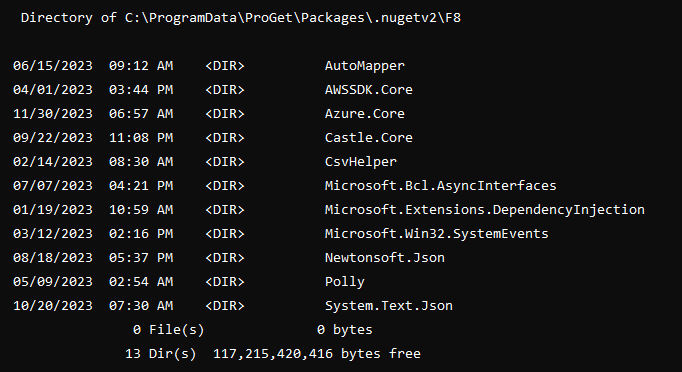
ProGet takes a more straightforward, file-based approach that’s transparent and easy to browse. Metadata is stored in a PostgreSQL database, while the actual package files are saved directly to a local disk, network drive, or cloud storage (like Amazon S3, Google Cloud, or Azure).
ProGet uses a clear, readable directory structure for packages. Each package is stored with its original name, making it easy to identify. For example, version 13.0.3 of Newtonsoft.Json would be stored as Newtonsoft.Json.13.0.3.nupkg.
Sonatype vs ProGet: Backing Up and Restoring
Backing up a Sonatype Nexus Repository requires coordinating both the metadata database and the blob storage. Because the blob files don’t mean anything without their metadata, you need to back up both together to ensure your data is intact. This isn’t unique to Nexus, but their blob-based system makes the raw data essentially unusable on its own. The database is necessary to understand or rebuild what’s stored.
ProGet uses a similar backup approach and involves backing up three main components:
- Configuration File
- PostgreSQL database
- Package Files
The key difference is that ProGet’s package files are readable and usable outside the system, making it easier to check or recover data. Overall, though, the backup and restore process works pretty much the same way.
Restoring in ProGet
Restoring ProGet is just as simple as backing it up. You replace the configuration and database files, restore the package files, and your instance is ready to go. Because ProGet stores packages in a clear, readable folder structure, it’s easy to verify that everything is in place and working correctly right after the restore.
Simple Data Management in ProGet
Both Sonatype Nexus and ProGet offer reliable backup and restore options to keep your development work safe. The process is fairly similar for both, handling your database and package files in much the same way. The main difference is in how the files are stored.
Nexus uses blob files, which don’t make much sense without the metadata, while ProGet keeps packages in a readable structure that you can actually view or use outside the system. This makes checking and recovering data a bit easier in ProGet, while still keeping the overall backup and restore process familiar for Nexus users.
Ready to explore more? This chapter is just a part of our ebook, “Migrating from Sonatype to ProGet“, covering everything from setting up repositories to managing your vulnerabilities, licenses, and much more. Reserve your free copy of free today!
