

ProGet Migration
How to Manage Vulnerabilities in ProGet for Artifactory Users
This article is part of a series on Migrating from Artifactory to ProGet, also available as an eBook.
When using JFrog’s Artifactory with X-Ray’s Software Composite Analysis (SCA), you’ll detect vulnerabilities in your repositories, and then use “Policies” and “Watches” to block any “violations”.
ProGet also has its own SCA features all within a single product. You can use this to scan packages and set up Policies to block vulnerable packages from being used in your development.
In this article we’ll look at how to create the same policies you’d use in Artifactory, but in ProGet. We’ll also introduce some improvements you can introduce to your vulnerability management workflow.
Vulnerability Scanning in ProGet
Instead of repositories in Artifactory, ProGet uses Feeds. ProGet uses its Software Composite Analysis to scan these feeds and manage vulnerability detection and blocking, much like Artifactory.
But while Artifactory repositories are automatically configured for scanning, ProGet users can configure this themselves when the feed is created.
Let’s say you create a NuGet feed called “public-nuget” with a Connector (Similar to a “Remote Repository” in Artifactory), you would be given the option of scanning the feed for vulnerabilities.
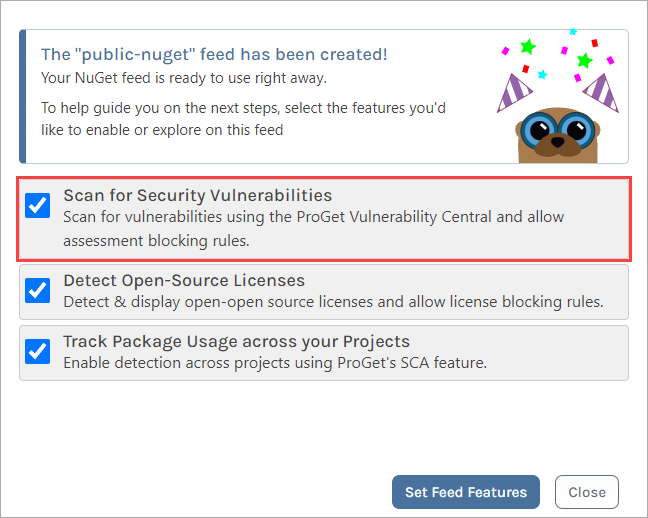
ProGet automatically scans feed packages against the ProGet Vulnerability Database (PGVD), an aggregate of several vulnerability databases such as NVD, curated by Inedo Security Labs.
Any detected vulnerabilities are then shown in the affected packages:
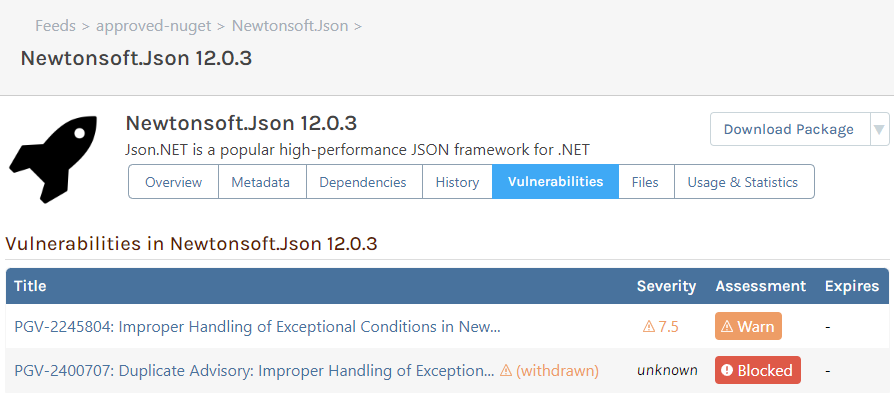
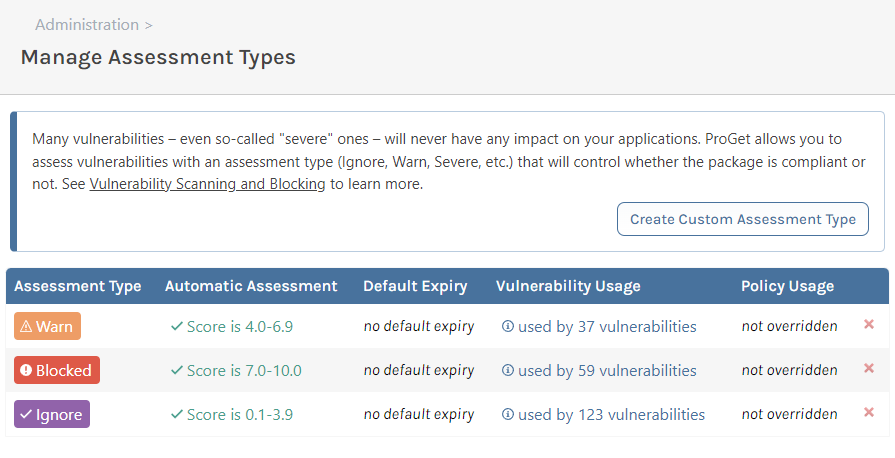
To manage vulnerabilities in ProGet, you can use Auto Assess, which uses default assessment definitions based on the CVSS.
ProGet also lets users assess vulnerabilities in different scopes, as many vulnerabilities – even severe ones – will not have an impact on your applications.
Migrating your X-Ray Policies to ProGet
Like X-Ray, ProGet has “Policies“. However, these aren’t the same “Policies” as you’d find in X-Ray.
- Policies in Artifactory: Rules that define criteria, with a configured set of automatic actions
- Policies in ProGet: Rules that define how assessed vulnerabilities are evaluated. This determines if a package is “✔ Compliant“, “⚠ Noncompliant“, or “⚠ Warn“.
ProGet’s Policies can be configured on the “Policy” page:

“⚠ Noncompliant” packages in ProGet are the similar to “violations” you’d find in Artifactory. You can block downloads or builds, and send notifications when a package is “⚠ Noncompliant“.
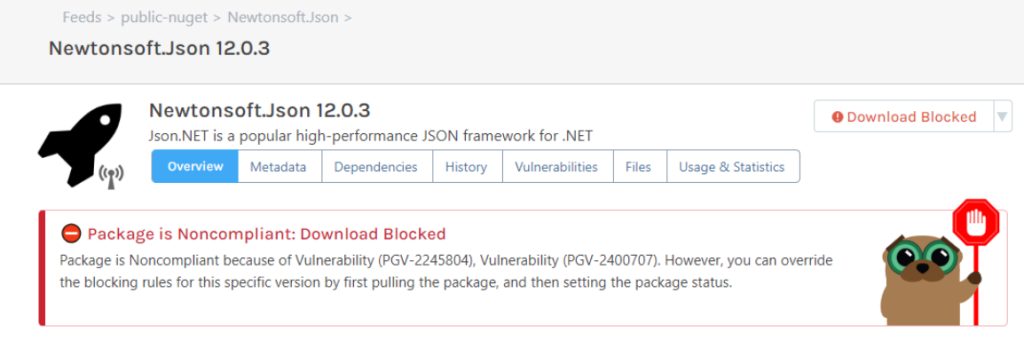
So, suppose you wanted to block all vulnerable package downloads from your “public-nuget” feed we created earlier. You’d create a new feed-level policy, which we will call “nuget-policy”. You’d then set all vulnerability assessments to “⚠ Noncompliant“. Now, any package with vulnerabilities from that feed will now be blocked from downloading:
Send Messages and Alerts with Notifiers
If you want to send emails or messages to alert your team when new vulnerabilities or “⚠ Noncompliant” packages are detected, you can use notifiers. These can also be set up to alert you via Teams or Slack.
Setting Exceptions to Policies
ProGet has “Exceptions” that act similar to “Ignore Rules” you’d use in Artifactory. These are created on the Policies page, and can exempt packages using filters like package name and version. The filters also allow for wildcards (e.g. 3.* to exclude all version 3 releases)

Improve Your Vulnerability Management
ProGet also offers several features that can improve your vulnerability management workflow.
Manual Assessment
Not all detected vulnerabilities pose a threat to your code, most present a minimal risk at most. This is why it’s best to assess package vulnerabilities on a case-by-case basis.
ProGet allows you to decide for yourself how packages should be assessed. It also lets you leave comments for each vulnerability, allowing teams to communicate their assessments.

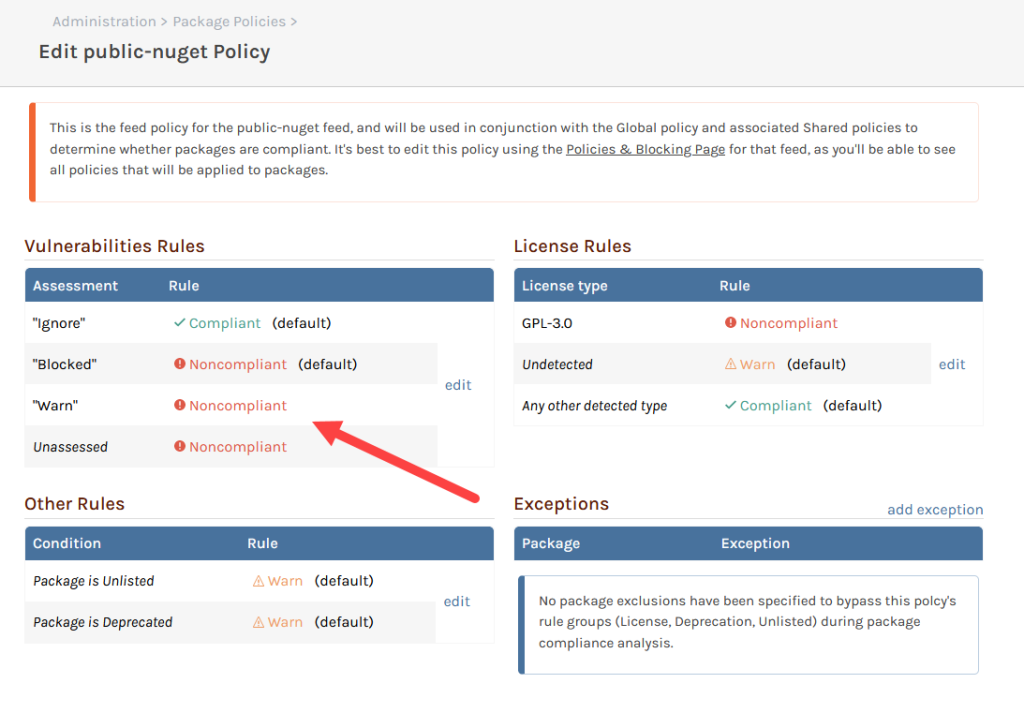
You can also set feed policies up alongside these. In the example below, we’ve set unassessed packages and packages assessed as “⚠ Warn” as “⚠ Noncompliant“, even though they are both configured as acceptable at a global level.
Customized Assessment Types
ProGet doesn’t limit assessment types based on CVS scores or Severity ratings. When you configure your vulnerability assessments, you can define your own types.
Now you can define what counts as “Severe” as opposed to just “High” or “Low“.

At times where you may be creating an assessment type just for a limited time due to testing etc. ProGet allows you to set an expiry to prevent any custom assessments from lasting any longer than intended.

Customized Feed Policies
Using “Global” policies in combination with feel-level policies allows you to define specific rules for specific feeds, while creating global compliance across all feeds.
Manage Your Vulnerabilities Effortlessly in ProGet
Like Artifactory, ProGet has its own Software Composite Analysis as part of the product. ProGet scans packages for vulnerabilities using a database that aggregates data from various sources such as NVD.
ProGet can either automatically assess package vulnerabilities or let you manually assess them yourself. You can also create “policies” to block “⚠ Noncompliant” packages.
This article is part of our eBook on Migrating from Artifactory to ProGet, which walks you through everything from setting up users and security to managing your repositories and much more. Download your free copy of “Migrating from Artifactory to ProGet” today!
