

ProGet Migration
How to Manage Replication in ProGet for Artifactory Users
This article is part of a series on Migrating from Artifactory to ProGet, also available as an eBook.
Setting up Replication in ProGet is straightforward if you’re already using it in Artifactory. Having said that, there are some differences Artifactory users must understand
How it all works is very similar, but the settings and structure of repositories make configuring it a little different.
In this article we’ll take a look at setting up replication in ProGet in a similar way to your Artifactory instance, as well as the different types of replication available.
Replication in ProGet
Like Artifactory, users with an Enterprise license can set up Replication in ProGet between two instances. In ProGet, it’s “feeds” that are replicated; like Artifactory’s repositories, but setup is a little different. Push and Pull replication is supported, as well as single and multi-push replication. ProGet also allows you to “Mirror Content”, where a feed will both push and pull to ensure it’s synchronized.
Multi-push replication involves a “Hub and Spoke” configuration, where the source server acts as the “Hub”, and destination/edge servers are the “Spokes.”

Setting this up can be done following our guide on How to set up replication to edge locations.
Setting up Replication
Replication is set up in ProGet through the UI. It can also be done with the ProGet API.
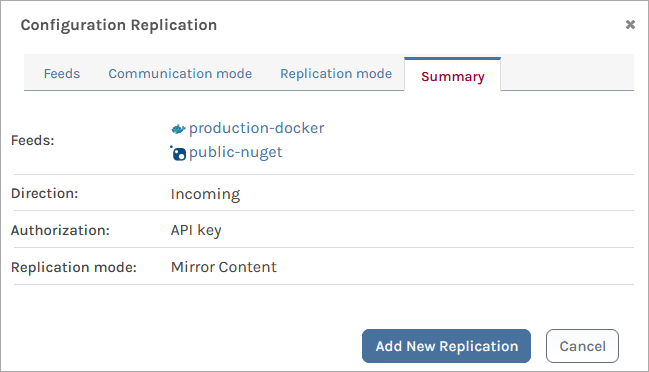
Replication is configured in one of two ways, as Edge Locations or Federated Development.
Edge Locations
Edge locations use the Hub and Spoke model to easily distribute content to other servers. Setting this up involves configuring your hub and spoke servers, which can be done following our guide.
There is also a specialized Edge Edition which has some additional features/dashboards that are specialized for edge computing and a licensing model designed to scale.
Federated Development
Federated Development allows software to be developed at multiple sites with multiple teams.

To set this up you’ll need to configure incoming and outgoing replication feeds, which you can learn more about in our guide for this.
Replication Scheduling
With Artifactory your replication is based on either a schedule or events, but in ProGet it’s performed automatically. If you need to do “one-off” replications, you can use ProGet’s Feed Migrators. Manual and scheduled replication is something we are considering, so let us know on our forums if this is something you’d like to see!
In ProGet you can use the Dashboard to monitor Replication status which we find as a much better alternative to JFrog’s script recommendations, as it saves time, simplifies tasks, and consolidates data in one place.
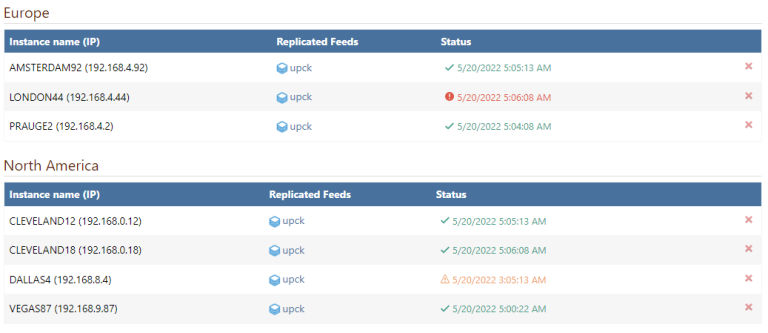
You can also use ProGet’s Health API to return the current replication status.
Replication Simplified with ProGet
ProGet offers replication, allowing you to push and pull, as well as mirror content to keep everything synchronized. As well as either single or multi-push replication using hub and spoke servers.
Replication is set up easily through either the UI or API, and allows you to configure everything for either Edge Locations or Federated Development.
This article is part of our eBook on Migrating from Artifactory to ProGet, walking you through everything from setting up repositories to managing your vulnerabilities, licenses and much more. Download your free copy of “Migrating from Artifactory to ProGet” today!
