

ProGet Migration
How to Manage API Keys in ProGet for Artifactory Users
This article is part of a series on Migrating from Artifactory to ProGet, also available as an eBook.
API Keys are essential tools used across platforms like Maven, Visual Studio, and npm. If you’re using Artifactory you’re probably using them for accessing packages and content in repositories, instead of storing usernames or passwords in configuration files.
ProGet also uses API Keys to manage feeds, packages, SCA, and other features. For anyone migrating to ProGet, you can take your Artifactory keys and use them with similar permissions, without the need to generate new ones.
In this article, we’ll look at how API keys work in ProGet, how you can migrate your current Artifactory keys, and how to set them up with the same permissions in ProGet.
API Key Integration from Artifactory to ProGet
In Artifactory there are a handful of ways to create and store API keys. Most users will create them when setting up their profiles, while administrators can also create them as needed.
However, Artifactory stores API keys as hashes, meaning you can’t extract or import them directly. Users often end up storing them elsewhere, or referring to scripts that use them. If you do have these keys on hand, you can recreate them in ProGet with similar permissions.
When you’re creating API keys in ProGet you have the option of entering keys as text yourself, making it much easier when migrating. You can take Artifactory keys you’ve stored externally, and use them as API Keys in ProGet. This means you won’t need to replace keys you’re already using in your scripts and automation.
Creating API Keys in ProGet
Creating and managing API Keys can be done in either ProGet’s UI, CLI with pgutil, or as an HTTP API request.
ProGet uses three main types of API Keys:
- System API Keys: These keys give you full control or specific permissions in your ProGet instance. They are used to automate ProGet configurations and access packages, containers, and assets.

- Feed API Keys: These are for managing capabilities per feed or group. They are usually restricted to specific feeds or groups, and offer limited access to associated packages, containers, and assets.

- Personal API Keys: The privileges of these are based on the user’s security attributes. They are managed by ProGet end-users and will mimic user access. These are similar to the API keys created in the user profile in Artifactory.

Users can create and manage their own personal keys, which Admins can also see and manage as well.

Migrating your Artifactory Keys into ProGet
Adding existing API keys with permissions is easy in ProGet. To start you’ll need to navigate to ProGet’s API Key page and create a new key:
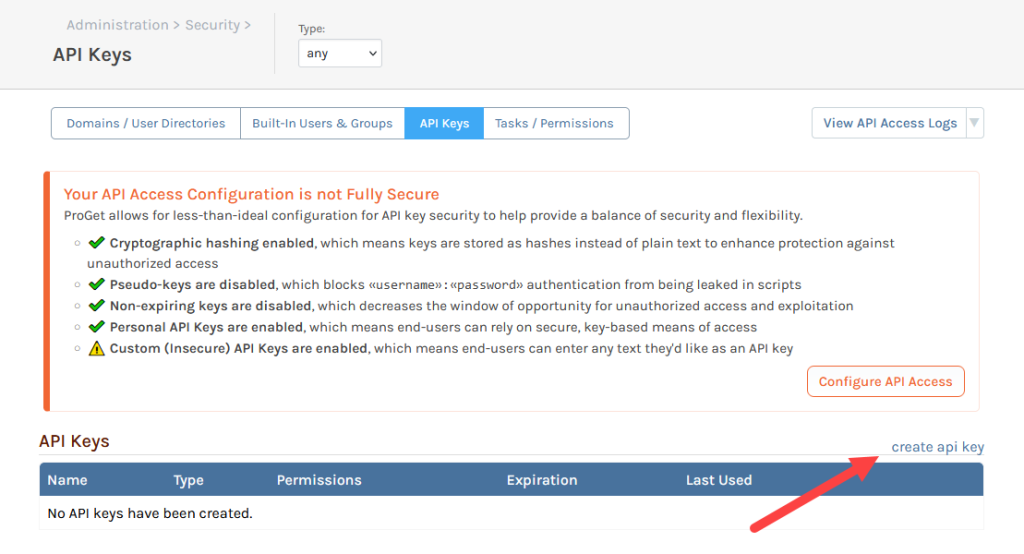
ProGet also offers information on how secure your keys are. In the screenshot above it shows that custom API keys are allowed, which will let you use your Artifactory API keys in ProGet.
From here you’ll give a name to the key, specify its type (System, Feed, or Personal) and configure the necessary permissions based on your Artifactory setup.
So, let’s say in Artifactory you had an an API key for the user “J.Smith” with all of their associated permissions In ProGet you can create the same permissions by creating a User API Key and selecting “J.Smith” from the list of users.

Finally, just copy across this user’s Artifactory API key into the text box, save it, and you’re done!

API Key Usage in ProGet made easy
ProGet supports API keys for many of its features like feeds, packages, and security access. These can be created for administration, feed management, and for individual users. Users can also create and manage their own personal keys.
API keys are set up so that if you have an Artifactory key to hand, you can use the same one with similar permissions in ProGet.
This article is part of our eBook on Migrating from Artifactory to ProGet, which walks you through everything from setting up users and security to managing your repositories and much more. Download your free copy of “Migrating from Artifactory to ProGet” today!
