

ProGet Migration
How Retention and Data Storage Work in ProGet for Artifactory Users
This article is part of a series on Migrating from Artifactory to ProGet, also available as an eBook.
Artifactory offers solutions for local and cloud storage. It also uses retention policies to help manage disk space.
When migrating to ProGet, you’ll need to know how ProGet stores data and how its own retention policies work. These are simple enough to understand for anyone already using Artifactory.
This article will break down ProGet’s modern approach to data storage and retention policies, contrasting them against Artifactory to help you migrate and set everything up.
Data Storage in Artifactory and ProGet
Artifactory’s “Filestore” lets you store your data either using a local file system with redundancy, or cloud storage such as Amazon S3. To store an artifact Artifactory uses its SHA-1 checksum as the file name, and places it in a folder named after the first two digits of the checksum. This can be confusing as it makes it difficult to tell which folders and files correspond to which artifacts in your instance.
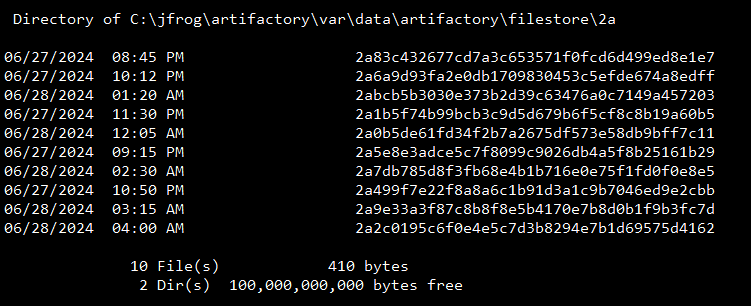
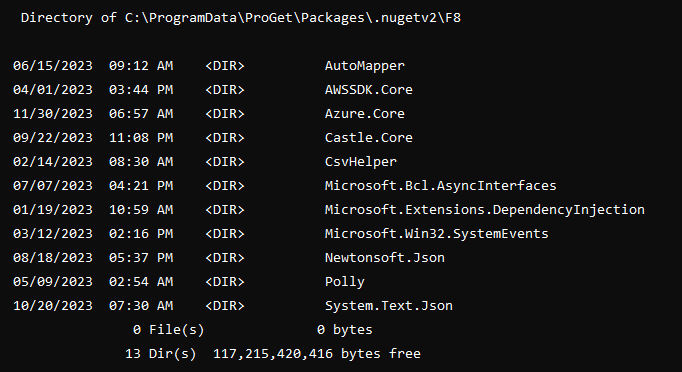
ProGet also stores files locally or in the cloud. Unlike Artifactory, it stores files in folders “as is”, with easily recognizable folder and file names. This makes it much easier to identify files compared to Artifactory’s naming conventions. Your version 13.0.3 of the Newtonsoft.Json package can easily be found as “Newtonsoft.Json.13.0.3.nupkg”, instead of “f3a1c9b2e7d8f5a6c4b9d2e3a1b8f0c6d9e8f7a3″…
Cold Storage Alternatives in ProGet
Artifactory has a feature called “Cold Storage” that lets you set archiving policies, moving artifacts to a separate instance. This feature made more sense 20 years ago when storage was more expensive. These days even highly-quality storage is relatively inexpensive. If you are using Artifactory Cold Storage, ProGet lets you set up something similar using a combination of replication, retention policies, and connectors.
Setting this up can be done either on the same or different server following these steps:
- Set up one feed, let’s call it “Feed A” on a regular disk storage.
- Create another feed, “Feed B” on more affordable cloud storage.
- Use replication to push from “Feed A” to “Feed B”
- Set up a Connector to connect “Feed A” to “Feed B”
- Configure a retention rule to delete from Feed A after 90 days of no use.
After 90 days, packages will appear in Feed A as “remote” packages.
Retention Policies in ProGet
Like Artifactory, ProGet lets you configure policies to manage disk space and control the cleanup of unused data. These “Retention Policies” are parameters you can set to define what should and shouldn’t be kept. This lets you automate an otherwise manual process to “spring clean” your disk, saving disk space and your time.
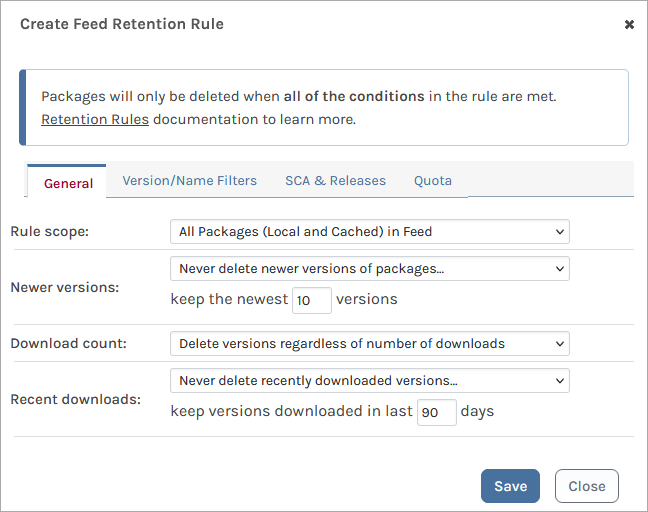
Retention Policies manage disc space in the same way as you would in Artifactory, and work with packages, assets, containers, and other ProGet features.
Examples of retention policies you could set might include:
- Dump specified packages when only X size of disk space remains
- Dump specified package versions when a feed reaches X size
- Delete packages over X number of days old
You can also set a policy to avoid packages such as “X number of latest versions”, or target cached packages only.

When you activate this rule, you can do a “dry run”, letting you test retention rules without actual deletion, so you can make sure they work as intended without worrying about data loss.
Manage your Data Easily in ProGet
While both Artifactory and ProGet offer storage and retention, ProGet offers a more modern approach to data storage and retention policies to manage your data. It also allows you to do a dry run to make sure everything is working as intended.
If you’re using Cold Storage in Artifactory ProGet also offers its own solutions for this.
This article is part of our eBook on Migrating from Artifactory to ProGet, which walks you through everything from setting up users and security to managing your repositories and much more. Download your free copy of “Migrating from Artifactory to ProGet” today!
