

NPM
npm Package Approval Flows & Connectors
This article part of a series on Mastering npm in the Enterprise, also available as a chapter in our free, downloadable eBook
Are you deploying applications to production with packages directly sourced from npmjs.org? This is a common practice for many organizations, with npmjs.org being a popular repository among developers and all. However, with this comes a bunch of stuff you’ll need to watch out for.
With npm Packages, your mileage may vary in terms of quality, licensing, and security. They aren’t subject to rigorous vetting, so it’s on you to sift through the mountain of packages to figure out what’s best for your project. This can be a bit overwhelming given the sheer number of packages available.
We’ll take a look at reasons why you should probably avoid relying on raw npm packages, and how implementing either a package approval workflow or package filtering can mitigate these concerns.
4 Big Risks of Using Packages Directly from npmjs.org
Given that just about anyone can publish a package to npmjs.org, and there’s no real way that they are vetted or endorsed, this can lead to all kinds of problems.
⚠️ Security Risks and Vulnerabilities: npm packages can contain security vulnerabilities, and some may even include malicious code. High-profile packages like lodash have had known issues that attackers could exploit. In a notable case, multiple popular JavaScript libraries were compromised with code designed to steal cryptocurrency. Without proper checks, your applications and data could be exposed to these kinds of risks.
⚠️ Unwanted Licenses: Almost every npm package has its own legal agreement, and when you use a package in your project, you might get legally tied up. Some licenses, like GPL-3, might not be a good fit for most apps and could set you up for legal headaches, like the Artifex v. Hancom case. Understanding these legal terms and making sure they match your project’s goals is a top priority.
⚠️ Low-Quality Packages: While npmjs.org offers a massive amount of packages, not all are created equal. Some may not be the best for your production environment. You could risk introducing bugs or other unforeseen issues into your app. Some of us remember the chaos left-pad caused.. These packages could result in wasting valuable development time and effort spent on troubleshooting.
⚠ High Package & Dependency Volume: One big issue you’ll face is the sheer number of npm packages and their dependencies that you have to deal with like Webpack, a module bundler known for the tons of dependencies it has. To review these packages, you’ll need to look at the package-lock.json to see the whole list of them with all their dependencies. Downloading all packages and dependencies manually takes forever, so finding a way to bulk download is pretty essential. What’s more, downloading individually can easily lead to dependency confusion. This is not only a logistical nightmare but also presents security risks, e.g. through Typosquatting
Use Only Approved npm Packages
The answer to these problems is to introduce a process in your development that makes sure you’re only using packages that are approved for use. “Approving” means checking that each package has:
✔ Low/no Vulnerabilities or Security Risks
✔ Acceptable License Agreements
✔ Suitable Quality for Production
✔ All Dependencies Accounted For
Finding the right process is important. If it’s too complex, you’ll risk developers bypassing the process. If it’s not thorough enough, unwanted packages will end up in your application. In this article we’re going to offer two processes that cover all these bases:
- Using a package approval workflow that approves packages from one repository to another to ensure only packages approved for production use are used by developers.
- Filtering npm Packages by their scope so that all packages are initially blocked by default, and only those approved are set to “allowed”.
The best way to approach either option is to use a private package repository. To look at how we can do these we’ll use ProGet, although other private repositories are conceptually similar.

Option 1: Use A Package Approval Workflow
Think of this as “code review” but for npm packages. Like code review, you’ll basically be vetting packages, in this case from npmjs.org before they are used in the application. A package approval workflow is typically built with two feeds. One of the feeds is used to store unapproved packages from npmjs.org. After the packages are vetted, they are “promoted” to the other feed for production use.
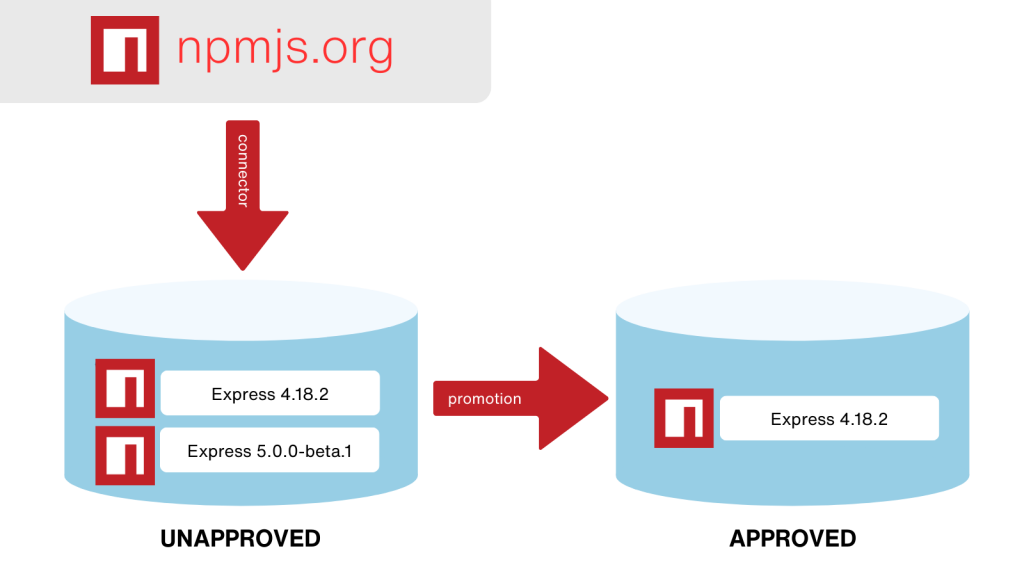
What are the Benefits of a Package Approval Workflow?
A package approval workflow makes sure developers can only use packages that have been vetted.
✔ It’s an easy and effective way to reduce the day-to-day decisions that developers need to make.
✔ They won’t need to constantly think about what packages they should or shouldn’t be using.
Implementing A Package Approval Workflow
Creating a package approval flow is pretty straightforward and can be done with two npm feeds in ProGet.
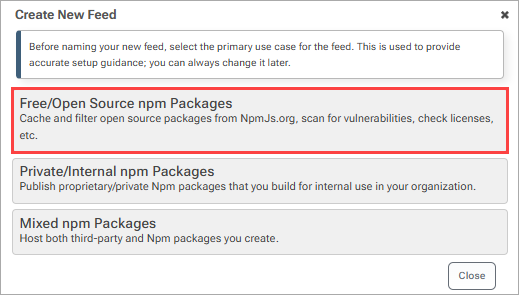
First, create the two feeds, one for unapproved packages proxied via connector from NpmJs.org:
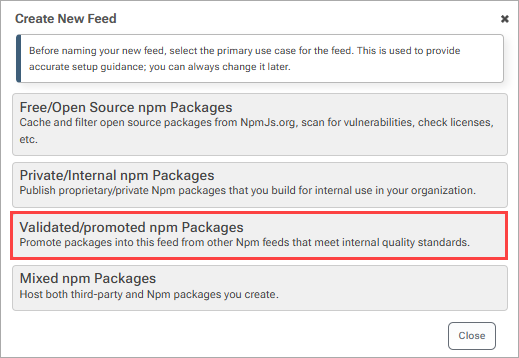
And one without a connector, for approved packages that developers can download packages from:
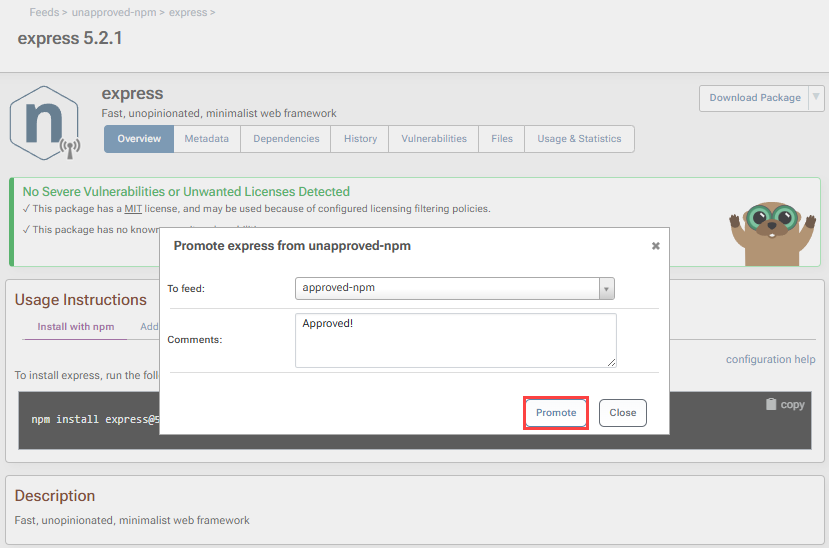
After vetting a package for quality, acceptable licenses, and vulnerabilities, you can promote it to the approved feed. Now, the package will be in the approved feed, ready for developers to download and use.
Bulk Promoting Your Packages
A necessary step in this workflow due to the thousands of packages you could be working with is bulk promotion. This allows you to promote npm packages in bulk as opposed to individually, which would literally take forever. Bulk promotion will save you significant time.
Note that bulk promotion only works with packages that are local or cached in ProGet. This means the person reviewing packages would connect his local npm to the unapproved feed, install these packages locally, and then verify them. Once verified, the developer would go back to ProGet and bulk promote the cache packages.
To do this go to “Packages” and select Bulk Edit. From here filter the feed or package name where necessary.

Select the Packages you want to promote, and then select “Promote Selected”.
You may also want to configure permissions so developers can only view or download packages from the approved feed.
For those familiar with using APIs, ProGet’s Package Upload API makes it even easier to upload your packages via a script.
Option 2: Filter your npm Packages:
Due to the sheer number of packages and dependencies you’ll be working with, filtering npm packages by their scope will make it much easier to handle them. Doing this is also very straightforward in ProGet.
Simply navigate to “Feeds” and select “Connectors”. From here select a connector such as “registry.npmjs.org” and select “Add Filter”.
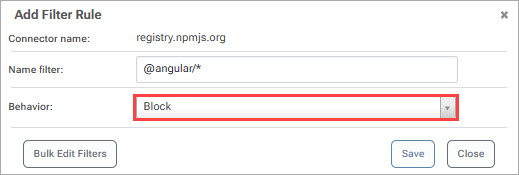
Now you will have options you can use to filter the current connector. We recommend first blocking all with a “*” filter, and then allowing specific packages one by one.
npm Package Approval in a Nutshell
Relying on npm packages from npmjs.org could introduce big problems, including security vulnerabilities, unwanted licenses, low-quality packages, and the challenge of dealing with a high number of packages and dependencies.
To mitigate these concerns, taking one of two approaches is essential:
- Using package approval workflow
- Filtering your package
Either approach can streamline your development, allowing developers to focus on building robust applications, reducing day-to-day decision-making, and enhancing overall project success and security.
There’s a lot to unpack here, so make sure you save a few notes to revisit later. If you’re looking for even more ways to improve how your team works with npm packages, why not sign up for our guide, Mastering npm in the Enterprise? It’s packed with additional strategies to help you make the most of npm in your organization. Sign up for your free copy today!
