

NPM
Making Sense of npm Package Licenses
This article part of a series on Mastering npm in the Enterprise, also available as a chapter in our free, downloadable eBook
Are you using npmjs.org for all your JavaScript packages? It’s a pretty common source for dev projects. But when it comes to package licenses, how aware are you of the ones you’re using? With over 100 packages in any given project, each with its own license, it’s totally understandable if you’re not keeping tabs on them all.
But here’s the thing – this approach has its legal risks. Knowing the licenses attached to your packages is super important. We’ve seen cases like Artifex v. Hancom in the past, where Hancom got into hot water for violating the open-source GPL-3.0 License agreement.
In this article, we’ll look at npm package licenses. It’s not just about dodging legal headaches but also making your development process way smoother. We’ll set up guidelines for npm package use in your projects, and walk you through the steps to get it sorted.
Understanding the Issues of npm Package Licensing
It’s fair to say, most people are aware that downloading software at work without proper authorization is a big no-no. One reason for this is the scrutiny needed over license terms of the software they intend to use. This is done to align with company policy and avoid potential legal trouble created from using unauthorized software.
npm packages are no different. People often overlook this though as npm packages are sourced from the npm registry. People don’t really see it the same as downloading software off the internet.
Just like software, npm packages contain copyrighted material. The author of the package usually has the final say in how their software can be used. A good example of this is The GPL 3.0 license. Organizations often keep this at arm’s length because it places strict restrictions on the use of software, requiring derivative works to be licensed under the same terms.
Here’s an example of a “GPL3.0” licensed package from npmjs.org, ccNetViz:
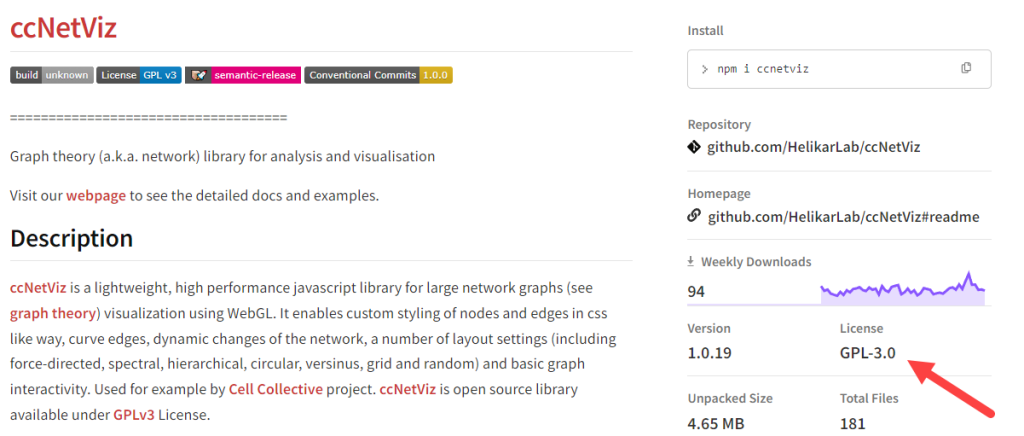
It’s a relatively friendly-looking graph theory library. We see its license is casually mentioned along with the version, total files etc. They all seem fairly innocuous, — but one of these is not like the others.
License agreements are legally binding contracts. If you were to use “ccNetviz” in production, you essentially enter into a contract with the package’s author. Simply downloading the “ccNetviz” implies you agree to abide by its terms. These agreements are no mere formality; they represent real-life commitments with real-life consequences. Just ask Hancom.
So, How Do I Find an npm Package License?
Besides searching npmjs.org, you can find an npm package’s license in the manifest file (package.json) within the package’s .tar.gz file. npm packages typically express their licenses in one of two ways:
The Software Package Data Exchange (SPDX) identifier code is a representation of a pre-existing open-source or free software license. Some are straightforward, such as “MIT”. While others can be more complex, like “CC BY-NC-SA.”. Let’s open up the “ccNetViz” package.json and take a look:
}
"license": "GPL-3.0"
...
}
An Embedded License File is a file that can be opened and read. They can usually be found as .txt or .md (Markdown) format. This is typically the case when the license associated with the package is non-standard or proprietary. In this case, you’ll find something like this:
}
"license": "SEE LICENSE IN <filename>"
}
More often than not, packages published on npmjs.org adhere to the SPDX License List, curated by the Linux Foundation. This list is mainly to identify open-source software licenses and includes a comprehensive collection of over 100 licenses, each associated with a unique SPDX code.
Let’s take a look at some other licenses you’re likely to find:
| SPDX Code | Full License Name |
|---|---|
| MIT | MIT License |
| MPL-1.1 | Mozilla Public License 1.1 |
| Apache-2.0 | Apache License 2.0 |
| BSD-3-Clause-Attribution | BSD with attribution |
| Beerware | Beerware License |
How SPDX Codes Make Life Easier
A good point of the SPDX Code is that it’s consistent. This means that the license it represents does not change. Any modifications or alterations to the license would require the creation of a new “version” of the license (e.g MPL-1.1 to MPL-2.0). So let’s say a package is originally licensed under MPL-1.1, and your organization determines that it’s acceptable, you can trust that the license’s terms will remain unchanged over time.
SPDX codes serve as a convenient and reliable way to identify licenses within npm packages. This consistency in how licenses are represented by SPDX codes simplifies the process of understanding and managing licenses associated with software packages.

What You Can Do to Manage Compliance in Production
We now know the risks packages like “ccNetViz” present, but what can we do about it? Manually reviewing and vetting licenses for npm packages can be a proper time sink. Automating this process makes things way easier, scanning npm packages to identify licenses and then approving or disapproving their usage.
One option to automate license approval is by using a private package repository. We’ll use ProGet as an example, taking a quick look into how you can easily set up automated license approval.
If you go into any package in a feed, right off the bat you’ll see the package’s license.

Remember how the “GPL-3.0” license could spell trouble? A user can configure ProGet to block attempted downloads of any package with a GPL-3.0 license.
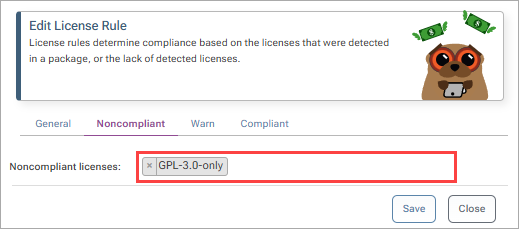
Not only does this save time compared to going into each package one by one and deciding if they can be used based on the license, but it also means nothing slips through the cracks.
ProGet can also be configured to filter licenses at the feed level, which you may need to do if license restrictions vary from project to project.
Know Your Licenses
npm licenses are crucial for package usage. Downloading npm packages implies consent to associated license terms.
💡 Automate license reviews with tools like ProGet to keep things compliant and save time. This helps consistently follow your organization’s license policies.
💡 Understanding npm licenses, automating compliance, and setting clear policies are important for avoiding legal headaches and maximizing package management efficiency.
This was a lot to absorb, so I recommend keeping a note of it. To keep this article and more on npm at hand, why not sign up for our guide, Mastering npm in the Enterprise. You’ll learn more about npm, npm package management and how to optimize your development. Sign up for your free copy today!
