

NPM
How to Version Internal npm Packages with SemVer2
An npm package versioned 1.4.5 doesn’t tell you much – certainly not whether it’s stable or what it’s supposed to do. Without context, it’s all too easy to misinterpret the purpose of a build, and this confusion leads to dependency issues, broken builds, or even runtime errors. Worst-case scenario? Unstable or untested code slips through your CI/CD pipeline and lands in production.
Semantic Versioning 2 (SemVer2) uses Pre-release Labels that make package stability and stage of development crystal clear. Better yet, SemVer2 is immutable, meaning names can’t be reassigned, so there’s no guesswork surrounding package stability in your CI/CD pipeline.
In this article, I’ll walk you through SemVer2’s versioning rules, how Pre-release Labels work, and how to keep your team on the same page when versioning npm packages.
What is SemVer2?
Semantic Versioning 2 – AKA SemVer2 – is a naming convention and rule set for versioning npm packages. Its job? Erasing uncertainty around a package’s stability and use. Here’s what SemVer2 looks like:
Major.Minor.Patch-Pre-release-Label
- Major versions are incremented when breaking changes and backwards incompatibility are introduced, e.g.,
1.0.0. - Minor versions are incremented when new backwards-compatible features are introduced, or if any features are now deprecated, e.g.,
1.1.0. - Patch versions are incremented if the new version only provides backwards-compatible bug fixes, e.g.,
1.1.1.
You can see that using SemVer2 is pretty straightforward. Its simple structure clearly communicates the stage of development a package is in. When everyone in your team speaks the same versioning language, unstable packages won’t be sneaking their way into your CI/CD pipeline.
But if your team still struggles with telling what’s stable and what’s not, or where a package is at in development, SemVer2 has you covered, with Pre-release Labels.

The Role of Pre-release Identifiers in SemVer2
Picture a developer working on npm package 1.1.5. How does anyone else on your team know what is does, or if it’s even stable?
Pre-release Labels fix that. These identifiers display pre-release stages of development, their inclusion always indicating instability – like 1.1.1-beta.1alpha (for early builds), beta (for later-stage testing), and rc (for release candidates). These labels are also immutable, so you know exactly what you’re looking at.
For a package labelled 1.1.5-beta.2 there’s no ambiguity about its purpose, development history, or risk of accidental use or overwriting.
Remember: Pre-release Labels are only for in-development, unstable versions, acting as a line of defense to prevent unfinished code going live.
Best Practices for Managing Internal npm Packages
💡 Use SemVer2 with an agreed-upon set of Pre-release Labels tailored to your team’s use cases. That way, everyone’s on the same page when it comes to versioning.
💡Set your CI/CD build scripts to automatically tag new builds with the right Pre-release Label, avoiding human error and buggy builds.
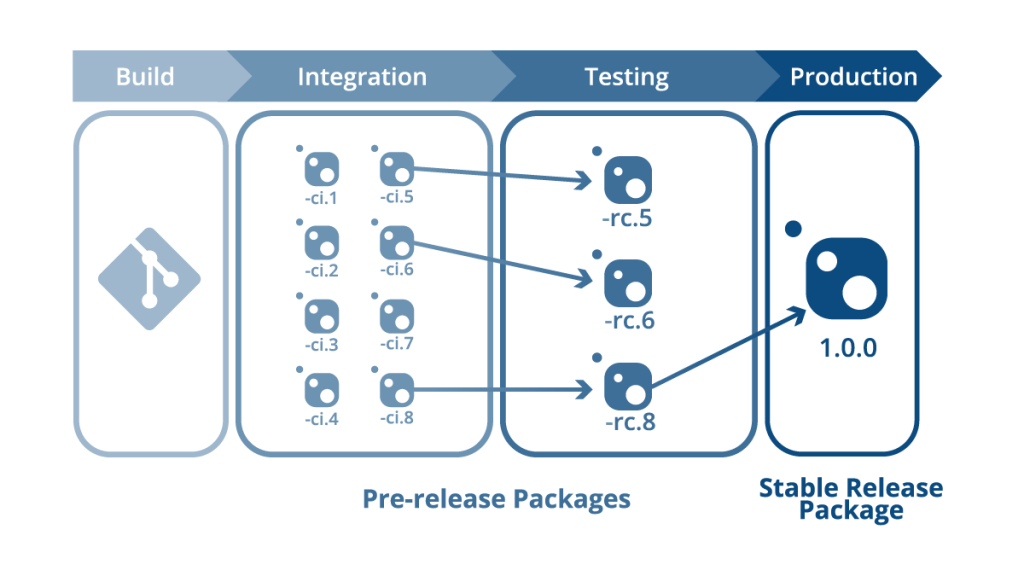
💡 Easily convert pre-release versions into stable versions with ProGet’s handy Repackaging feature:
With SemVer2 Repackaging moves packages along your CI/CD pipeline without changing the contents – just the version name. You can test the exact same packages at each stage of your pipeline, and repackage them as stable releases when ready.
Take Control of Your npm Package Versioning
Keeping npm package versioning consistent is no small feat, and leaving it up to chance only invites confusion, instability, and broken production builds.
SemVer2 and Pre-release Labels are powerful tools, clarifying what packages do, their stage of development, and preventing unstable code advancing further than it should. Curb confusion, reduce broken builds, and start using SemVer2 and Pre-release labels today so unstable packages don’t make it to production.
That was a lot to take in! If you’re ready to start versioning npm packages with SemVer2, go ahead and bookmark this page for quick reference! Better yet, this info’s in our guide, Mastering npm in the Enterprise. It’s packed with tips on handling npm package dependencies, license compliance, scoping, automating vulnerability assessments, and more. Sign up for your free copy today!
