

NPM
Why you Should Automate your npm Vulnerability Assessments Using ProGet
You’ve seen vulnerability assessments pop up while managing npm packages in ProGet. Running npm audit sparks questions about what vague warnings like “high-severity” warnings actually mean for your applications, leaving you stuck making calls with little context. On top of that, floods of security notifications and false positives cause alert fatigue, human error, and impactful vulnerabilities slipping into production.
In ProGet, you can automatically scan your npm packages for vulnerabilities—including dependency and licensing issues—and set rules to approve or contain packages based on contextual risk.
In this article, I’ll explore the challenges of vulnerability assessments and show how to automate them using ProGet, so you can skip the pitfalls of manual assessments and stop unsafe packages sneaking into your CI/CD pipeline.
What Makes Vulnerability Assessments so Challenging?
npm package vulnerabilities are security weaknesses that may be exploitable in your builds. For example, the jQuery package has a vulnerability related to Object.prototype pollution:
Basically, in read-only applications, the risk is minimal—user input can’t affect the backend or operating systems. Plus, modern browsers use updated frameworks and are unlikely to rely on the jQuery package.
So yeah, context matters—not all vulnerabilities pose threats. Critical warnings can exist in unused or transitive dependencies, but small safety issues and deprecated code flying under the radar might do real damage. Annoyingly enough, vetting packages comes with a bunch of challenges:
💥 In CI/CD workflows, continuous updates can bring new vulnerabilities daily, making keeping up impossible.
💥 Manual vulnerability assessment, for example, running npm audit, won’t catch dependency conflicts or licensing issues.
💥 Manual vulnerability assessments overlook vulnerabilities hidden deep within packages, and a lack of real-time alerts means these vulnerabilities can go undetected for long periods.
Updating packages to sort out these warnings can trigger new bugs, so effective vulnerability management is all about balancing security with stability.
ProGet’s automated vulnerability assessments handle the heavy lifting, so you can focus on your builds instead of fighting to keep your CI/CD pipeline free from unsafe packages.

npm Package Vulnerability Assessments in ProGet
ProGet automatically scans npm package vulnerabilities with customizable rules for package categorization and approval based on your organization’s risk profile.
⭐ ProGet flags vulnerabilities and licenses via the ProGet Vulnerability Centre (PGVC), a continuously updated aggregation of vulnerabilities pulled from recognized databases like the GitHub Advisory Database, National Vulnerability Database, and SPDX License List.
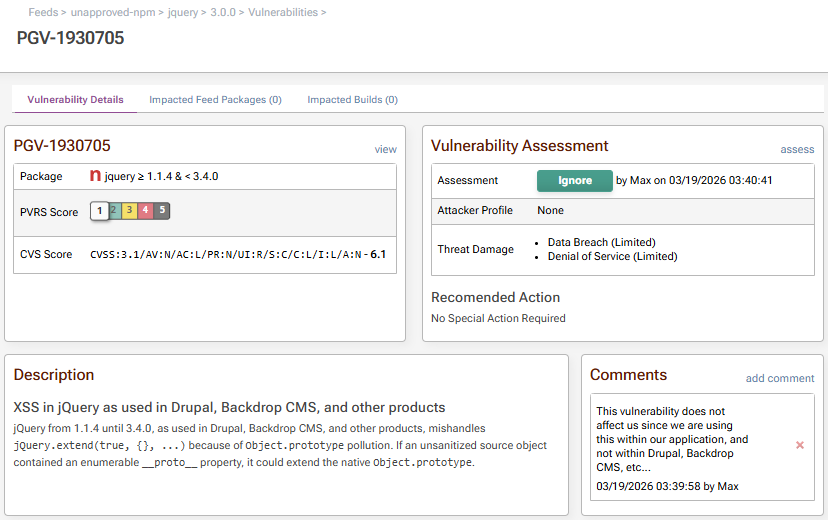
By configuring a risk profile unique to your organization, vulnerability PVRS Scores provide meaningful guidance on how to handle vulnerabilities, whether that means ignoring a context safe vulnerability, or applying immediate remediation when real threats are detected.
⭐ Automated Vulnerability Assessment lets you set rules for approving or containing packages based on severity, dependencies, licenses, and excepted packages, so context-safe packages aren’t gated unnecessarily.

⭐ Assessment Management puts you in control of how different vulnerabilities are handled: ignore false positives, caution risky packages, and contain confirmed threats. Comments keep your team aligned on the reasoning behind each call.
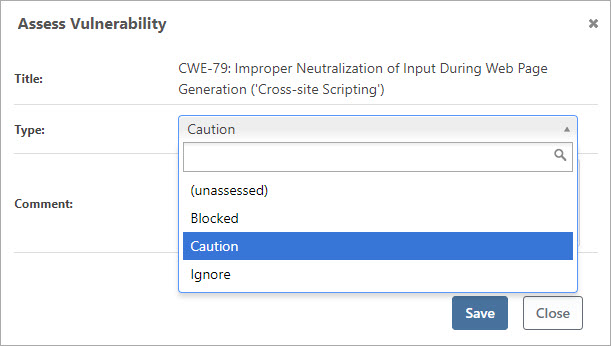
⭐ Containment automatically prevents access to unapproved packages, so exploitable risks don’t enter your CI/CD pipeline.

You’ll want to configure your ProGet automated assessments and risk profile for your team’s applications, containing truly impactful vulnerabilities without compromising control over the “vulnerable” packages that are actually safe for your CI/CD pipeline.
Automating your Vulnerability Assessments with ProGet
If you’re concerned about npm package vulnerabilities in your ProGet feeds, head over to the Reporting and SCA tab:

Here in the overview, you can see the following:
💡 The vulnerabilities associated with your npm packages.
💡 Licenses currently in use with your npm packages.
💡 A record of downloaded noncompliant packages.
💡 A vulnerability analysis of your recent builds.
Want to configure assessment types for your npm packages? The Vulnerabilities Overview tab gives you a bird’s eye view of assessed vulnerabilities in your npm packages.
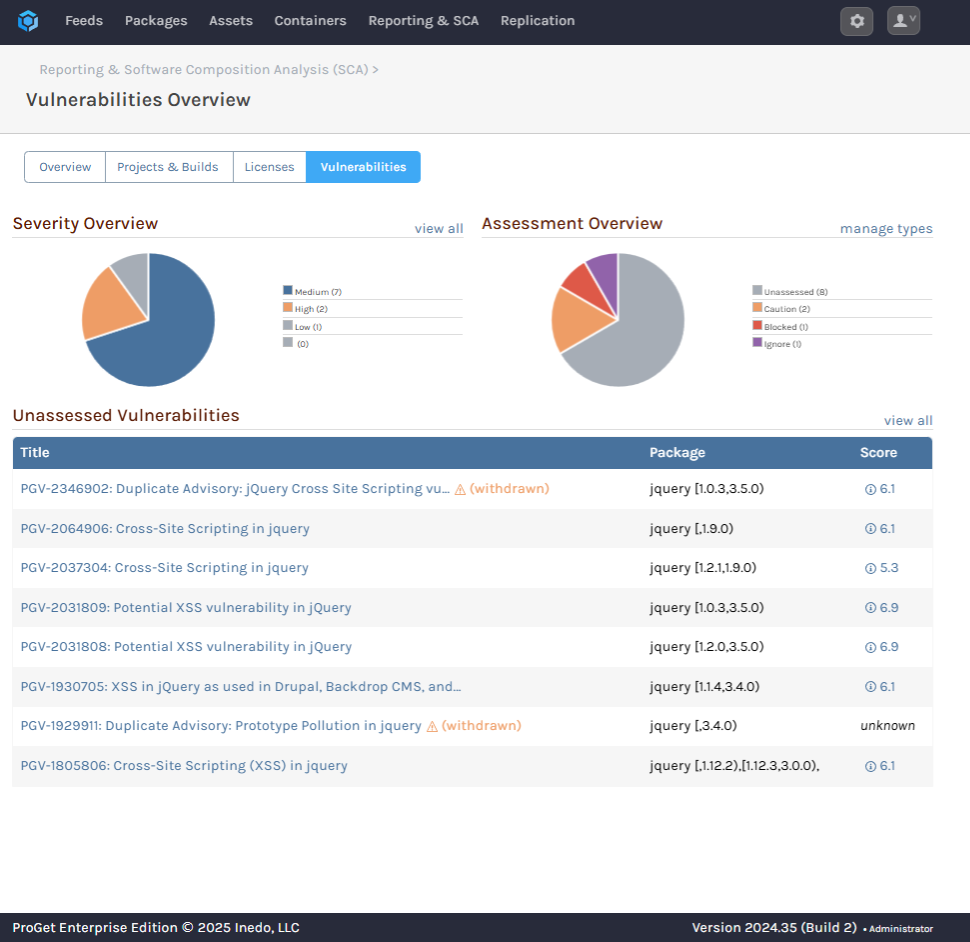
Simply select “manage types” to configure how different vulnerabilities are assessed, including blocking downloads, when scanning your npm packages.
You can also enforce license rules via “manage license types and rules” in the License Usage and Overview tab, by choosing which licenses you want to be flagged as noncompliant.

By setting clear rules and monitoring packages 24/7, you’ll automate away human error, reduce risk, and keep impactful vulnerabilities out of your CI/CD pipeline.
Automate your Approach to Vulnerability Assessment
Handling package vulnerabilities is more than spotting security issues—it’s making a call on whether these exploits actually affect your application. These decisions take time, but with ProGet you can automate your vulnerability assessments.
ProGet lets you quickly scan and assess package vulnerabilities, flagging licensing and dependency issues based on your custom rules, giving you the final say on what gets approved. As a ProGet user, it’s time to start leveraging these features to keep vulnerabilities out of your production builds.
Phew, that’s a lot to digest, and if you’re planning on automating your vulnerability assessments with ProGet, bookmark this page for future reference. Better yet, check out our free eBook, Mastering npm in the Enterprise, which contains this info, and is crammed with tips on SemVer2, scoping, and more!
