

Inedo
Recently Published and Aged Packages in ProGet 2026
Newly published packages carry a degree of uncertainty. Regressions, breaking changes, and other defects often aren’t discovered until a version has been used by a wider audience in real-world environments. In ProGet 2026, two additional compliance rules to help you vet and monitor open-source packages in your organization. These rules are part of our focus on Software Composition Analysis (SCA) and security.
In this article, we’ll talk about the risks of both new and dated packages, how these rules work in ProGet 2026, and best practices for adding them to your own compliance policies.
🐣The Risk of Newly Published Packages
Each day, thousands of new package versions are published to public repositories like NuGet.org, npmjs.com, PyPI etc. Most of these packages are completely harmless, but not all – and given the sheer volume of packages, developers that always use the latest version will run into trouble at some point.
Although the primary risk with newly-published versions is unexpected regressions, they may also harbor security problems. For example, the largest npm compromise in history (also known as the Shai-Hulud worm) impacted over 500 newly-published packages at npmjs.com.
Given these risks, and the fact that there is rarely a benefit to using a newly-published open-source package in most organizations, it makes sense to identify “recently published” packages. ProGet makes this easy with the Recently Published compliance rule.

We recommend setting this rule to Noncompliant. This allows you to surface these packages during build-time when running pgutil builds scan.
⛓️💥The Risk of Aged Packages
Likewise, using open-source packages that haven’t been updated in years is also risky. ProGet makes it just as easy to warn about Aged Package usage with compliance rules.

While the “if it ain’t broke don’t fix it” mindset is generally prudent in software, platform and operating system upgrades are inevitable. Those can cause old libraries to exhibit unexpected behavior, which can be very painful to troubleshoot after a Patch Tuesday.
From a security standpoint, they may have a vulnerability that was never publicly disclosed and may never because security researches focus newer packages. And if a vulnerability is reported, the author is much less likely to patch an older version.
However, the biggest risk often lies in their dependencies. This creates a risk multiplier, because each outdated dependency (and its own dependencies) carries similar issues.
Best Practices: Recently Published and Aged Packages in ProGet
ProGet’s Policies & Compliance Rules offer a lot of flexibility in defining what “compliant” means in different contexts, and let you decide whether you want to block or warn about packages that are not compliant.
📑 Policy Creation Guidance
In general, Policies & Compliance Rules are an alternative to using Package Promotion, which is the process of promoting packages between feeds to ensure that only approved and verified packages are used in the right environments, such as production.
A Package Approval Workflow relies on human judgement and offers the most flexibility and thoroughness when defining compliance; see HOWTO: Approve and Promote Open-source Packages to learn more. However, this is also resource-intensive and many organizations find it more effective to rely on automated policy enforcement instead. That’s where these new rules will come in.
Guideline: Warn for Aged Packages, Noncompliant for Newly Published Packages
- Mark “Aged Packages“ as Warn: Developers are unlikely to choose an outdated package for a new project, but many legacy applications still depend on older versions. A warning provides visibility without disrupting existing applications.
- Mark “Newly Published Packages” as Noncompliant. These packages carry additional risk because regressions, breaking changes, undiscovered vulnerabilities, and malicious code may not be identified until wider adoption.
For both rules, we recommend running pgutil builds scan to manage risk effectively at the build stage. Vulnerability-based rules can still be used to enforce stronger controls when needed.
Guideline: Third Party Packages Only
Like with other compliance rules in ProGet, recently published and aged package rules are only intended for open-source packages that were published to public repositories (i.e. those you downloaded through a connector). When using Mixed Feeds (i.e. feeds that contain both your own and third-party packages), you can define an exception for internal packages (e.g. names that match Inedo.* or @inedo/)
For internal packages, there’s certainly a risk to using aged packages, but it’s much more manageable. Should an old internal package no longer be suitable for internal use, it can be marked as “deprecated” and issue clearer warnings/guidance to end users.
🤔 Handling Exceptions & Special Cases
Before defining compliance rules, think about how you’ll handle exceptions. ProGet allows you to exempt packages by name and version, but someone will have to decide which exceptions are appropriate. And then, decide which feature to use for that exception. There are three options:
- Rule Exceptions (★★★) are recommend, as they are the most flexible and easiest to visualize in one place. They are created at the policy-level and allow you to create permanent or temporary exceptions for different compliance rules by using package name and version ranges
- Server Metadata Overrides (★★☆) can also work, as they allow you to simply change a publish date; these are useful for one-off exceptions, like bumping a newly-published package a few days forward
- Always Allow Downloads (★☆☆) will bypass compliance checking completely, which means other rules you may wish to enforce (like vulnerability checking) will be bypassed
Although Rule Exceptions are the ideal choice, you are limited to three exceptions in ProGet Basic – or just enough to test the feature. The feature is primarily for ProGet Enterprise only.
Use Case: Continuously Deployed Package & Name Exceptions
The AWSSDK.S3 NuGet package has effectively transcended versioning and has a new version published every few days. Each version both fixes and introduces new bugs, as is common with other “continuously deployed” software.
That means that, if your developers rely on that package, there’s no sense in enforcing a “newly published” rule, as they will constantly be requesting exceptions to use the latest version. In this case, specifying a Rule Exceptions for AWSSDK.S3 makes sense.
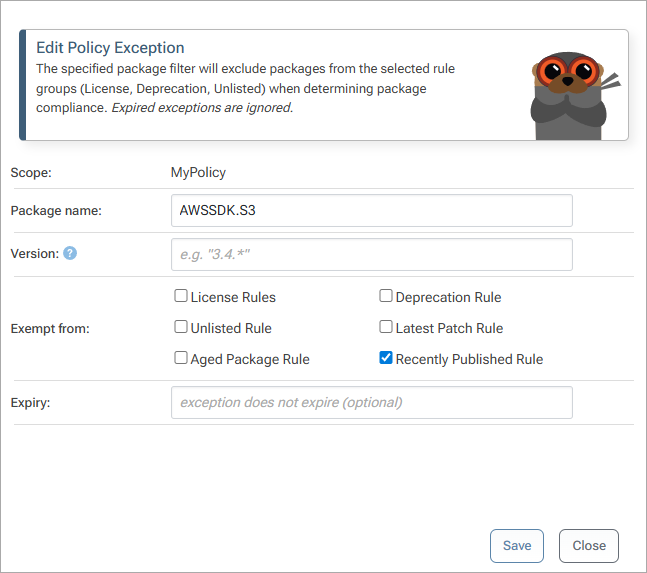
You can also specify a wildcard, such as AWSSDK.* or @angular/*.
Use Case: Required Legacy Package & Version Exceptions
.NET Framework packages like the Swashbuckle NuGet package will likely never see another update, so having constant warnings about “aged packages” in your legacy applications adds a lot of unnecessary noise. Using a Rule Exception for this package usually make senses:
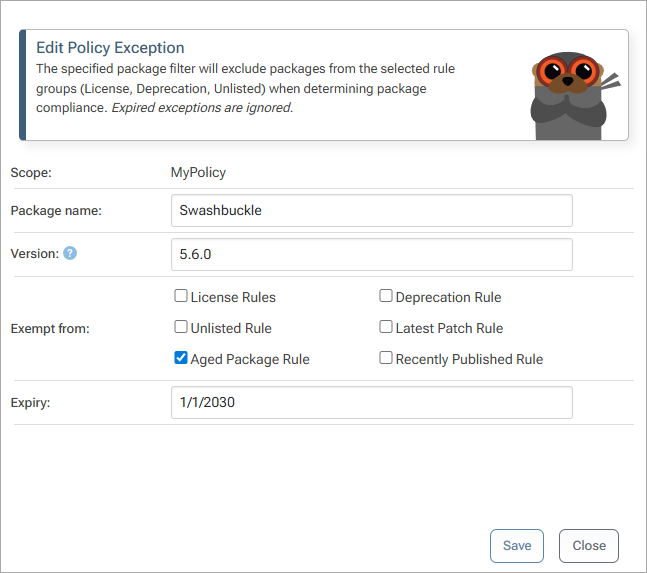
You can specify a date in the far future for the exception to expire and can also use version wildcards and ranges (like 5.6.*).
Use Case: One-off New Version & Metadata Edit
Every now and then, your developers may need to use a brand-new version of specific package. For example, if a vulnerability is patched in a newer version, it may be less risky to use the new and patched version instead of the older and vulnerable version.

While you could certainly use a policy exception that would expire in a few days, you could also bump the published date by Overriding Metadata. The main advantage to this is approach is that you won’t need to clean-up the expired exception later – and in the long run, having a publish date shifted by a few weeks won’t make any difference.
Use Case: ProGet Basic & Always Allow Downloads
The “Always Allow Download” will bypass all compliance-checking and simply use a specific version of a package. If you’re using ProGet Basic, this may be a good alternative for handling required legacy packages. Realistically, even if a vulnerability is discovered, you’ll still need to use the package version as the author will likely never publish a new version.
⏩ Next Steps
In ProGet 2026, you can use these rules right away. However, note that the “publish date” in ProGet 2025 and earlier is whenever a package is added to a feed. This means that, even if a package was published to NuGet.org 3 years ago, the “publish date” will be whenever it was first cached. You’ll want to change this behavior under “Admin > Advanced Settings > Use Connector Publish Date”, and then clear your connector cache.
These compliance rules are just one part of ProGet’s broader SCA capabilities. Our goal is to help organizations better understand and manage open-source risk without creating unnecessary friction for developers. Our overall goal is to make these features as easy to use as possible, both for first-time users and as things scale in the organization. Let us know if you’ve got any ideas by posting in the forums!
