

Inedo
ProGet 2025 PostgreSQL Preview is Now Available
For the past several months, we’ve been hard at work integrating a new database backend that will make ProGet even easier to maintain. We’ve finally reached a technical milestone that I’m proud to share.
ProGet 2024.33 includes a ProGet 2025 Preview Feature that allows you to try out the new PostgreSQL database backend. We’ve already migrated some of our ProGet Edge Nodes and will be monitoring for errors and performance changes. Although the feature isn’t quite release-ready, you’re more than welcome to join us in the testing and trying it out.
In this article, I’ll show how the Migration to PostgreSQL process will work, what reverting to SQL Server means, and some of the prerequisite configuration changes. I’ll also talk about what else we need to do between now and ProGet 2025… which I hope we can release in May!
How to Migrate from SQL Server to PostgreSQL
As a technology preview, PostgreSQL support in 2024.33 is limited to certain environments:
- Existing Instance Only; you cannot yet create a new ProGet instance from scratch with PostgreSQL
- Single-node Only; clustered instances (load-balanced, high-availability) are not currently supported
- No IIS (Windows); only the Integrated Web Server is currently supported
Assuming those don’t apply, you can start the migration process by going to Administration > Database Overview page and clicking on the Begin PostgreSQL Migration button:
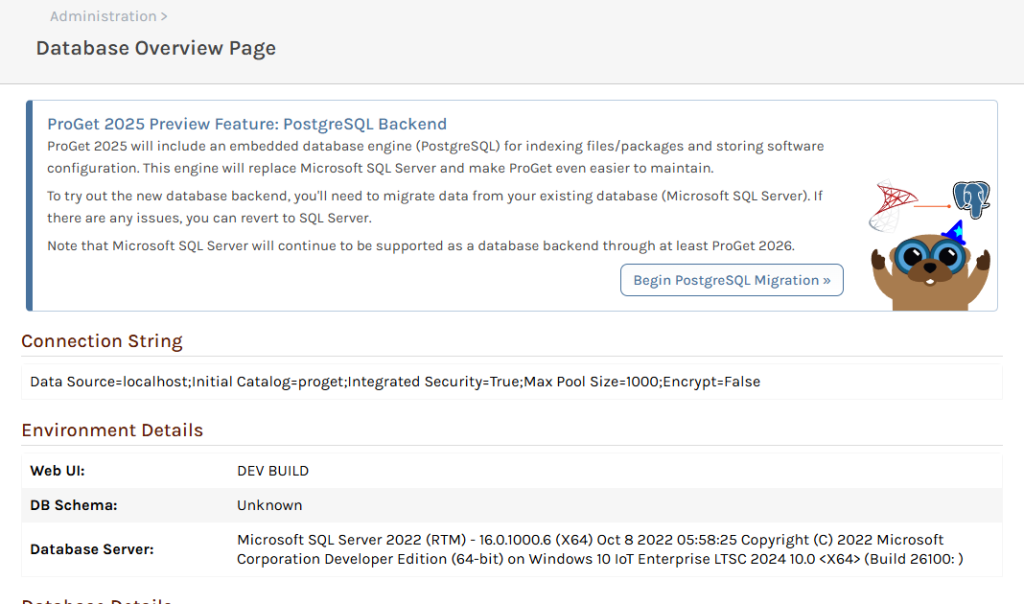
Before you can start the migration, ProGet will check a few configuration prerequisites:
- Enhanced Database Monitoring must be enabled
- On Windows, Optimized Service Mode must be enabled
- On Linux, the preview-edition
proget-postgresimage must be used instead ofproget - The PostgreSQL engine must be initialized
Once the prerequisites are met, you’ll be able to start a migration job:

Clicking the “Begin Migration” button will do the following:
- Disable the API and other Background Jobs
- Copy all Database tables from SQL Server to PostgreSQL
- Modify ProGet’s Start-up Configuration
- On Windows, this involves editing the configuration file
- On Linux, this involves adding a marker file to the data directory
- Restart the ProGet Service
- Finalize/complete the job
In our testing, this job takes a few seconds on a mostly empty database and a few minutes on extra-large databases (10GB+).
Reverting Back to SQL Server
Reverting back to SQL Server is much simpler: just click the Revert to SQL Server button, and ProGet will Modify the Start-up Configuration and then restart the service.
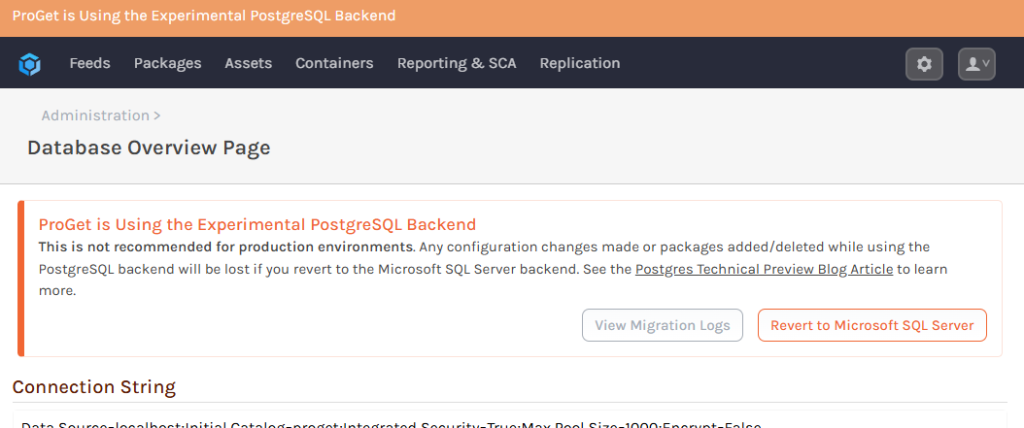
Note any data changes in PostgreSQL will not be made in SQL Server. This includes creating new feeds, user configuration, etc. New packages will not show up and deleted packages will appear to come back — but you’ll get a “file not found” if you try to download.
Prerequisite / Configuration Changes for Windows
ProGet 2024.33 includes a custom build of PostgreSQL that’s been security-hardened, stripped of unneeded features, and optimized for ProGet. These files are dormant and will remain unused until the PostgreSQL engine is initialized from within ProGet.
Enabling Optimized Service Mode in ProGet 2024
Although ProGet 2025 will have an Optimized Service Architecture, ProGet 2024.33 can run in this mode with a minor startup configuration change. Once enabled, ProGet can initialize the new database engine.
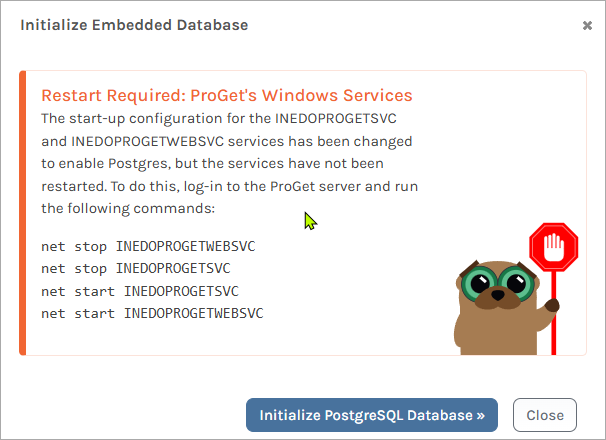
Behind the scenes, ProGet will simply edit the Installation Configuration File and add <SupervisorEnabled>true</SupervisorEnabled>. You’ll then need to manually restart both services.
ProGet 2025+ Optimized Service Architecture
ProGet 2024 and earlier versions use two Windows Services:
INEDOPROGETWEBSVCis a Web Server that handles HTTP requests for the web application and front-endINEDOPROGETSVCruns background jobs like package indexing and vulnerability scanning
This architecture made sense when ProGet used an older platform (i.e. .NET Framework), but it now only exists for historical purposes. The dual-service configuration also adds architectural complexity, requires more hardware resources, and ultimately makes it impractical to run our database engine.
In ProGet 2025, there will just be a single Windows service (INEDOPROGETSVC) that will be used to manage the Web Server, background jobs, and our embedded database engine. We’ve used this model on ProGet for Linux for years, and it simplifies web- and background communication significantly.
The INEDOPROGETWEBSVC will still exist, but only to make it easier to rollback to ProGet 2024 if needed. It will likely be deleted in ProGet 2026, but you can remove it earlier if you’d like. It does nothing except wait for a Stop command to terminate.
Note that when ProGet 2024 and earlier is hosted in IIS, an IIS-managed Site and Application Pool is used instead of the INEDOPROGETWEBSVC service. In ProGet 2025, if you still want to use IIS, then Site will be reconfigured to be a reverse-proxy.
Configuration Changes for Linux
Unlike Windows, running a PostgreSQL engine on Linux requires installing a number of packages and making a few other operating system changes. Although it’s probably fine, we didn’t want to make these kinds of changes to our ProGet container images in a maintenance release.
Instead, we created a second repository (proget-postgres) that includes ProGet 2024 container images with the PostgreSQL engine. When we ship ProGet 2025, we’ll switch back to a single repository (i.e. proget).
The Road to ProGet 2025
Although ProGet itself is running on PostgreSQL, there are still a few things we need to do before releasing our first version of ProGet 2025. Some are PostgreSQL-related, but several are not.
New & Improved Feed Indexer (Target: 2024.34)
This has nothing to do with PostgreSQL, but it’s been on our list for a while. It will essentially proactively detect issues in feed and add more capabilities to the re-index function to fix these issues.
New Instance Support & InedoHub Changes (Target: 2024.34)
Getting a new instance of ProGet running against PostgreSQL should be relatively simple; we just need to add some initial data, like a default Admin account and some other settings that exist in a “fresh” database.
After that, we need to make a few changes to InedoHub to support a ProGet installation that doesn’t use SQL Server. That also shouldn’t be too hard.
Importing & Exporting Database Files (Target: 2024.35)
If you’d like to migrate a ProGet instance to a new server, you’ll need to Backup & Restore the Database. It’s not all that complicated, but it’d be a lot more convenient if you could simply export a database file from within ProGet, and then import it in a new instance.
That’s what we’re planning to build:
- Export SQL Server database to
.pgdbfile - Export PostgreSQL database to
.pgdbfile - Import
.pgdbfile to PostgreSQL
We’ve got it mostly working, but just need to handle more edge cases, like blocking ProGet usage while exporting to prevent missing data or deadlocks. I’d like to get this as a preview feature in ProGet 2024.
Updated Styling (i.e. CSS, fonts) (2025.0)
We’re currently working on relatively minor styling changes to give ProGet a fresh look and feel.
Small Behavioral Changes, Library Upgrades, Refactoring (2025.0)
Like with all Major releases, we’ll take the opportunity to make some small behavioral changes, pay off technical debt with refactoring, and update third-party libraries we use. We’ll be working on our upgrade notes in the coming weeks, but they’ll mostly be changes that make sense but weren’t appropriate for a maintenance release. For example:
- Update CycloneDX & SBOM export to 1.6
- No longer display Withdrawn package vulnerabilities
- Update “Deprecation message” text from SCA analysis
- Add a license text field in SBOM exports for custom licenses
- Rename “Maven (Classic)” feeds to “Maven (Legacy)”
Clustered Installation & InedoDB (Target: 2025.0)
For clustered (multi-server) installations, we need to package our custom build of PostgreSQL into a “product” called InedoDB and then make an installable package for Windows and a standalone Docker container (inedodb).
We likely will not finish this by the time ProGet 2025 is ready to ship, which means that users with Clustered Installation will have to wait a bit if they wish to migrate to PostgreSQL.
ProGet 2025+ And Beyond
Our products’ roadmap is largely driven by user feedback, and ProGet 2025’s PostgreSQL support and Optimized Service Architecture ultimately deliver what many have been asking: making ProGet even easier to self-host and manage. It also opens the door for a lot of other self-hosting improvements we can make that would have been impossible with a dual-service, SQL Server model.
Although ProGet 2025 is just around the corner, we’ll continue to add low-risk features through maintenance releases and think about what other changes we should introduce in ProGet 2026. As always, don’t hesitate to drop me a note or post some ideas on the forums.
