

.NET
.NET 10: What’s Changed and Why It Matters to You
November is here, which means .NET 10, the latest installment of Microsoft’s .NET, is as well. As usual, it brings a bunch of changes and updates to improve both development and performance.
Microsoft talks about the changes in the official release notes, but following my .NET 6, .NET 8, and .NET 9 rundowns, I’m back to give you a heads up on what’s changed and what you’ll want to know before deciding to upgrade.
In this article, we’ll take a look at .NET 10’s “Long Term Support” and what that means for you. We’ll also check out what’s new, what’s on its way out, and what to keep in mind if you’re thinking about upgrading to .NET 10.
.NET 10’s an LTS release
Since .NET 10 is an “even number” release, it falls under Long Term Support (LTS). In other words, you can count on three years of support, lasting through November 2028.
Microsoft shook up its release pattern with .NET 5. Odd-numbered releases get Standard Term Support (STS) for two years, up from the previous 18 months. While even-numbered releases are Long Term Support (LTS) with three years of coverage.
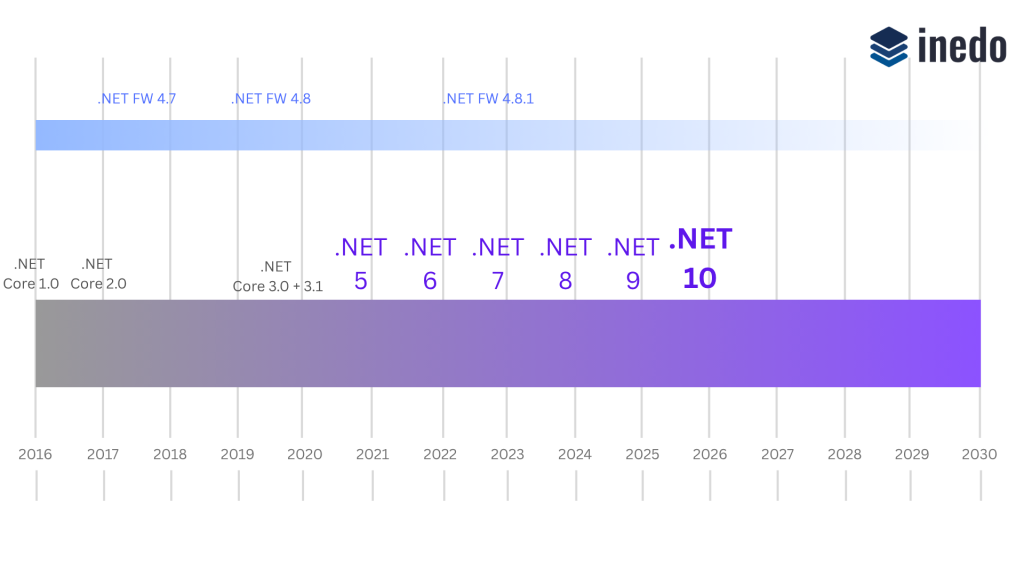
If you’re currently on .NET 9 and find .NET 10’s new features useful, it might be worth upgrading. You’ll also get the longer support time that comes with an LTS release.
What’s coming in .NET 10?
At first glance, Microsoft’s .NET 10 update list might look like a lot, especially if you’re not a .NET pro. But keeping up is important, so here’s a simple breakdown of what’s new this November.
Smarter, Faster NuGet Package Security
NuGet auditing was first introduced in .NET 8, letting you get alerts about packages that might have security issues. With .NET 9, even transitive dependencies are scanned, giving you a fuller picture of your project’s security. These warnings appear in Visual Studio and on your build servers, so you can keep tabs on package health across your workflow.
But not all vulnerabilities are equally serious; some can impact your app’s security, while others are potential threats that may be challenging to exploit. Ignoring these vulnerabilities or blindly upgrading isn’t the best approach.
Building on this, .NET 10 takes NuGet auditing a step further with a new feature: pruning framework-provided package references. This is enabled by default for projects targeting .NET 10 or higher in the latest SDK, and it brings some nice benefits.
⭐ Faster builds – By removing unnecessary framework packages from the restore and analysis process, your builds complete more quickly.
⭐ Less disk space usage – Fewer packages being restored means less clutter on your machine.
⭐ Fewer false positives – NuGet Audit and other dependency scanners now have less noise to sift through, so alerts are more meaningful.
Additional Changes
Beyond the NuGet audit improvements, .NET 10 continues to focus on making development faster, safer, and more efficient. Apps start quicker and run more efficiently thanks to runtime improvements and smarter optimizations. System.Text.Json is safer by default, LINQ adds new aggregation methods, and debugging is easier with updated diagnostics.
Security gets a boost with post-quantum cryptography, AES KeyWrap, improved certificate lookups, and TLS 1.3 on macOS. Developer tools are more improved, with easier CLI commands, and faster NativeAOT workflows for prototyping and builds. C# 14, EF Core 10, and updates to ASP.NET Core and Blazor make code more expressive and better performing.

What’s on its way out in .NET 10?
.NET 10 doesn’t introduce any new deprecations compared to .NET 9, and the same older .NET Framework technologies are still deprecated:
⚠️ Windows Communication Foundation (WCF)
⚠️ Windows Workflow Foundation (WF)
ASP.NET Web Forms apps will keep working even with the new .NET releases. WCF also continues to function, thanks to its connection to .NET Framework support. But just because they still work doesn’t mean you have to stick with them. There are more modern approaches you could take, like:
💡 Migrating Web Forms to Microservices
💡 Maintaining them with a CI/CD pipeline
Migrating to .NET 10
So if you’re still on .NET Framework or .NET Core, now’s a good time to start thinking about the future.
If you’re already on the “current” .NET series (from .NET 5 to .NET 9), upgrading is pretty straightforward. If you’re coming from .NET Framework, start by inventorying your existing apps, checking them for deprecated libraries, planning a rough migration schedule, and speeding up your releases, as updating rarely will only make migration harder later.
Migration can feel intimidating, so it’s a good idea to save this page for reference. Better yet, check out our free .NET Migration Guide, which covers everything you’ll need to know about migrating from older versions of .NET or .NET framework, and what this means for your current applications!
