

Chocolatey
How to Distribute Software using Chocolatey in the Enterprise
This article is part of a series on Chocolatey for the Enterprise, also available as a chapter in our free, downloadable eBook
It takes a massive effort to install, upgrade, and maintain applications across 1000s of Windows machines in an organization. It’s cumbersome and prone to errors. It’s why most of us use configuration management and automation tools to deal with large-scale software deployment and maintenance.
Chocolatey is one of those automation tools that can help. However, a lot of Windows administrators think that Chocolatey is more tailored for individual users and therefore might not meet the needs of large organizations. But that’s not the case, and there are many cases that Chocolatey can actually fit in quite nicely.
In this article, I’m going to talk about what Chocolatey is, how it fits into the enterprise, and how effective it is at handling software installed on both Windows desktops and servers.
So, What is Chocolatey?
Chocolatey is a Windows package manager that automates software deployment. It uses “Packages”, that is pre-configured bundles of applications that contain the files you’ll need to install or manage your apps, such as metadata and scripts. You’ll mainly get these from Chocolatey.org, a centralized repository hosting 10,000+ community-maintained packages.
To install Chocolatey packages you run basic command-line commands. So, if you’re installing Adobe Reader you would run:
choco install adobereader…which would run the following script:
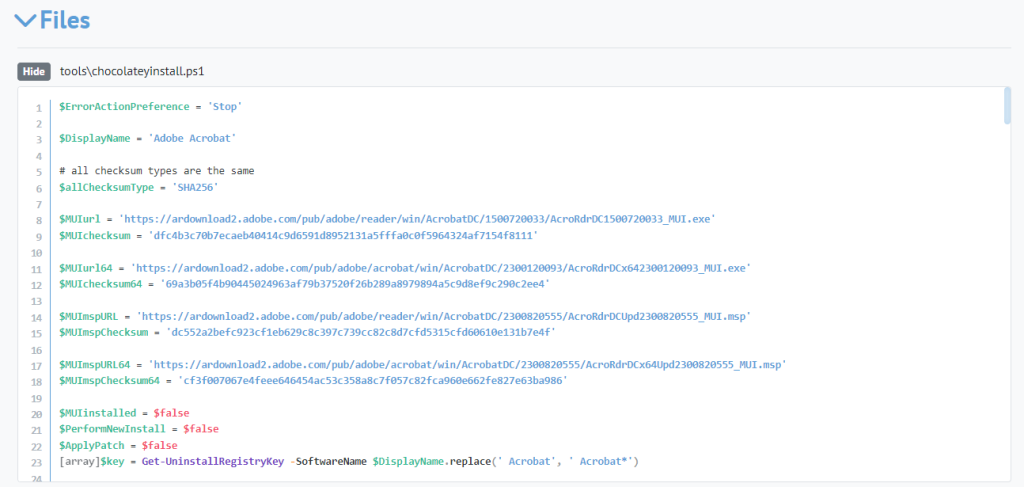
You also won’t have to worry about version control. Running that command will always download the latest version. If you do want an earlier version though, you can just add a bit extra to your command:
choco install adobe reader --version=2023.8.20470What’s more, if someone tries installing a package that is already installed, they won’t be able to because of Chocolatey’s in-built self-correction. You can imagine how this keeps things free of unintended changes or redundancies.
At this point, I want to mention the other Windows package managers out there. Namely, WinGet and Scoop. They’re newish, and a bit lacking in features, community, and the sheer number of available packages to install. They can probably do the job, but they’re several steps behind Chocolatey.

How does Chocolatey Fit into My Organization?
When it comes to Windows configuration management, there are categories to consider:
- Windows/machine configuration like domain, network, group policy, and other security settings
- Application configuration, i.e. the versions of software and tools installed on the machine
Although they are both automated in a similar manner, with some kind of PowerShell script, the decisions that go into each type of configuration will vary:
- IT / Network Operations generally decide which version of Windows to use, how the security settings are configured, what desktop customizations are allowed, when machines are patched, etc.
- Business Teams/Units generally decide which applications team members should be using, when to upgrade those applications, etc.
The lines between machine and application can get a little blurry, especially when it comes to installing utility applications that all machines require.
Chocolatey specializes in application configuration, and it works in conjunction with machine configuration like Ansible or Puppet. Don’t think of it as something to replace your CM tools, but to use alongside them.
How is Chocolatey Used?
Chocolatey.org might look like a basic public repository of Windows applications packages, but it’s less of a download hub and more of a framework to manage internal software installations. What that means is it lets you do things like use private feeds or host proprietary software packages.
Chocolatey packages are intended for self-service. Creating a private repository using a package repository like ProGet lets anyone in your organization install the applications they need, while you have the final say in what gets installed. You can even set up package internalization for even more control and faster deployment.
As I mentioned earlier, it’s pretty common to see Chocolatey used together with other CM tools like Puppet, Ansible, or Chef. The latter handles the heavy lifting related to Windows configuration, while Chocolatey takes care of all the application configuration, saving you the time and effort of manually doing it yourself.
Bottom line, Chocolatey is the tool used to distribute Windows applications across the enterprise.
Chocolatey Use Cases: How is it Best Used?
Chocolatey can be used with a range of software and tools –some better than others. Your mileage will really vary. Generally speaking, Chocolatey can be used for:
- Third-party Windows desktop applications
- Internal / in-house developed Windows desktop applications
- Windows Server-based tools and applications
- Internal / in-house developed Windows server applications
…but how well does Chocolatey meet these needs?
⭐⭐⭐ Third-party Windows desktop applications
Probably the best use of Chocolatey in large-scale organizations. The command-line-based interface not only makes it quick to install packages, but also makes it easy to keep software up to date by always installing the latest version.
Chocolatey’s Community Package Gallery contains thousands of applications that are ready to install, such as Adobe Acrobat Reader or Google Chrome

You won’t find yourself needing to visit multiple websites or manage individual installers, saving you hours when setting up thousands of desktops. It’s also much easier to figure out versions compared to .exe- or .msi installers with vague names like “installer.exe” 🙄
It doesn’t have everything. You can also easily create packages around licensed desktop apps like Microsoft Office Suite. As long as there’s an MSI or silent installation.
⭐⭐Internal / in-house developed Windows desktop applications
You can also use Chocolatey to distribute the desktop applications that you’ve built for internal use. This is a great option if your developers already build and maintain installers and MSIs. You simply need to bundle those in Chocolatey package by following steps like these.
However, when it comes to modern Windows desktop applications, you may find that technologies like ClickOnce are a better fit. It basically turns desktop applications into web applications.
For both third-party and in-house apps, you can use private repositories to curate lists of approved software. This lets users have access to the same set of software, keeping compatibility and security issues to a minimum.
⭐ Windows Server-based tools and applications
Chocolatey is generally not a good fit for Windows server-based tools and applications. Although the public gallery contains server applications SQL Server, Tomcat, and Jenkins these tools often require additional configuration like firewall configuration, license installation, port settings, security permissions, data directory paths, etc.
Although Chocolatey can run the basic installer, you may find it easier to simply run a PowerShell script directly that also configures those other aspects.
📛 Internal Applications Installed on Servers
Chocolatey isn’t really designed for your own, internally developed server applications. They usually need custom installers that have unique configurations, which just adds to the cost and complexity. For something like this, you’re better off implementing CI/CD using a platform like BuildMaster to take care of your internal Windows applications.
*Technically*, Chocolatey could be used for either Windows server-based tools or internal applications on servers, but it’s way less effective compared to using it for desktop apps.
Chocolatey for Your Organization
Chocolatey is a reliable way of automating deployment in the enterprise, especially for desktop applications. It integrates well with CM tools such as Puppet, handling the software configuration side of things.
While it’s good at managing desktop software, the same can’t quite be said when it comes to server tools and internal server applications that require precise control over installation processes.
So, that was a lot of useful info, and it’s a good idea to note it down for easy access. Or, just grab a free copy of our eBook Chocolatey for the Enterprise, where I’ve compiled everything on this page and more! For a look into versioning, privatization and internalization, licensing, and offline environments using Chocolatey, it’s great to have on hand. Sign up for your free copy today!
