

.NET
.NET Standard Term Support (STS) Changes: Simplified
The differences between .NET STS (Standard Term Support) and .NET LTS (Long Term Support) aren’t always easy to grasp. It’s why we’ve already covered much of the confusion, breaking down .NET LTS. But Microsoft’s recent changes to STS support may raise new questions about the current .NET release cadence and which version to upgrade to.
For developers on .NET 8 and .NET 9, you’re likely wondering how the updates to STS support affect your upgrade plans, especially with .NET 10 here. And for those on .NET Framework and planning to migrate to .NET, understanding the new STS changes will be useful when targeting a version for migration.
In this article, we’ll look at the changes to Microsoft’s .NET support policies, specifically .NET STS, to clarify how the release cadence lines up now, and how the extended duration of support for .NET STS versions factors into your decision when choosing between STS and LTS.
The Difference Between STS and LTS
First, let’s quickly recap how the release cadence has been for versions of .NET:
- Odd-numbered releases (e.g. .NET 7 and .NET 9) received Standard Term Support (STS), which was originally for 18 months after release.
- Even numbered ones (e.g. .NET 8 and .NET 10) received Long Term Support (LTS) for 3 years after release.

So, the current STS version, .NET 9 would have originally ended support in May 2026, while support for .NET 8 lasts all the way to the end of that year. However, as of September, some of this is no longer the case. Delving into the changes made to the support policies for .NET STS will hopefully prove helpful, illustrating how the new release schedule makes STS better, but you’re still going to be better off sticking with LTS.

STS: So, What’s Changed?
This September, Microsoft announced that the duration of STS support would be increased from 18 months to 24 months. If you’ve done the math, then you’ve already figured out this means support for .NET 9 now ends in November 2026, coinciding with the expected releases of .NET 11.
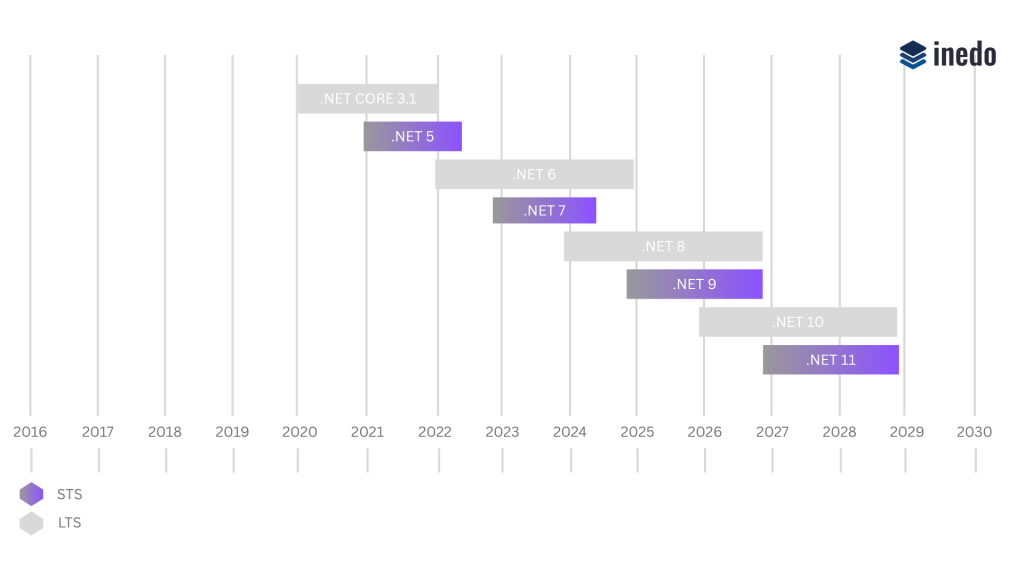
This seems like a great change, and it is, but don’t forget that just because the end of STS support for .NET 9 now coincides with the end of support for .NET 8, the LTS releases of .NET still receive a longer support window overall.
Depending on when you upgrade, the extra year of support offered might come in handy. But it’s not just the duration of the support that needs to be considered your decision to upgrade may be based on the features available in each version as well.
You might be wondering, “what’s the big deal?” If I’m already on .NET 8 or planning to upgrade to .NET 10 then I’m already on LTS, “What difference does this change to STS make for me?” It might not be clear at first, but the changes Microsoft are making also have advantages for the users of .NET LTS.
What Do These Changes Mean For Me?
When updating to the next .NET release, you’ll want to choose the version that will provide you with the largest window of support from the time you upgrade, which with .NET 10 here, will likely be an LTS release. Why does the duration of support matter? If you’re using an unsupported version of .NET, you’re risking the following problems:
⚠️ Security Risks – Without ongoing security updates provided by Microsoft, your apps will become vulnerable to potential security threats.
⚠️ Compatibility Concerns – The same applies to compatibility, with outdated .NET versions not working seamlessly with newer operating systems and hardware.
⚠️ Technical Assistance – STS versions will have accessible technical support for less time.
⚠️ Performance and Stability – If you don’t update .NET when support for your version ends, you’ll see performance and stability issues begin to arise over time.
⚠️ New Features – The new features introduced for both LTS and STS versions won’t be available on outdated versions of .NET.
Staying on LTS means you won’t get access to features introduced in the next STS release. While remaining on .NET 10 for its full support window is recommended for long-term stability, it could be worth reviewing what .NET 11 introduces to see if those updates justify an earlier upgrade for your team.
Luckily, the extended STS support helps mitigate this issue! Out-of-Band features (OOB) delivered outside the regular .NET cadence can pull in STS packages, even when you’re on an LTS release. Previously the smaller support window for STS meant this would leave you with unsupported packages, creating potential security risks for LTS users. With the longer STS support, developers on LTS have more freedom to download and experiment with new OOB features without the risk of any pulled packages becoming unsupported and potentially risky to use.
So, while direct updates to LTS arrive with .NET 10, the changes to STS make it easier to use new features across both versions. This is especially true for releases ending support in the same month, like .NET 8 and 9, or .NET 10 and predictably the future .NET 11. With these changes in mind, now is a great time to evaluate your current .NET version, so what should your next steps be?
What Should My Next Steps Be?
Here’s a quick guide to your next steps based on your .NET version:
⬆️ If you’re on .NET 9 (STS): Consider upgrading to the latest LTS release, .NET 10. Getting in on the ground floor means you’ll benefit from having the largest window of support possible for your version of .NET.
⬆️ If you’re on .NET 8 (LTS): It’s great that you’re already on an LTS release of .NET. Upgrading to .NET 10 is optional, but forward-looking, allowing you to maximize the larger support window if you make the upgrade earlier rather than later.
⚠️ If you’re on .NET Framework: Plan your migration to .NET LTS as soon as possible. Older versions of .NET are deprecated and receive no new features. While security updates may still arrive, there will be now new features, and older versions may eventually face compatibility issues with modern OS updates.
🔎 Evaluate your NuGet packages and third-party dependencies: Regardless of your current version, ensure that all of your dependencies are compatible with your target .NET version. Incompatible packages can cause runtime issues, breaking your applications after upgrading.
💡Leverage the .NET Upgrade Assistant: Microsoft’s .NET Upgrade Assistant is a powerful tool to simplify migration. It guides you through updating project files, resolving package dependencies, and ensuring compatibility with the latest .NET version.
📖 Review our additional migration tips: Finally check our existing .NET migration guide and other .NET migration tips for further insight on making your migration smoother and faster.
STS Extended: The Takeaways
Keeping your .NET version updated is no small feat, but leaving upgrades up to chance, or worse, remaining on an unsupported version, can lead to security risks, compatibility issues, and unexpected downtime.
Understanding how Microsoft’s updated support timelines align between STS and LTS can help you make an informed upgrade decision that balances stability, longevity and access to the latest .NET innovations through OOB features, without compromising the length of support that your apps need.
This was a lot to take in, but everything here is covered in our free .NET Migration Guide. It’s crammed with tips on handling NuGet packages, ASP.NET web forms, and modularizing your apps using microservices, to make your migration as smooth as possible.
