

ProGet
Dealing with Fluent Assertions License Changes in ProGet
In January 2025, Fluent Assertions updated its license and terms alongside the release of version 8.0, now charging a premium for commercial use. Even so, it’s still readily available on NuGet.org, which will lead to problems if developers upgrade and continue to use it within their corporate environments.
These changes come with legal and operational challenges for organizations relying on Fluent Assertions in their projects. ProGet provides ways to get around these risks, like selectively blocking version 8.x of Fluent Assertions while still allowing your developers access to older, unrestricted versions.
In this article, we will offer three solutions for navigating these licensing changes in ProGet:
💡 Blocking downloads of Fluent Assertions and limiting access to only pre-cached versions safe for production.
💡 Filtering the License used by Fluent Assertions to prevent users from using this or any package with the same license
💡 Blocking Specified Versions of Fluent Assertions to prevent users from downloading them.
What Happened with Fluent Assertions 8.0?
With the release of Fluent Assertions 8.0, the licensing model has changed due to its partnership with Xceed. It has moved on from the Apache 2.0 license to a new commercial license, costing $129.95 per developer per year for commercial use.
This potentially causes organizations several headaches:
- More thorough reviews and oversight are required for these new licensing terms.
- Challenges in using Fluent Assertions in commercial settings due to non-transferable licenses.
- Teams may need to reconsider relying on Fluent Assertions as a dependency, leading to project delays or migration work.
Fortunately, ProGet users have a handful of options for getting around this with ProGet’s package and license filters.

Solution #1: Restricting Downloads of Fluent Assertions
When proxying OSS packages using a connector, you can set it to filter which packages can be viewed and downloaded. Any packages already cached to your ProGet instance will still be accessible when a filter is in place, allowing you to control which packages can be used by developers.
In this example, we will block all downloads of Fluent Assertions from our NuGet proxy feed, while allowing developers to view and download version 7.1.0, cached locally. This can be done for multiple versions of the same package, as needed.
Pros and Cons:
- ✅ Full oversight and control of specific versions vetted for use in development
- ❌ Specific Package versions need to be requested and “whitelisted” for developers to access
Step 1: Cache Fluent Assertions 7.1.0
Navigate to Fluent Assertions version 7.1.0 in your NuGet feed and select “Pull to ProGet” from the drop-down menu.

From here select “Install Package” to cache it locally to your ProGet instance.

Note: Repeat as needed for any other version of Fluent Assertions used in development
Now any package with this custom license (including Fluent Assertions version 8.0.0 and above) will be blocked from download.
Step 2: Create a Filter for Fluent Assertions
Navigate to “Feeds” > “Connectors” and select your NuGet.org connector.

Select “Add filter” under “Package Filters”.

Add “FluentAssertions” as a filter, select “Block” from “Behavior”, and then select “Save”.

Now, attempting to download any version of Fluent Assertions will result in an error.
However, downloads of Fluent Assertions 7.1.0 will still be possible (along with any other versions cached in the same way), allowing developers to use this specific version.
Solution #2: Filtering Xceed’s Source-Available License
Rather than blocking specific packages, ProGet’s SCA License Detection and Blocking lets you create license filters that can block specific packages by their license.
In this example, we will create a custom license based on the Xceed license embedded in Fluent Assertions versions 8.x, and then filter this license. This will prevent developers from downloading any packages associated with it.
Pros and Cons
- ✅ Full access to packages below 8.0.0 that still use the Apache 2.0 license
- ❌ Any future variations of this custom license will need to be identified and assigned.
Step 1: Assign A Custom License
Navigate to Fluent Assertions version 8.0.0. You should see a warning that an unidentified license is embedded in this package. Select “Assign License Type to Package”.

Select “Create New License…” from the “Assign license” field, enter a code and title for this license (we’ve called it “XCEED” here), and select “Assign License”.

Step 2: Filter the Custom License
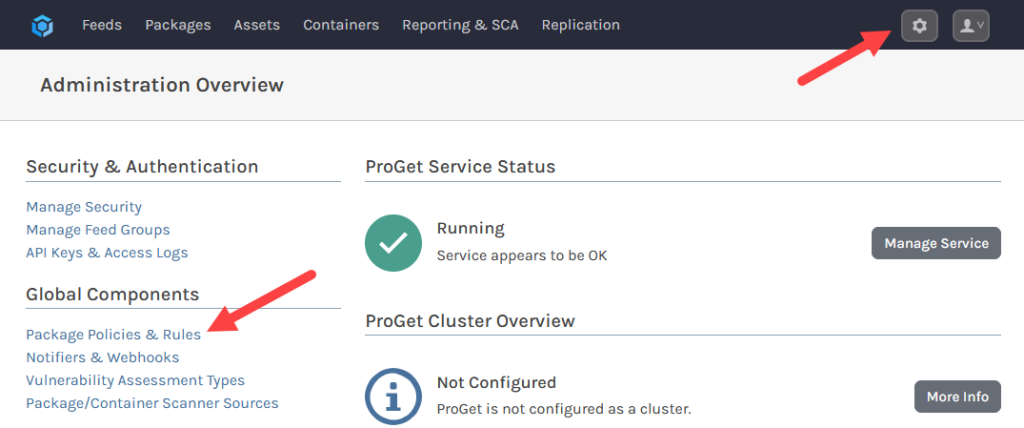
Navigate to “Administration” > “Package Policies and Rules” and select “edit” for the “Global” policy.
🔽

Select “edit” under “License Rules”.

Then, navigate to the “Noncompliant” tab and add the custom license from the list. Then select “Save”.

Now any package with this custom license (including Fluent Assertions versions 8.x) will be blocked from download.
Warning: At the time of writing Fluent Assertions versions 8.0.0 and 8.0.1 have slight variations of the license embedded, so this process will need to be repeated for both.
Solution #3: Blocking Specific Package Versions
One final solution is to block specific versions of Fluent Assertions by configuring their package status on a version-to-version basis.
For this, we will first locally cache Fluent Assertions versions 8.x that use the new commercial license. We will then configure the package status of each to prevent them from being downloaded.
Pros and Cons:
- ✅ Full oversight and control over which specific versions developers will be prevented from downloading
- ❌ Every time a new version is released it will need to be identified and explicitly added
Step 1: Pull the Package to ProGet
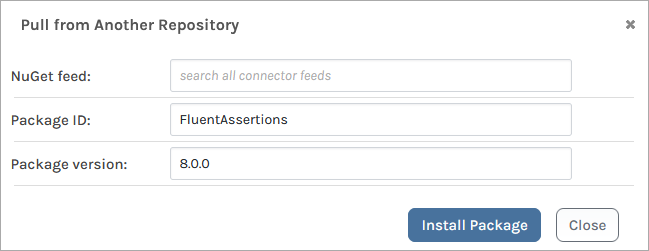
Navigate to version 8.0.0 of Fluent Assertions in your NuGet feed, and select “Pull to ProGet” from the drop-down menu.

From here select “Install Package” to cache it locally to your ProGet instance.
Step 2: Set the Package Status to “Blocked”
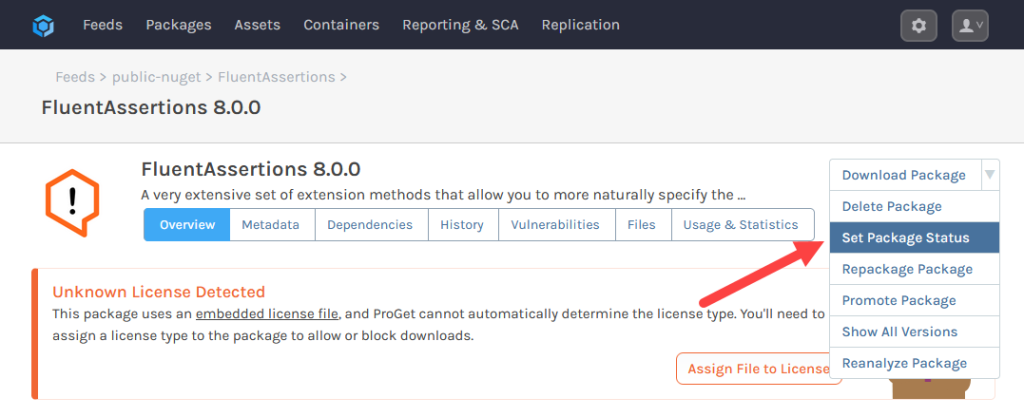
Select “Set Package Status” from the drop-down menu of your cached package.
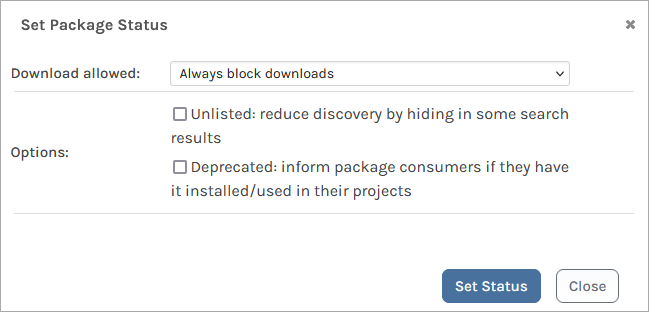
Set “Download allowed” to “Always block downloads” and select “Set Status”.
Note: Repeat as needed for any other version of Fluent Assertions 8.0.0 and above.
Now, developers will be unable to download any packages set as blocked.

Navigating the Fluent Assertions 8.0 Issue
The release of Fluent Assertions 8.0 introduced significant licensing changes, including the shift to a paid license, leaving many organizations dealing with the legal and operational headaches that these changes raise.
Fortunately, ProGet offers practical solutions to mitigate these issues. By controlling access to specific versions of Fluent Assertions or filtering packages with the new Xceed commercial license, you can maintain access to earlier, unrestricted versions while ensuring compliance in your development.
Phew, we covered a lot today, and if you’re navigating Fluent Assertions license compliance, I definitely recommend bookmarking this page to revisit later! Better yet, it’s a chapter in our free eBook, the .NET Migration Guide! It’s packed with tips on ASP.NET support, deciphering SemVer, implementing microservices, managing dependencies, and more! Sign up for your free copy today!
