

ProGet Migration
How to Manage Licenses in ProGet for Artifactory Users
This article is part of a series on Migrating from Artifactory to ProGet, also available as an eBook.
If you’re using JFrog’s X-Ray SCA and Artifactory, you’ll manage license compliance using “Watches” and “Policies” to detect the licenses used in packages and any violations.
ProGet’s SCA is all contained within a single product, with no need for any “add-ons”. ProGet also uses “Policies” to manage license compliance, although these aren’t the same as the “Policies” you’d find in Artifactory.
In this article we’ll look at how to manage licenses in ProGet, and license compliance with ProGet’s “Policies”.
Licenses in ProGet
Like Artifactory, ProGet has a large, inbuilt database of licenses, curated from a number of sources such as the SPDX License List. Licenses contain basic information, including the SPDX IDs and URLs. They can also embed license files.

License Detection
Licenses are detected automatically in both locally hosted and remote packages by analyzing the metadata. It can also identify licenses by package name, version, SPDX, URL or embedded files.
ProGet can also detect unknown licenses in packages. You can either assign these with an existing license in the database, or create your own.
Adding Licenses in ProGet
You can add additional licenses in ProGet, setting the name and license code.
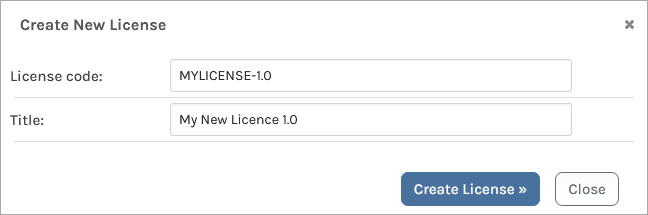
You can also edit existing licenses in the database, beyond just the “Edit Alias” option that Artifactory offers.

Configuring your License Policies
ProGet uses “Policies” to manage license compliance; but these aren’t functionally the same as “Policies” you’d set up in Artifactory.
- Policies in Artifactory: Rules that define criteria, with a corresponding set of automatic actions
- Policies in ProGet: Rules that define how package licenses are evaluated. These determine if a package is “✔ Compliant“, “⚠ Warn” or “⚠ Noncompliant“.
“⚠ Noncompliant” packages in ProGet are similar to “violations” in Artifactory. You can block downloads and builds, and send notifications when a package is “⚠ Noncompliant“.
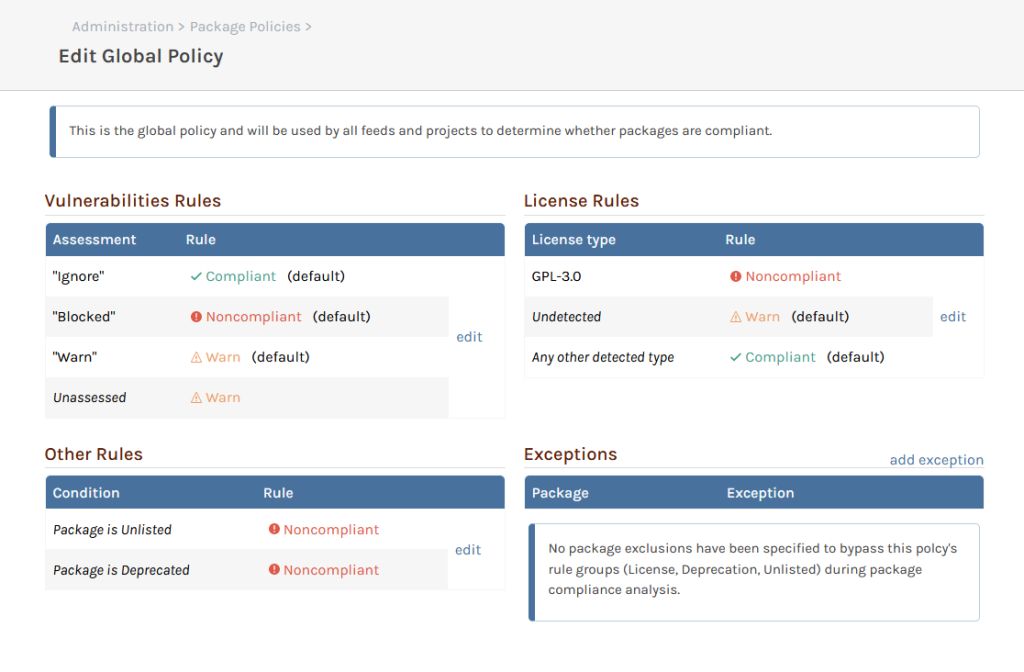
ProGet’s policies can be configured on the “Policy” page:
Packages flagged as “⚠ Noncompliant” will be blocked from being downloaded.
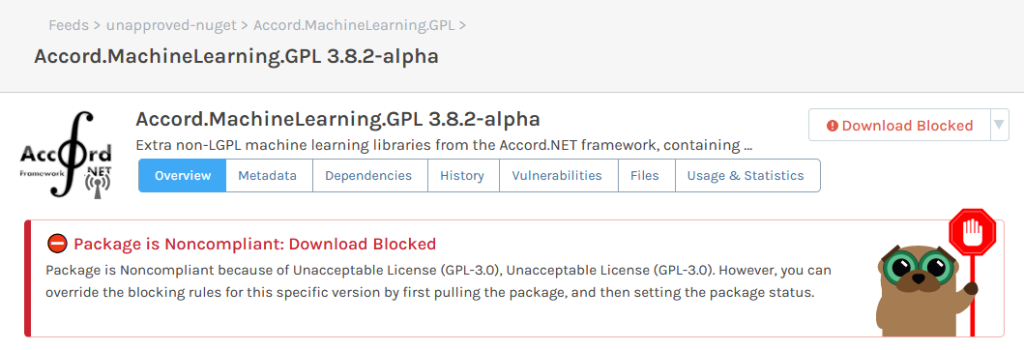
Let’s say you wanted to block downloads of any package with the “GPL 3.0” license, known for being risky to use in production. You would go to “Global Policy” and set the “GPL 3.0” license as “⚠ Noncompliant“. This will block packages with this license from being downloaded.

Sometimes you might need to block a license only being used by packages in a particular feed. In this case, you can block licenses at feed-level by creating a “Shared” policy.

Setting Exceptions to Policies
Licenses assessed as “⚠ Noncompliant” may be considered acceptable in some cases. To allow certain packages with these licenses you can create exceptions, much like the “Ignore Rules” in Artifactory.
Creating exceptions allows you to exclude certain packages or versions from global or shared policies. These are created on the Policies page, and are set using several filters. They also allow for wildcards (e.g. 3.* to exclude all version 3 releases)

You may also want to create an exception just for a limited time, such as for internal packages (MyCompany.*) or version ranges where metadata is known to be incorrect. In these cases, you can also set an expiry date.
Keep your License Use Compliant in ProGet
Like Artifactory, ProGet has SCA features for license management, and uses a large, curated database of licenses to automatically detect the licenses of packages in feeds.
Use ProGet to edit or add licenses, and assign them to packages with unknown or absent licenses. Then create “Policies” to block “⚠ Noncompliant” licenses from being used in production.
This article is part of our eBook on Migrating from Artifactory to ProGet, walking you through everything from setting up repositories to managing your vulnerabilities and much more. Download your free copy of “Migrating from Artifactory to ProGet” today!
