

NuGet
How to Easily Set Up a Private NuGet Server for Your NuGet Packages for Free
Storing packages on public platforms like NuGet may be convenient, but it comes at the cost of control, security, and access. When a third party owns and curates your packages, your team’s unrestricted package access can introduce major problems to your code. And the third-party NuGet Gallery cannot keep your private NuGet packages private.
A basic private NuGet server (like NuGet.Server) is fine—until your team grows. One feed just doesn’t cut it. A better option is a free private NuGet server with multi-feed support, role-based access, and local caching for better performance and reliability.
In this article, we’ll walk through how to set up exactly that with ProGet—an internal NuGet server that puts you back in control without adding cost or complexity.
How to Set Up Your Private NuGet Server: Free, Fast, Easy
Step 1: Install a Package Management System
To set up a private NuGet package server, you will need some form of package management tool to host it. For this guide, we will be using ProGet.
Downloading ProGet will install the lightweight Inedo Hub. Depending on your Internet connection, you can have ProGet installed in as little as two minutes. Don’t have a license key? Let ProGet know when you install it, and you’ll be prompted to create one after installation. And don’t worry about extra costs: you can create as many NuGet feeds as you want in the free-forever version of ProGet.
Step 2: Create a “Private” Feed
Navigate to “Feeds” and add a new feed.
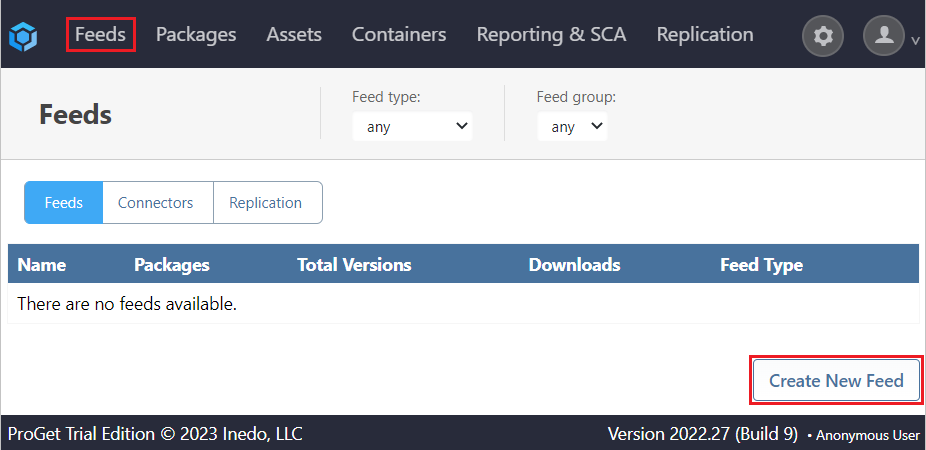
From here, you can set it as a private feed for you to upload and publish your own private NuGet packages. Finally, just give your feed a name, set the features and you’re done!

That’s it! Take things to the next level by configuring security and access controls, vulnerability scanning, and more—all designed to keep your .NET packages both safe and accessible.

Why Set Up a Private NuGet Server
Private NuGet server solutions like ProGet help you keep proprietary NuGet packages both private and easily accessible for internal use. ProGet provides a single home for all feeds, while still keeping them separate, and its access controls add extra security.
The list of benefits that come with having your own private NuGet server is long. You can read more about it here. But I’ll quickly review some of the most important highlights here:
Quality Control
Keeping your proprietary production-ready and -unready packages totally separate helps you stay organized and avoid human error that could introduce problems in Production. ProGet offers different NuGet feed types to indicate package quality:
- Public (for third-party, production-unready packages)
- Private (for first-party packages)
- Vaildated (for approved, production-ready packages)
Access
When developers go to the NuGet Gallery and find a creative solution to solve a specific problem, they can inadvertently introduce new problems. Assign permissions to add security and reduce risk.
Feed-level privilege controls in ProGet give granular control over development assets. Plus, integrate with AD/LDAP to use existing teams and roles to define per-feed permissions.
ProGet can act as your NuGet proxy and get developers the packages they need while following organizational rules for security and privacy by letting management filter out unacceptable packages. ProGet can “stand in front of” NuGet as your proxy to get 100% of the NuGet packages you need with 0% direct contact with the site.
Package Promotion & Repackaging
Promoting a package in ProGet copies a package between feeds in just three clicks. And a package promotion pipeline restricts the ‘promote to’ feed, adding an extra layer of privilege controls.
Using ProGet, you can also further indicate production-ready packages while keeping packages immutable with repackaging. Once a package has passed pre-release testing, ProGet lets you easily repackage it as release-quality—so that exactly what was tested goes to production.
Take Control with a Private NuGet Server
Public NuGet platforms may seem convenient, but they expose you to security risks, loss of control, and unreliable access. Basic tools like NuGet.Server don’t scale with your team’s needs and offer little more than a band-aid for the bigger problem—keeping your packages secure, organized, and governed.
A private NuGet server is your first step to ending .NET development headaches. ProGet makes it easy—free to use, quick to set up, and packed with features to accommodate using NuGet at scale, like multi-feed support, control access, caching, and more. Stay in control of your packages, without the stress.
You’ll probably need to refer to this page later, so make sure to bookmark it, or check out or free eBook, NuGet at Scale. It’s full of tips on managing NuGet dependencies with lockfiles, implementing CI/CD with NuGet packages, and a lot more!
